
Brightness Control per app

3.9star
393 reviews
10K+
Downloads

Everyone
info







About this app
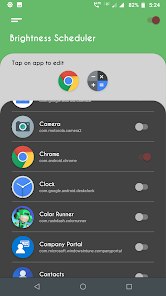
Brightness Manager allows to configure the brightness level for every apps you want.
so when you open particular app, brightness setting changes automatically as per the setting you configured for that app.
There are many users requested for the app that changes brightness level of the device automatically when particular app open. we found its very simple job, and for such simple job we made this simple and easy app Brightness Manager.
Note: Some device have max brightness level more then 255, for those devices, we have added option in app setting to find and fix the max brightness for the app. please navigate to app setting and use this option to find and save your device max brightness setting.
Features:
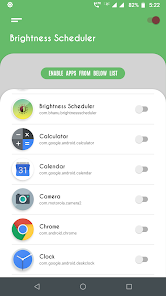
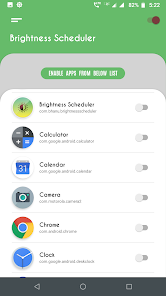
◇ Enable apps for auto brightness setting.
◇ Automatically changes the brightness level when you open the app.
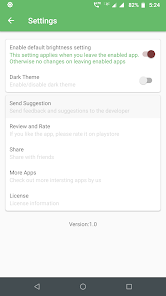
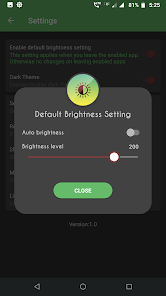
◇ Default brightness settings for apps those are not configured.
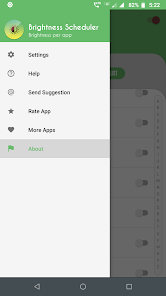
◇ Clean and easy UI to configure quickly.
App need background service running all the time to check and apply brightness setting when you open particular app.
Permissions:
Modify System settings: permission need to change brightness setting automatically.
Usage Access: permission needed to check currently running app for applying brightness setting.
How to configure:
1. Give all require permissions app asks for.
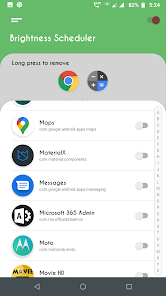
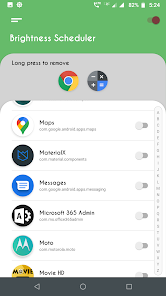
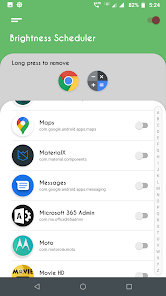
2. Enable app one by one for which you need brightness setting.
3. Enable using switch at right side of the app listed.
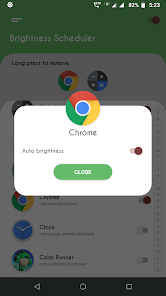
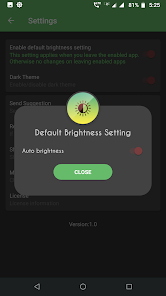
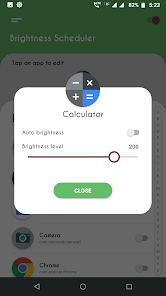
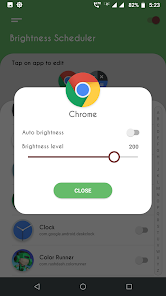
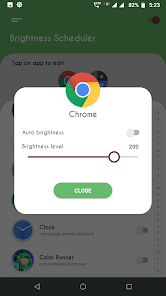
4. on this, Brightness configuration dialog will appear.
5. Choose the brightness level you want for the app.
6. Remember, if you enable auto brightness, you cannot set than brightness level manually. as it will enable auto brightness mode for that app.
7. That's all.
Note:
✔ Please make sure Brightness Manager is ON, please check the switch at right top corner.
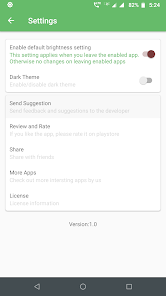
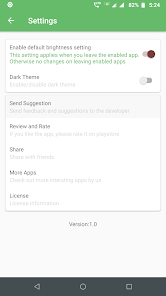
✔ App also provides default brightness setting for the apps those are not configured,
so when you leave the app, the default settings gets applied. find this in app setting screen.
✔ By default, this default brightness setting is OFF, this means, brightness setting will remain same after you exit the app.
Please try app and let us know, what more we can do to improve the app and to make app more useful to all users. your suggestions are really appreciated and help us to cater best app to our all users.
If you like the app, please leave your review and rating on playstore.
Thank you.
so when you open particular app, brightness setting changes automatically as per the setting you configured for that app.
There are many users requested for the app that changes brightness level of the device automatically when particular app open. we found its very simple job, and for such simple job we made this simple and easy app Brightness Manager.
Note: Some device have max brightness level more then 255, for those devices, we have added option in app setting to find and fix the max brightness for the app. please navigate to app setting and use this option to find and save your device max brightness setting.
Features:
◇ Enable apps for auto brightness setting.
◇ Automatically changes the brightness level when you open the app.
◇ Default brightness settings for apps those are not configured.
◇ Clean and easy UI to configure quickly.
App need background service running all the time to check and apply brightness setting when you open particular app.
Permissions:
Modify System settings: permission need to change brightness setting automatically.
Usage Access: permission needed to check currently running app for applying brightness setting.
How to configure:
1. Give all require permissions app asks for.
2. Enable app one by one for which you need brightness setting.
3. Enable using switch at right side of the app listed.
4. on this, Brightness configuration dialog will appear.
5. Choose the brightness level you want for the app.
6. Remember, if you enable auto brightness, you cannot set than brightness level manually. as it will enable auto brightness mode for that app.
7. That's all.
Note:
✔ Please make sure Brightness Manager is ON, please check the switch at right top corner.
✔ App also provides default brightness setting for the apps those are not configured,
so when you leave the app, the default settings gets applied. find this in app setting screen.
✔ By default, this default brightness setting is OFF, this means, brightness setting will remain same after you exit the app.
Please try app and let us know, what more we can do to improve the app and to make app more useful to all users. your suggestions are really appreciated and help us to cater best app to our all users.
If you like the app, please leave your review and rating on playstore.
Thank you.
Updated on
Safety starts with understanding how developers collect and share your data. Data privacy and security practices may vary based on your use, region, and age. The developer provided this information and may update it over time.

No data shared with third parties
Learn more about how developers declare sharing

No data collected
Learn more about how developers declare collection
Ratings and reviews
3.9
382 reviews

James Hamilton
- Flag inappropriate
April 5, 2021
This app is designed well. There are some cute UX/UI features like the scale of brightness seems to bounce on a vertical level while you slide left and right. Which seems to have no effect on the settings other than a nice bouncy scale to look at. Which sums up this app well. Looks nice. Doesn't really do anything. It's supposed to manage the brightness of each individual app. 1) I've never thought to myself I want my screen dim. But only for these 3 apps. 2) it doesn't actually work.
15 people found this review helpful

A Google user
- Flag inappropriate
- Show review history
April 13, 2020
This is one of the best apps for your device, if it has an OLED screen. This update fixed an issue with the Max brightness setting. Now it works perfectly The developer read my previous review, and within days he responded with an update, that fixed the issue. That's really caring. So I'm now giving 5 🌟's. and recommend it especially to people who have OLED screens and keep there Devices on longer than 6 to 8 hours. It'll help prevent burn in!
23 people found this review helpful
Galaxy studio apps
April 9, 2020
Latest update we added option in setting for the devices those do not have standard 255 max brightness, please follow the steps given in app setting to set your device max brightness. please email us at yogi.306@gmail.com, if you face any other issue.

Frank Graham
- Flag inappropriate
May 1, 2020
Android 8 - Galaxy J7 Prime. Works like charm, but had to do it this way. DL. Went to OS app Permissions and set BM to ON. Ran BM. Asks for 2 Permissions. Both failed to take. Restarted phone. Ran app. Selected 1st requested box, and it took. Tried 2nd one, Fail. Restart. See 1st Ok, select 2nd. Takes. Restart. Now can set per app as well as global setting. Tricky but worked in that order. Sammy can be funky about Permissions on a fresh dl sometimes. Can see light improvement rignt away.
3 people found this review helpful
Galaxy studio apps
May 2, 2020
Thank you for your detailed feedback. permission issue you describe is something we are not able to reproduce on any of our test devices, we are still checking on this, but sometime some specific phones with OS version have such issues.
please email us at yogi.306@gmail.com for any issues you finds later.


