Collage Maker
Contains ads
4.8star
142K reviews
1M+
Downloads

Everyone
info



About this app
Collage Maker is a powerful and easy to use photo collage maker and photo editing app.
Collage Maker help you create perfect picture collages. You can pick layout you like best, edit collage with background, frame, filter, sticker, text, doodle, and much more. Then share with friends on Instagram, Facebook, Messenger, WhatsApp, Twitter, etc.
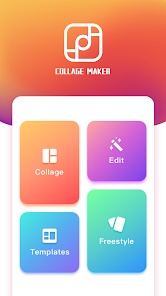
Collage:
Just select some images you love, you can easily put them in a perfect layout, add numerous styles of background, text, sticker and frame to make your pics art, creating unique and awesome collages of your own.
Edit:
Revolutionize your photos with filter by just one tap. Make perfect photos with great filter effects by adjusting the details of brightness, contrast, warmth.
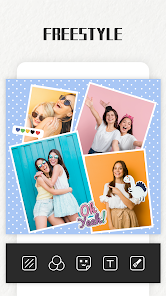
Freestyle:
Try freestyle if you don't like being fettered and the fixed template frames. Determine the location of the photos and the placement of materials on collage by yourself.
Templates:
100+ Stylized templates including Film, Magazine and Ripped Paper etc. Have fun with this Insta story maker, share your most memorable moments with friends.
Features:
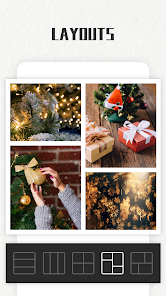
1. Layout: Built-in 100+ Layouts of frames or grids to choose from.
2. Crop: You can crop photos freely.
3. Background: Blur, Color, Animal, Heart, Artistic, Rainbow and Fruit etc. Each used to decorate your work will make your photos more attractive.
4. Border: You can choose the border width and rounded corner size.
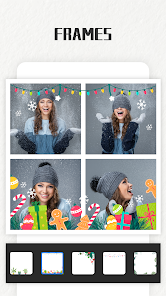
5. Frame: Built-in 100+ art photo frames to choose from.
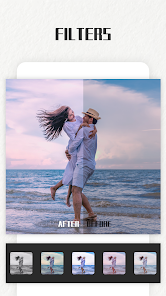
6. Filter: Built-in 100+ high quality filters. Each filter will make your photos instantly become an art.
7. Adjust: Make perfect photos with great filter effects by adjusting the details of brightness, contrast, warmth.
8. Sticker: Built-in 500+ funny stickers to choose from.
9. Text: Add text on photo with 30+ art typefaces.
10. Doodle: Doodle on pictures by a good many of brush types and get surprise effect, including enriched colors and adjustable strokes.
Collage Maker is completely free! Download it NOW!
Collage Maker help you create perfect picture collages. You can pick layout you like best, edit collage with background, frame, filter, sticker, text, doodle, and much more. Then share with friends on Instagram, Facebook, Messenger, WhatsApp, Twitter, etc.
Collage:
Just select some images you love, you can easily put them in a perfect layout, add numerous styles of background, text, sticker and frame to make your pics art, creating unique and awesome collages of your own.
Edit:
Revolutionize your photos with filter by just one tap. Make perfect photos with great filter effects by adjusting the details of brightness, contrast, warmth.
Freestyle:
Try freestyle if you don't like being fettered and the fixed template frames. Determine the location of the photos and the placement of materials on collage by yourself.
Templates:
100+ Stylized templates including Film, Magazine and Ripped Paper etc. Have fun with this Insta story maker, share your most memorable moments with friends.
Features:
1. Layout: Built-in 100+ Layouts of frames or grids to choose from.
2. Crop: You can crop photos freely.
3. Background: Blur, Color, Animal, Heart, Artistic, Rainbow and Fruit etc. Each used to decorate your work will make your photos more attractive.
4. Border: You can choose the border width and rounded corner size.
5. Frame: Built-in 100+ art photo frames to choose from.
6. Filter: Built-in 100+ high quality filters. Each filter will make your photos instantly become an art.
7. Adjust: Make perfect photos with great filter effects by adjusting the details of brightness, contrast, warmth.
8. Sticker: Built-in 500+ funny stickers to choose from.
9. Text: Add text on photo with 30+ art typefaces.
10. Doodle: Doodle on pictures by a good many of brush types and get surprise effect, including enriched colors and adjustable strokes.
Collage Maker is completely free! Download it NOW!
Updated on
Safety starts with understanding how developers collect and share your data. Data privacy and security practices may vary based on your use, region, and age. The developer provided this information and may update it over time.

No data shared with third parties
Learn more about how developers declare sharing

This app may collect these data types
App info and performance and Device or other IDs

Data is encrypted in transit

Data can’t be deleted
Ratings and reviews
4.9
136K reviews

Breawna Barr
- Flag inappropriate
April 2, 2022
Uninstalled. Glitchy, slow, disruptive ads and final straw when it crashes in the middle of a huge project that suddenly disappears a second from completion as you're redirected to the first step of selecting photos (that it took way too much time to hunt down in all of your folders the first time). NOPE!! With the plethora of options when it comes to editors and collage makers, it's just not worth wasting your time with anything subpar.
107 people found this review helpful
Grit Inc.
May 26, 2022
Hello, we want to solve your problem. Can you describe the problem in more detail? Thank you.

Ameena
- Flag inappropriate
- Show review history
September 25, 2022
I've been looking for an alternative app for GridArt and this is one of the apps I'm testing out — so far, so good. I like that there aren't any watermarks, that it's free and only contains ads (just be sure not to click on them, for it may be dangerous), and that it has exactly just what I need from a photo-editing app; ratio variety & collages. Update: After trying out 8 different photo-editing apps, this, by far, is the ultimate best. I highly recommend this app if you're looking for one!
48 people found this review helpful

Wünderboy
- Flag inappropriate
November 9, 2020
Better that IG's layout app. Let's you pick the same images multiple times, has option to round off corners. More aspect ratio options than just 1:1. Background pattern images, (might even upgrade for more of them.) Also has a lot of instagram style filters built in as well, which can be applied to images separately instead of all or nothing. Very recommend.
167 people found this review helpful
App support
phone
Phone number
+8618810653628