
Device Matrix: System Info
Contains adsIn-app purchases


Everyone
info
5+
Downloads


About this app
Monitor Your Device. Know It Better.
Want to know what's inside your Android phone and how it's performing?
Device Matrix: System Info brings your phone's specifications, hardware details, CPU, RAM, storage, battery, network and more together in one easy-to-use app.
Check your phone details, monitor system resources, explore installed apps, test hardware and understand your device through a clean and simple dashboard.
KEY FEATURES
📱 DEVICE & SYSTEM INFORMATION
Explore your phone's basic details:
• Device model and manufacturer
• Android version and build number
• Security patch and kernel information
• Available system details
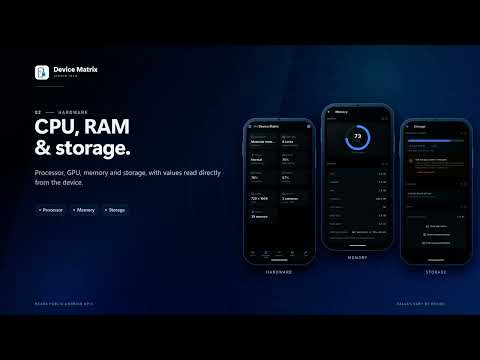
⚙️ CPU & PROCESSOR
Learn more about your phone's processor:
• CPU model and core count
• Current and maximum CPU frequency, where available
• SoC and GPU information
• Processor details reported by your device
🧠 RAM & MEMORY MONITOR
Understand how your phone uses memory:
• Total and available RAM
• Memory usage details
• Low-memory status, where supported
• Live memory usage graph
💾 STORAGE INFORMATION
Check your phone's storage:
• Total storage capacity
• Used and available space
• Easy-to-understand storage details
🔋 BATTERY INFORMATION
Keep an eye on your battery:
• Battery level and charging status
• Temperature and voltage
• Current readings, where supported
• Available battery details
🌡️ THERMAL INFORMATION
Explore temperature readings from available sensors, including battery and other supported hardware components.
📺 DISPLAY INFORMATION
Check screen resolution, density, refresh rate and other available display details.
📶 NETWORK INFORMATION
Understand your network connection:
• Wi-Fi and mobile network details
• Connection and signal information
• IP information, where available
• VPN, Data Saver and airplane mode status
📡 WI-FI ANALYZER
Explore nearby Wi-Fi networks, signal strength and available channel information.
🔌 CONNECTIVITY
Check supported connectivity features such as Wi-Fi, Bluetooth, NFC and more.
🧭 SENSORS
Explore built-in sensors, their names, types and live readings where supported.
📷 CAMERA INFORMATION
View front and rear camera details, available capabilities and supported features.
📲 INSTALLED APPS & APP ANALYZER
Explore apps installed on your phone:
• App name, icon and version
• Package and installation details
• System and user app identification
• App storage usage, where available
• Sort apps by name, size or last updated
• View individual app details
🛠️ HARDWARE TESTS
Check supported hardware components and features using available tests. View test progress and results in one place.
🏠 HOME-SCREEN WIDGETS
Keep important information on your home screen:
• RAM, Storage and Battery widgets
• Date & Time widgets
• Different widget sizes
• System, Light, Dark and Transparent themes
• Adjustable transparency
📄 EXPORT DEVICE REPORT
Create and share a PDF report with the device information you want to include. Choose available details and customize your report.
✨ CUSTOMIZE YOUR EXPERIENCE
Make the dashboard your own with customizable Home sections, themes, accent colors and appearance settings.
HONEST DEVICE INFORMATION
Device Matrix uses information reported by Android and your phone's manufacturer. Available readings can vary by device, Android version and system restrictions. If a value is not exposed by your device, it will be shown as unavailable instead of being guessed or invented.
FREE TO USE
All features, tools, widgets, themes and accent colors are available for free. There are no Pro plans or feature subscriptions.
An optional lifetime Remove Ads purchase is available to enjoy the app without advertisements. It only removes ads and does not unlock or restrict any features.
GET TO KNOW YOUR PHONE BETTER
Explore your phone's hardware, monitor important system details and understand how your device works, all in one convenient app.
Install Device Matrix: System Info and explore your device with confidence.
Want to know what's inside your Android phone and how it's performing?
Device Matrix: System Info brings your phone's specifications, hardware details, CPU, RAM, storage, battery, network and more together in one easy-to-use app.
Check your phone details, monitor system resources, explore installed apps, test hardware and understand your device through a clean and simple dashboard.
KEY FEATURES
📱 DEVICE & SYSTEM INFORMATION
Explore your phone's basic details:
• Device model and manufacturer
• Android version and build number
• Security patch and kernel information
• Available system details
⚙️ CPU & PROCESSOR
Learn more about your phone's processor:
• CPU model and core count
• Current and maximum CPU frequency, where available
• SoC and GPU information
• Processor details reported by your device
🧠 RAM & MEMORY MONITOR
Understand how your phone uses memory:
• Total and available RAM
• Memory usage details
• Low-memory status, where supported
• Live memory usage graph
💾 STORAGE INFORMATION
Check your phone's storage:
• Total storage capacity
• Used and available space
• Easy-to-understand storage details
🔋 BATTERY INFORMATION
Keep an eye on your battery:
• Battery level and charging status
• Temperature and voltage
• Current readings, where supported
• Available battery details
🌡️ THERMAL INFORMATION
Explore temperature readings from available sensors, including battery and other supported hardware components.
📺 DISPLAY INFORMATION
Check screen resolution, density, refresh rate and other available display details.
📶 NETWORK INFORMATION
Understand your network connection:
• Wi-Fi and mobile network details
• Connection and signal information
• IP information, where available
• VPN, Data Saver and airplane mode status
📡 WI-FI ANALYZER
Explore nearby Wi-Fi networks, signal strength and available channel information.
🔌 CONNECTIVITY
Check supported connectivity features such as Wi-Fi, Bluetooth, NFC and more.
🧭 SENSORS
Explore built-in sensors, their names, types and live readings where supported.
📷 CAMERA INFORMATION
View front and rear camera details, available capabilities and supported features.
📲 INSTALLED APPS & APP ANALYZER
Explore apps installed on your phone:
• App name, icon and version
• Package and installation details
• System and user app identification
• App storage usage, where available
• Sort apps by name, size or last updated
• View individual app details
🛠️ HARDWARE TESTS
Check supported hardware components and features using available tests. View test progress and results in one place.
🏠 HOME-SCREEN WIDGETS
Keep important information on your home screen:
• RAM, Storage and Battery widgets
• Date & Time widgets
• Different widget sizes
• System, Light, Dark and Transparent themes
• Adjustable transparency
📄 EXPORT DEVICE REPORT
Create and share a PDF report with the device information you want to include. Choose available details and customize your report.
✨ CUSTOMIZE YOUR EXPERIENCE
Make the dashboard your own with customizable Home sections, themes, accent colors and appearance settings.
HONEST DEVICE INFORMATION
Device Matrix uses information reported by Android and your phone's manufacturer. Available readings can vary by device, Android version and system restrictions. If a value is not exposed by your device, it will be shown as unavailable instead of being guessed or invented.
FREE TO USE
All features, tools, widgets, themes and accent colors are available for free. There are no Pro plans or feature subscriptions.
An optional lifetime Remove Ads purchase is available to enjoy the app without advertisements. It only removes ads and does not unlock or restrict any features.
GET TO KNOW YOUR PHONE BETTER
Explore your phone's hardware, monitor important system details and understand how your device works, all in one convenient app.
Install Device Matrix: System Info and explore your device with confidence.
Device info & monitoring for CPU, RAM, storage, battery and all phone specs.
Updated on
Safety starts with understanding how developers collect and share your data. Data privacy and security practices may vary based on your use, region, and age. The developer provided this information and may update it over time.


What’s new
Updates
• Improved navigation reliability and app stability.
• Various bug fixes and optimizations.
• Improved deep-link support.
• All features remain free, with an optional lifetime Remove Ads purchase.
• Improved navigation reliability and app stability.
• Various bug fixes and optimizations.
• Improved deep-link support.
• All features remain free, with an optional lifetime Remove Ads purchase.
App support
About the developer
RAVI BHUSHAN
binkodtech@gmail.com
Village Binan, PO Poeg, Tehsil Ani
District Kullu
Kullu, Himachal Pradesh 172026
India