
Blind Tech Community

Everyone
info
5K+
Downloads

Everyone
Learn more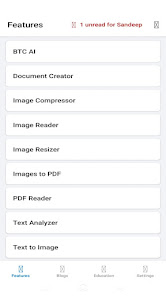


About this app
# Blind Tech Community
**Blind Tech Community** is a fully accessible Android app designed specifically for blind and visually impaired users, unifying digital tools, community resources, and support in one place. Optimized for screen readers, it makes phone usage easy with AI tools, document helpers, file sharing, news, and live support.
**🔹 Why Choose Us?**
* **All-in-One:** Access dozens of tools without switching apps.
* **Accessible:** Built for TalkBack and simple, high-contrast layouts.
* **Secure:** Direct device file sharing; local-first processing.
* **Lightweight:** Runs smoothly on all Android devices.
**🔹 Key Features**
* **🧠 AI & Voice:** **BTC AI** (conversational assistant), **AI Image Generator** (art creator), **Voice Assistant** (voice commands), and **CV Studio** (resume builder).
* **👁️ Vision & Camera:** **Instant Reader** (instant TTS), **Assisted Camera** (framing helper), **Money Reader** (bill scanner), **Color Detector**, **Image OCR** (photo-to-text), **Scene Analyzer (Beta)**, and **QR Scanner/Generator**.
* **📄 Documents:** **Document Reader** (listens to PDF, EPUB, Word, Excel), **Scanner** (scans pages), **Converter** (format swap), **Document Creator & Editor**, and **PDF Toolkit** (merge, split, lock).
* **🎧 Audio & Video:** **Media Plus** (background music player & online streaming), **Music Studio** (recording/mixing), **Audio Recorder**, **Transcriber (Beta)** (speech-to-text), **Video Analyzer (Beta)**, **Lyrics Maker**, and **Slideshow Maker**.
* **⚙️ Accessibility & System:** **Nano Screen Reader** (our screen reader), **Quick Assist** (remote helper control), **UPI Payment Announcer** (spoken transaction alerts), **Battery Assistant** (voice status), **Time Assistant**, **Task Reminder** (voice alarms), **Screen Recorder**, and **File Transfer**.
* **🌐 Community & News:** **Helpline** (voice support), **Digital Cyber Cafe** (forms/bookings help), **Content Hub** (podcasts, debates, comedy), **Global News Portal** (regional news), **Courses** (basics/screen readers), **Project Request** (commission custom software), **Knowledge Center**, **Blogs**, and **Online Radio**.
* **🧮 Utilities:** **Notepad**, **Password Saver** (local locker), **Link Saver** (bookmarks), **Calculator** (accessible modes), **Text Analyzer**, **Text to audio** (MP3 conversion), **Translator** (dozens of languages), **Train Status** (live tracking), **Encryptor/Decryptor**, and **YouTube Tag Gen**.
**🔒 Permissions & Privacy Disclosures**
To provide accessibility features, the app requests consent-based permissions. All processing is local and secure.
1. **Accessibility Service (`BIND_ACCESSIBILITY_SERVICE`):** Used strictly to power core assistive features for blind and visually impaired users. This includes **Nano Screen Reader** (our screen reader that reads screen content aloud for eyes-free navigation) and **Quick Assist** (allowing a trusted helper to perform remote gesture controls like taps and swipes to guide you during active sessions). Safe, optional, and no data is collected, saved, or sent.
2. **Notification Access:** Powers **UPI Payment Announcer** to read incoming transaction alerts. Local processing only.
3. **Usage & App List Access:** Powers **Instant TTS**. Detects the active app to auto-adjust voice speed/settings (e.g. read books slowly, chats quickly) and lists apps in settings so you can customize them.
4. **Location, Camera, Mic & Storage:** Location (GPS guidance & train status); Camera (OCR, bill scanner); Microphone (voice typing, recording); Storage (open, edit, save local files).
**🛡️ Privacy Commitment**
Features like remote support and file sharing connect directly between devices without cloud servers. We never collect, store, or sell your data.
**Blind Tech Community** is a fully accessible Android app designed specifically for blind and visually impaired users, unifying digital tools, community resources, and support in one place. Optimized for screen readers, it makes phone usage easy with AI tools, document helpers, file sharing, news, and live support.
**🔹 Why Choose Us?**
* **All-in-One:** Access dozens of tools without switching apps.
* **Accessible:** Built for TalkBack and simple, high-contrast layouts.
* **Secure:** Direct device file sharing; local-first processing.
* **Lightweight:** Runs smoothly on all Android devices.
**🔹 Key Features**
* **🧠 AI & Voice:** **BTC AI** (conversational assistant), **AI Image Generator** (art creator), **Voice Assistant** (voice commands), and **CV Studio** (resume builder).
* **👁️ Vision & Camera:** **Instant Reader** (instant TTS), **Assisted Camera** (framing helper), **Money Reader** (bill scanner), **Color Detector**, **Image OCR** (photo-to-text), **Scene Analyzer (Beta)**, and **QR Scanner/Generator**.
* **📄 Documents:** **Document Reader** (listens to PDF, EPUB, Word, Excel), **Scanner** (scans pages), **Converter** (format swap), **Document Creator & Editor**, and **PDF Toolkit** (merge, split, lock).
* **🎧 Audio & Video:** **Media Plus** (background music player & online streaming), **Music Studio** (recording/mixing), **Audio Recorder**, **Transcriber (Beta)** (speech-to-text), **Video Analyzer (Beta)**, **Lyrics Maker**, and **Slideshow Maker**.
* **⚙️ Accessibility & System:** **Nano Screen Reader** (our screen reader), **Quick Assist** (remote helper control), **UPI Payment Announcer** (spoken transaction alerts), **Battery Assistant** (voice status), **Time Assistant**, **Task Reminder** (voice alarms), **Screen Recorder**, and **File Transfer**.
* **🌐 Community & News:** **Helpline** (voice support), **Digital Cyber Cafe** (forms/bookings help), **Content Hub** (podcasts, debates, comedy), **Global News Portal** (regional news), **Courses** (basics/screen readers), **Project Request** (commission custom software), **Knowledge Center**, **Blogs**, and **Online Radio**.
* **🧮 Utilities:** **Notepad**, **Password Saver** (local locker), **Link Saver** (bookmarks), **Calculator** (accessible modes), **Text Analyzer**, **Text to audio** (MP3 conversion), **Translator** (dozens of languages), **Train Status** (live tracking), **Encryptor/Decryptor**, and **YouTube Tag Gen**.
**🔒 Permissions & Privacy Disclosures**
To provide accessibility features, the app requests consent-based permissions. All processing is local and secure.
1. **Accessibility Service (`BIND_ACCESSIBILITY_SERVICE`):** Used strictly to power core assistive features for blind and visually impaired users. This includes **Nano Screen Reader** (our screen reader that reads screen content aloud for eyes-free navigation) and **Quick Assist** (allowing a trusted helper to perform remote gesture controls like taps and swipes to guide you during active sessions). Safe, optional, and no data is collected, saved, or sent.
2. **Notification Access:** Powers **UPI Payment Announcer** to read incoming transaction alerts. Local processing only.
3. **Usage & App List Access:** Powers **Instant TTS**. Detects the active app to auto-adjust voice speed/settings (e.g. read books slowly, chats quickly) and lists apps in settings so you can customize them.
4. **Location, Camera, Mic & Storage:** Location (GPS guidance & train status); Camera (OCR, bill scanner); Microphone (voice typing, recording); Storage (open, edit, save local files).
**🛡️ Privacy Commitment**
Features like remote support and file sharing connect directly between devices without cloud servers. We never collect, store, or sell your data.
Built to make technology work for everyone.
Updated on
Safety starts with understanding how developers collect and share your data. Data privacy and security practices may vary based on your use, region, and age. The developer provided this information and may update it over time.
- No data shared with third partiesLearn more about how developers declare sharing
- This app may collect these data typesPersonal info
- Data is encrypted in transit
- You can request that data be deleted


What’s new
• Added new Selfie Video Recorder feature
• Fixed application crashes and enhanced Media Plus playback stability
• Fixed Screen Recorder bugs and improved performance
• General stability improvements and bug fixes
• Fixed application crashes and enhanced Media Plus playback stability
• Fixed Screen Recorder bugs and improved performance
• General stability improvements and bug fixes
Everyone
Learn moreApp support
phone
Phone number
+911169296719
About the developer
swarup baral
sandeepgotam49@gmail.com
noda dimiri
cuttack, Odisha 754105
India


