
Blur Video and Photo Editor
Contains adsIn-app purchases

star
25.5K reviews

Everyone
info
5M+
Downloads


About this app
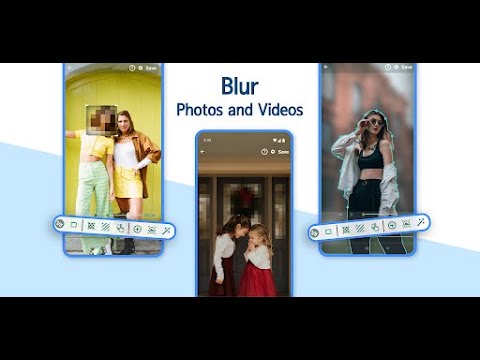
Blur Video and Photo Editor allows you to apply blurry effects on video and images on phone gallery items or media captured using a camera. Powerful video editing tool with fantastic features! ✅💯
This blur video editor answers all your video editing needs regarding pixelating faces or other unwanted objects and areas of a video. You can define more than 1 area to blur/pixelate using rectangles or custom shapes (lasso select/using your finger). 😎
🥇 Check out why this is the number one Video Blur Editor for Android! 🥇
You can also blur the background and define the duration of each area to adjust the intensity of the blur filter, along with the option to blur selected or un-selected areas.
Fantastic Features of Blur Video and Photo Editor:
✅ Track the specific object and apply a blurry effect on it
✅ Apply a blurry effect on the moving object
✅ Blur the background of the photo or video
✅ Pixelate unwanted portions of the image/video effectively
✅ Use rectangles or custom shapes to blur photos or videos
✅ Blur faces like a PRO
✅ Simple and intuitive app UI 😍
✅ The most compelling Blur Photo and Video Editor
✔ As soon as you start the app, it shows you the option to select an image or video
✔ Select from the gallery or capture a new one
✔ Define the area to blur, or use an adjustable rectangle area,
✔ Yes, simple as that!
⭐ Enable object tracking - define object area in two simple steps!
⭐ Use colors instead of a blurry effect to blur photos and videos!
⭐ Specify more than one area to blur!
⭐ Blur video background like a PRO!
⭐ Blur Faces on photos and videos!
⭐ Choose between blur, pixelate and color to hide objects!
⭐ Add a blurry effect on the selected or unselected area of the photo/video!
⭐ Zoom area by clicking on the hand figure in the bottom bar.
⭐ Increase the processing speed!
⭐ Specify the duration of the blur area
⭐ Change aspect ration
🌟 Blur Video and Photo Editor Tool – A Clear Conclusion by our USERS 🌟
In a nutshell, the Blur Video and Photo App is the best video editor. Download the app and start taking the benefits by editing your favorite content. Use Blur Photo Editor and edit your content easily.
🌟 Explore and discover the possibilities 🌟
Suppose you want to protect your privacy, shop, car, documents, etc. You can do it with the help of the Blur Photo and Video Editor App. You can blur faces, personal videos, funny content, Tik Tok videos, YouTube videos, Any HD vlog, your vlog, or any required video.
Discover the highest utility tool to blur faces or pixelate any desired part in it in the shortest amount of time. 💯👍
Fantastic Blur Photo Editor
This blur video editor answers all your video editing needs regarding pixelating faces or other unwanted objects and areas of a video. You can define more than 1 area to blur/pixelate using rectangles or custom shapes (lasso select/using your finger). 😎
🥇 Check out why this is the number one Video Blur Editor for Android! 🥇
Blur Background Easily!
You can also blur the background and define the duration of each area to adjust the intensity of the blur filter, along with the option to blur selected or un-selected areas.
Fantastic Features of Blur Video and Photo Editor:
✅ Track the specific object and apply a blurry effect on it
✅ Apply a blurry effect on the moving object
✅ Blur the background of the photo or video
✅ Pixelate unwanted portions of the image/video effectively
✅ Use rectangles or custom shapes to blur photos or videos
✅ Blur faces like a PRO
✅ Simple and intuitive app UI 😍
✅ The most compelling Blur Photo and Video Editor
HOW TO USE BLUR PHOTO AND VIDEO EDITOR?
✔ As soon as you start the app, it shows you the option to select an image or video
✔ Select from the gallery or capture a new one
✔ Define the area to blur, or use an adjustable rectangle area,
✔ Yes, simple as that!
Use advanced options from professional video and photo editing tools easily:
⭐ Enable object tracking - define object area in two simple steps!
⭐ Use colors instead of a blurry effect to blur photos and videos!
⭐ Specify more than one area to blur!
⭐ Blur video background like a PRO!
⭐ Blur Faces on photos and videos!
⭐ Choose between blur, pixelate and color to hide objects!
⭐ Add a blurry effect on the selected or unselected area of the photo/video!
⭐ Zoom area by clicking on the hand figure in the bottom bar.
⭐ Increase the processing speed!
⭐ Specify the duration of the blur area
⭐ Change aspect ration
🌟 Blur Video and Photo Editor Tool – A Clear Conclusion by our USERS 🌟
In a nutshell, the Blur Video and Photo App is the best video editor. Download the app and start taking the benefits by editing your favorite content. Use Blur Photo Editor and edit your content easily.
🌟 Explore and discover the possibilities 🌟
Suppose you want to protect your privacy, shop, car, documents, etc. You can do it with the help of the Blur Photo and Video Editor App. You can blur faces, personal videos, funny content, Tik Tok videos, YouTube videos, Any HD vlog, your vlog, or any required video.
Create an amazing blur background effect like a PRO!
Discover the highest utility tool to blur faces or pixelate any desired part in it in the shortest amount of time. 💯👍
Apply blur/pixelate/color effect with different shapes, options, aspect ratio.
Updated on
Events & offers

Safety starts with understanding how developers collect and share your data. Data privacy and security practices may vary based on your use, region, and age. The developer provided this information and may update it over time.


Ratings and reviews
25K reviews

A Google user
- Flag inappropriate
October 20, 2019
It only blurred the chosen area for just a few seconds, then it was clear for a while, then blurred again . When I tried the tracking feature, the area to be blurred started bouncing all over the place but the item it was supposed to be tracking remained stationary. Then when I went to save the 20-minute video, it took forever to download. May be close to an hour. It was disappointing to find out it didn't work after waiting so long. I will uninstall it now.
179 people found this review helpful
Firehawk
December 18, 2019
As this app track selected object in each frame(that may be take time), so if frame-rate of video is high then you may notice some delay in preview, but when video is processed then object is detected properly in each frame.
You can also try to lower the matching score in settings screen and see if this improve your result.

hzhz jdxj
- Flag inappropriate
- Show review history
July 26, 2026
absolutely useless and a waste of time. I have never left a review before, but this app is so shockingly bad that I am. evrytime I click blur image it flashes the ad underneath and does nothing at all. this is basically just an app to watch a constant ad and click a button in frustration for 20 minutes before uninstalling. don't waste your time with this God awful app.
2 people found this review helpful
Firehawk
July 27, 2026
Hi! We are sorry to hear that you are not quite happy with the App. Please, share your concerns with us by email and we will be happy to assist you further. We are sorry to hear that the ads caused inconveniences. Ads usually show on the free version of the App. The Premium version has no ads.

Victor Dugger
- Flag inappropriate
December 12, 2022
Awesome app!!! Simple to use UI. Pretty expensive for the premium version. Wish that would come down. Thumbs up on everything else though. A lot of tweaks and options available that are simple to understand and easy to apply directly to the preview version which shows the effects from any changes. I would definitely recommend some... And maybe some more if the price ever comes down. 👍👍😎
122 people found this review helpful
What’s new
Added Redo/Undo last action feature
Fixed some app crashing issues
Fixed some app crashing issues
App support
About the developer
ROUNDS AI LTD
support@firehawk.ai
18/7 Yechezkel
TEL AVIV-JAFFA, 6259524
Israel
+1 740-754-0716


