
Scribe Fairy
Contains adsIn-app purchases


Everyone
info
10+
Downloads


About this app
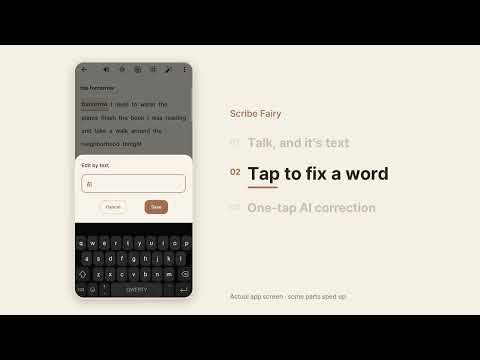
Scribe Fairy turns what you say into text as you speak. Fix any word with a tap,
let AI clean up typos and spacing, and keep a tidy note that began with one
sentence. Meetings, ideas, lectures, and the day’s journal, in a calm
paper-notebook design.
■ Live dictation
Speech becomes text right away. Each finished sentence is saved at once, so
nothing is lost if the app closes, and the mic wakes up again after a pause.
Turn on “Keep the recording too” and your voice stays with the note — tap a word
that looks wrong and hear what you really said.
■ Word-level editing — your fixes stay fixed
Tap the words to change and fix them by typing or by speaking again. Words you
edit are locked (long-press to lock any word), and AI correction never touches a
locked word. In PRO, AI can even write the title.
■ AI correction — choose how much to polish
Level 1 fixes spelling and spacing. Level 2 also removes fillers like “um”.
Level 3 smooths sentences from context. Level 4 writes a summary as a new note
and leaves the original alone. Level 5 rewrites in the purpose and tone you pick.
Nothing is applied blindly — compare before / after first, then accept.
■ Ask AI
Ask questions grounded in your own notes. Pick a period and ask “When did I go
to the doctor last month?”. Notes are chosen on your device; only short excerpts
go to the server.
■ My Diary
One page a day on a calendar, with the weather as an icon. Write on manuscript,
lined, or dot-grid paper and decorate with stickers, doodles, photos, and voice
clips. Move any note into that day’s diary — formatted text can keep its style
or follow the paper.
■ Tags and search
End a note with #tag and it is tagged on save. Browse by topic, or search by
text or date. Lists sort by creation date (or last edited, your choice).
■ Read aloud
Voice notes read from the word you tap; text notes and diaries from the cursor.
Choose the speed and the voice.
■ Export
Save notes as TXT or PDF, and share diary pages as image cards.
■ Correction dictionary
Register names and terms as proper nouns and correction keeps your spelling.
Your own fixes become rules for next time.
■ Encrypted Google Drive backup
Backups are encrypted on your device (AES-256) with a password you choose and
stored in your own Drive; restore on a new phone with that password. Set the
password once — later backups use a key in your device’s secure storage. Auto
backup can be daily, weekly, or “1 min after edits”. The app only touches files
it created. The password itself is never stored — keep it safe.
■ App lock
Turn it on in Settings and the app asks for your fingerprint, face, or screen
lock when you open it and when you return after 5 minutes away. The app never
sees biometric data.
■ What does this button do?
Press and hold any button for a card that explains it and whether it is free,
PRO, or uses Mana.
■ On-device recognition
“On-device recognition only” asks the phone to process speech locally, without
sending audio over the network (needs an offline speech pack).
■ Fairy Mana
AI correction, AI organizing, and Ask AI run on Fairy Mana — about one per 5,000
English characters, and the cost is shown before you run anything. New users get
free Mana; top up in the app. Your balance follows your Google account.
■ Theme, language, dates
Light, dark, or system. Korean and English. Date order, 12/24-hour time, week
start.
■ Premium (PRO)
PRO removes ads and unlocks exclusive themes and backgrounds, diary and calendar
decorations, automatic tags and titles, and AI organizing. Subscribe or buy once
(lifetime), on up to 3 devices per account.
Notes stay on your device by default; only AI features and Drive backup send the
data they need, always over HTTPS. Crash reports can be turned off in Settings
and never include note contents.
Privacy policy: https://scribefairy-legal.pages.dev/privacy-en
The easiest note starts with a word. Start it with Scribe Fairy.
let AI clean up typos and spacing, and keep a tidy note that began with one
sentence. Meetings, ideas, lectures, and the day’s journal, in a calm
paper-notebook design.
■ Live dictation
Speech becomes text right away. Each finished sentence is saved at once, so
nothing is lost if the app closes, and the mic wakes up again after a pause.
Turn on “Keep the recording too” and your voice stays with the note — tap a word
that looks wrong and hear what you really said.
■ Word-level editing — your fixes stay fixed
Tap the words to change and fix them by typing or by speaking again. Words you
edit are locked (long-press to lock any word), and AI correction never touches a
locked word. In PRO, AI can even write the title.
■ AI correction — choose how much to polish
Level 1 fixes spelling and spacing. Level 2 also removes fillers like “um”.
Level 3 smooths sentences from context. Level 4 writes a summary as a new note
and leaves the original alone. Level 5 rewrites in the purpose and tone you pick.
Nothing is applied blindly — compare before / after first, then accept.
■ Ask AI
Ask questions grounded in your own notes. Pick a period and ask “When did I go
to the doctor last month?”. Notes are chosen on your device; only short excerpts
go to the server.
■ My Diary
One page a day on a calendar, with the weather as an icon. Write on manuscript,
lined, or dot-grid paper and decorate with stickers, doodles, photos, and voice
clips. Move any note into that day’s diary — formatted text can keep its style
or follow the paper.
■ Tags and search
End a note with #tag and it is tagged on save. Browse by topic, or search by
text or date. Lists sort by creation date (or last edited, your choice).
■ Read aloud
Voice notes read from the word you tap; text notes and diaries from the cursor.
Choose the speed and the voice.
■ Export
Save notes as TXT or PDF, and share diary pages as image cards.
■ Correction dictionary
Register names and terms as proper nouns and correction keeps your spelling.
Your own fixes become rules for next time.
■ Encrypted Google Drive backup
Backups are encrypted on your device (AES-256) with a password you choose and
stored in your own Drive; restore on a new phone with that password. Set the
password once — later backups use a key in your device’s secure storage. Auto
backup can be daily, weekly, or “1 min after edits”. The app only touches files
it created. The password itself is never stored — keep it safe.
■ App lock
Turn it on in Settings and the app asks for your fingerprint, face, or screen
lock when you open it and when you return after 5 minutes away. The app never
sees biometric data.
■ What does this button do?
Press and hold any button for a card that explains it and whether it is free,
PRO, or uses Mana.
■ On-device recognition
“On-device recognition only” asks the phone to process speech locally, without
sending audio over the network (needs an offline speech pack).
■ Fairy Mana
AI correction, AI organizing, and Ask AI run on Fairy Mana — about one per 5,000
English characters, and the cost is shown before you run anything. New users get
free Mana; top up in the app. Your balance follows your Google account.
■ Theme, language, dates
Light, dark, or system. Korean and English. Date order, 12/24-hour time, week
start.
■ Premium (PRO)
PRO removes ads and unlocks exclusive themes and backgrounds, diary and calendar
decorations, automatic tags and titles, and AI organizing. Subscribe or buy once
(lifetime), on up to 3 devices per account.
Notes stay on your device by default; only AI features and Drive backup send the
data they need, always over HTTPS. Crash reports can be turned off in Settings
and never include note contents.
Privacy policy: https://scribefairy-legal.pages.dev/privacy-en
The easiest note starts with a word. Start it with Scribe Fairy.
Speak, and it becomes text. AI polishes it, keeps your voice, diary and backup.
Updated on
Safety starts with understanding how developers collect and share your data. Data privacy and security practices may vary based on your use, region, and age. The developer provided this information and may update it over time.


What’s new
Easily enter and edit voice memos, diary entries, and emotional records.
App support
About the developer
정주혁
boomdiboom1@gmail.com
용산로 88 장기주공아파트
105동 1105호
달서구, 대구광역시 42687
South Korea