Bosch Leveling Remote
3.3star
631 reviews
100K+
Downloads

Everyone
info
About this app
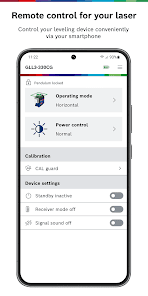
The Bosch Leveling Remote app enables you to conveniently control your Bosch Professional leveling tool via Bluetooth® from your smartphone.
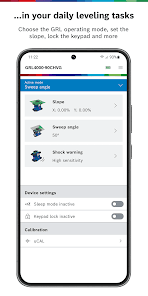
Using the app, you can control the laser remotely without having to even touch it, thereby increasing productivity and efficiency in your daily leveling tasks.
The app can be connected to all Bosch Professional leveling tools (line lasers, combi lasers and rotary lasers) which contain a "C" in the name, for example:
• GCL 2-50 C/CG Professional
• GCL100-80C/CG Professional
• GLL 3-80 C/CG Professional
• GLL3-330C/CG Professional
• GRL 600 CHV Professional
• GRL 650 CHVG Professional
• GRL4000-80CHV Professional
• GRL4000-80CH Professional
• GRL4000-90CHVG Professional
Main functions when using a GCL or GLL device:
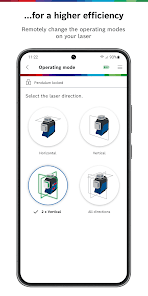
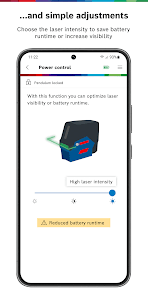
• Conveniently control your combi / line laser by setting the operating mode, turning your tool into standby or changing the laser intensity to optimize the laser visibility or battery runtime.
• Monitor your tool by checking the battery and device status via the app.
• Check for potential external influences and calibration intervals to ensure the accuracy of your line laser (available for selected tools)
Main functions when using a GRL device:
• Easily control all main functions of your rotary laser such as setting slope, modifying the rotation speed, or putting your device into standby mode
• Benefit from app-only features like setting up the partial projection (Mask Mode) or creation of Profiles to save and apply the setting you need
• Check the accuracy of your tool and have it corrected automatically
We are very pleased to receive your feedback and improvement suggestions for our application. Simply contact us via app.support@de.bosch.com and let us know if you have any wishes or problems – we are happy to help you!
Using the app, you can control the laser remotely without having to even touch it, thereby increasing productivity and efficiency in your daily leveling tasks.
The app can be connected to all Bosch Professional leveling tools (line lasers, combi lasers and rotary lasers) which contain a "C" in the name, for example:
• GCL 2-50 C/CG Professional
• GCL100-80C/CG Professional
• GLL 3-80 C/CG Professional
• GLL3-330C/CG Professional
• GRL 600 CHV Professional
• GRL 650 CHVG Professional
• GRL4000-80CHV Professional
• GRL4000-80CH Professional
• GRL4000-90CHVG Professional
Main functions when using a GCL or GLL device:
• Conveniently control your combi / line laser by setting the operating mode, turning your tool into standby or changing the laser intensity to optimize the laser visibility or battery runtime.
• Monitor your tool by checking the battery and device status via the app.
• Check for potential external influences and calibration intervals to ensure the accuracy of your line laser (available for selected tools)
Main functions when using a GRL device:
• Easily control all main functions of your rotary laser such as setting slope, modifying the rotation speed, or putting your device into standby mode
• Benefit from app-only features like setting up the partial projection (Mask Mode) or creation of Profiles to save and apply the setting you need
• Check the accuracy of your tool and have it corrected automatically
We are very pleased to receive your feedback and improvement suggestions for our application. Simply contact us via app.support@de.bosch.com and let us know if you have any wishes or problems – we are happy to help you!
Updated on
Safety starts with understanding how developers collect and share your data. Data privacy and security practices may vary based on your use, region, and age. The developer provided this information and may update it over time.

No data shared with third parties
Learn more about how developers declare sharing

No data collected
Learn more about how developers declare collection

Data is encrypted in transit

Data can’t be deleted
Ratings and reviews
3.2
615 reviews

Viktor Z
- Flag inappropriate
May 16, 2024
Please make on/off button larger. I turn the laser on and off 50 times a day and the toggle switch is very small. Also, please make buttons for brightness instead of slider bar because you can't do fine adjustments anyway. It's only low medium and high brightness. Three buttons will do fine. Also, if possible, make side laser pod to project vertical beam. I use it most often and would like to assign a different laser pod for the vertical plane. Otherwise, app does everything I need fine. Thanks!
Robert Bosch Power Tools GmbH
June 10, 2024
Hello Viktor, thank you for your review - we will forward your feedback to have it reviewed. Feel free to contact us for further annotations via app.support@bosch.com - thank you! Your Levelling Remote Team

Dean Ferguson
- Flag inappropriate
January 5, 2024
App seems to do what you need it to do satisfactorily, my problem is with the Bosch Professional GLL 3-80 CG Laser. Being a tiler when doing walls the horizontal laser and 1 vertical laser are most needed.. unfortunately there is no way to use the horizontal beam with 1 vertical beam. The only option is to have horizontal with 2 vertical plane lasers on... absolutely not ideal having excess unnecessary beams shooting all over the place and wasting more battery power than needed..
Robert Bosch Power Tools GmbH
January 12, 2024
Hello Dean, thank you for your review! We would like to help you make our app work for you, so we would recommend you to contact us via app.support@bosch.com and tell us what exactly you don't like about the app. We are looking forward to hear from you!

Keith P
- Flag inappropriate
December 31, 2021
Don't bother downloading this app 🤷♂️. Extremely disappointed in Bosch for this, very poor effort for Bluetooth connection (it will not connect whatsoever!), Bosch used to be a 100% success rate for tools but not now I'm sad to say. I was really hoping this would make collecting all the dimensions I need for my projects that much easier, I guess not. The Bluetooth functionality is totally pointless. Bad Bad Bosch! (Slap hand 👋🏼)
20 people found this review helpful
Robert Bosch Power Tools GmbH
January 5, 2022
Hi Keith, thank you for your review and we apologize for the inconvenience. Please contact our support via app.support@bosch.com for further assistance with establishing a connection, ideally with the name of the device you are trying to connect to the "Levelling Remote" App. Looking forward to hearing from you!