
xlplayer(trial)


Everyone
info
1+
Downloads

Everyone
Learn more


About this app
xlplayer consists of a note-taking feature based on Excel files (.xlsx) and a text player utilizing TTS (Text-to-Speech).
You can edit notes directly on your phone or manage and utilize vast amounts of data—created on a PC using Excel or Google Sheets—without being restricted by time or location.
Practice shadowing using your own custom materials.
■ Excel Notes
These are list-style notes based on Excel files (.xlsx).
They serve as the playlists for xlplayer.
+ Key Note Features
File/sheet management
Note editing
Search, sort, and color-coding
Settings: Batch changes for font, size, line spacing, and text color; toggle visibility for specific colors
■ Text Player
The text player sequentially displays the sorted (searched/categorized) list items as two-sided cards (Question/Answer) and outputs audio using Google TTS. It functions as a study and language-learning tool designed for repetition and memorization.
+ Key Player Features
Manual/Auto-play
7 playback modes
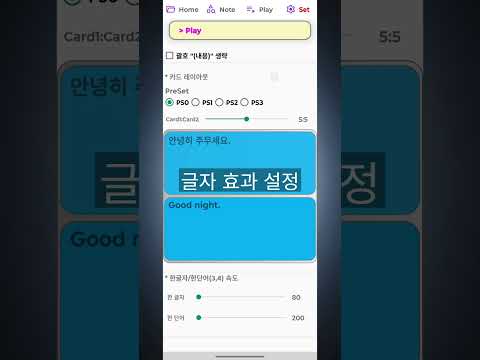
Card design settings: Font, size, line spacing, card size (aspect ratio), background color, text alignment
Audio settings: Select language, voice, and speed for each card
One-way repeat, back-and-forth repeat, auto-stop
Forward/reverse playback
A-B repeat (looping a specific section)
Repeated audio playback for cards
You can edit notes directly on your phone or manage and utilize vast amounts of data—created on a PC using Excel or Google Sheets—without being restricted by time or location.
Practice shadowing using your own custom materials.
■ Excel Notes
These are list-style notes based on Excel files (.xlsx).
They serve as the playlists for xlplayer.
+ Key Note Features
File/sheet management
Note editing
Search, sort, and color-coding
Settings: Batch changes for font, size, line spacing, and text color; toggle visibility for specific colors
■ Text Player
The text player sequentially displays the sorted (searched/categorized) list items as two-sided cards (Question/Answer) and outputs audio using Google TTS. It functions as a study and language-learning tool designed for repetition and memorization.
+ Key Player Features
Manual/Auto-play
7 playback modes
Card design settings: Font, size, line spacing, card size (aspect ratio), background color, text alignment
Audio settings: Select language, voice, and speed for each card
One-way repeat, back-and-forth repeat, auto-stop
Forward/reverse playback
A-B repeat (looping a specific section)
Repeated audio playback for cards
Excel(Note) + (Text)Player, Early Access Trial (7 days)
Updated on
Safety starts with understanding how developers collect and share your data. Data privacy and security practices may vary based on your use, region, and age. The developer provided this information and may update it over time.
- No data shared with third partiesLearn more about how developers declare sharing
- No data collectedLearn more about how developers declare collection


Everyone
Learn moreApp support
About the developer
정재웅
brbnote77@gmail.com
주공길 24
충주시, 충청북도 27345
South Korea