Block Touch in Broken Screen
Contains ads
3.3star
374 reviews
50K+
Downloads

Everyone
info
About this app
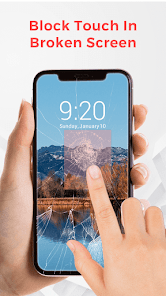
Do you have a broken, damaged or defective mobile display? Your device gets accidental, random, arbitrary & self touch? Want to block touch in broken screen area?
All the above questions answer is here in the Block Touch in Broken Screen application.
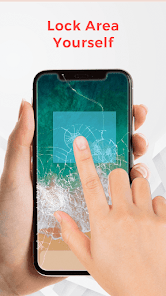
This app helps to block touch in the damaged screen area. You can block the defective screen area manually by locking the touch area of the desired size.
Block Touch in Broken Screen gives two modes to lock the touch:
1. Manual mode
2. Automatic mode
1. Manual mode
- Firstly, enable this manual auto block service.
- Lock the touch area of the desired size on the mobile screen.
- To apply it on screen, then press the volume up button or double-tap.
- To cancel it, press the volume down button.
2. Automatic mode
- Enable the auto block touch service.
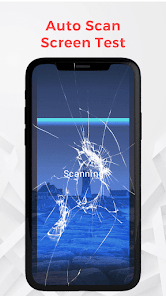
- It automatically detects the broken, damaged, and defective screen touches.
Note:- During the auto analysis, do not touch on screen.
Additional options in block touch in broken screen area:
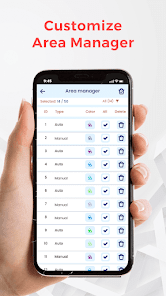
→ Area manager
- It gives the details of the defective area as auto/manual type and color.
- You can also delete the areas which you think are working properly.
- Easy to filter by auto and manual type.
→ Settings
* Rounded corner
- If you want to block the mobile corner display, then use this option.
- You can adjust the degree of the rounded corner and make it more rounded.
- Enable the Top and rounded as desired.
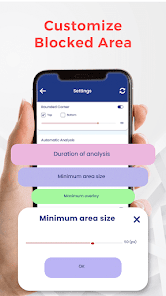
* Automatic analysis
- Set duration for block screen auto analysis.
- Can set the area size from 5(px) to 50(px).
- Set overlay area for block screen(maximum 50 overlays).
* Manual analysis
- Enable to apply view using a double-tap on the selected area.
- Can select broken screen area by free size or by entering its DP size.
Use this app as a Partial Screen to avoid touch in a broken screen.
All the above questions answer is here in the Block Touch in Broken Screen application.
This app helps to block touch in the damaged screen area. You can block the defective screen area manually by locking the touch area of the desired size.
Block Touch in Broken Screen gives two modes to lock the touch:
1. Manual mode
2. Automatic mode
1. Manual mode
- Firstly, enable this manual auto block service.
- Lock the touch area of the desired size on the mobile screen.
- To apply it on screen, then press the volume up button or double-tap.
- To cancel it, press the volume down button.
2. Automatic mode
- Enable the auto block touch service.
- It automatically detects the broken, damaged, and defective screen touches.
Note:- During the auto analysis, do not touch on screen.
Additional options in block touch in broken screen area:
→ Area manager
- It gives the details of the defective area as auto/manual type and color.
- You can also delete the areas which you think are working properly.
- Easy to filter by auto and manual type.
→ Settings
* Rounded corner
- If you want to block the mobile corner display, then use this option.
- You can adjust the degree of the rounded corner and make it more rounded.
- Enable the Top and rounded as desired.
* Automatic analysis
- Set duration for block screen auto analysis.
- Can set the area size from 5(px) to 50(px).
- Set overlay area for block screen(maximum 50 overlays).
* Manual analysis
- Enable to apply view using a double-tap on the selected area.
- Can select broken screen area by free size or by entering its DP size.
Use this app as a Partial Screen to avoid touch in a broken screen.
Updated on
Safety starts with understanding how developers collect and share your data. Data privacy and security practices may vary based on your use, region, and age. The developer provided this information and may update it over time.

This app may share these data types with third parties
Device or other IDs

No data collected
Learn more about how developers declare collection

Data is encrypted in transit

Data can’t be deleted
Ratings and reviews
3.2
369 reviews

Cayden Or
- Flag inappropriate
- Show review history
October 28, 2025
It blocks the screen, (I forgive the ads because) it does what it advertised but... it forces the screen to be vertical, area can't be invisible (even has a reddish hue, not a service installable in the accessibility menu, block size can't be smaller. it's funny that it forces horizontal games to launch vertically but... that introduces more problems so pls fix it's difficult to find another similar app, so pls fix
5 people found this review helpful

Ivan Mar Duno
- Flag inappropriate
September 19, 2025
it's good but the problem is it's not working when the screen is landscaping, it doesn't rotate when the block touch is active which is very big loss.
2 people found this review helpful

Nelly's brand
- Flag inappropriate
November 22, 2025
It would work at first but the problem would get worse later on. I would recommend it if you plan on fixing the phone in 1-2 days but anything other than that, forget it. The auto also has to work with the manual for it to be effective. Also you have to be going back to the app every 10-15 minutes to put it back on. It also doesn't let you auto rotate. once you put the manual in one spot, that is the spot until you uninstall and install again. summary: just fix your screen!
What’s new
- Bug fix.
- Improve Performance.
- Improve Performance.
App support
About the developer
PRANAVGIRI MUKESHGIRI GAUSWAMI
jinrapat1992@gmail.com
India


