
BuildCalc

star
203 reviews

Everyone
info
10K+
Downloads

Everyone
Learn more


About this app
What if you could take the best construction calculator and fix it. That’s right ... you love it, it has served you well, and you stand by it ... but could it do more? Could it be easier to use?
*** I have a lot of myself in this app and want it to be the best construction calculator app. IF YOU ENCOUNTER ANY DIFFICULTIES, PLEASE CONTACT ME AT INFO-AT-BUILDCALC.COM - I REALLY WANT TO HELP! ***
After nine months of development and testing by pros from around the world, BuildCalc for Android is ready to give you more - more function and more answers with less complexity, less hassle, and less confusion.
MORE FUNCTIONALITY:
• Advanced Baluster Function: Complete layout of railing and staircase balusters with less guess work - and with all the flexibility you need for every custom job.
• Advanced Stair function: Stair layouts for professional results - including dimensioned drawings of your Stringer, Stringer Installation, and Finished Staircase. And you can email a PDF of these drawings right from BuildCalc so you can print them or share them.
• Fence Function: Give BuildCalc a fence row length and it will tell you how many posts, rails, pickets, and or panels you need.
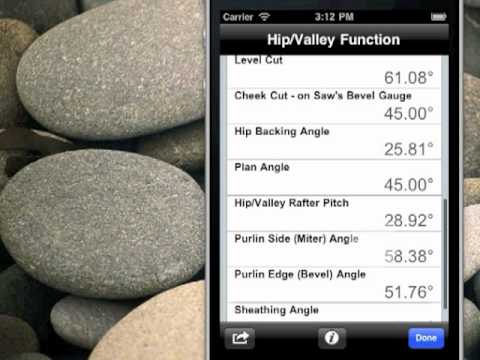
• Interactive Functions: The Stair, Baluster, Compound Miter, Diagonal and Hip/Valley functions are now fully interactive. Want to change input values? Change the Run? Switch between Regular and Irregular Hip Roof analysis? You can do this and your results will be updated automatically - without you needing to remember what key to press.
• New Full Daylight Visibility Mode
MORE ANSWERS:
• You are no longer tied down to: only one brick, block or tile size for the masonry function; a fixed number of drywall sheet sizes; only one footer cross sectional area; or one size of shingles and sheathing. If you don’t see the size you want, you can add as many as you need. And for area input, you can store your custom sizes in Length x Width format, so you won’t have to do mental gymnastics to figure out what was the dimensions for that last size you stored.
• Want to cut your hip roof rafter using a miter saw ... or a circular saw using a hand-held protractor? With a tap of a button, BuildCalc will automatically switch between Miter Saw and Protractor results. BuildCalc can do this for Compound Miters, too.
• Sheathing Angles, Purlin Angles, Gable Area, Backing Angles, Plan Angles, Rough vs. Finished Stair Layout Dimensions, Stringer Throat, Stringer installation dimensions ... and a lot more not found on other construction calculators.
LESS COMPLEXITY AND LESS HASSLE:
• Tired of having to press and press and press buttons to get the results of a calculation? BuildCalc puts an end to this. For all advanced functions, you get ALL of your results in list form with just one or two key taps.
• And, rather than having to write down those results, all advanced functions allow you to save your results so you can recall the complete results at your convenience.
• Less “quirks”. Have you been annoyed by arcane key stroke sequences on other construction calculators? We are too. BuildCalc streamlined the keystrokes to do a better job of giving you less “errors” and more results. Don’t remember what you have to enter before a Hip Rafter or Stair calculation? Well, now you don’t have to. BuildCalc will provide you with a check list of inputs and on-the-spot help to get it right.
• Drywall and Masonry “Room Mode”: If you have stored a Length, Width and Height for a room, BuildCalc will give you the Drywall or Masonry required for the walls and the ceiling / floor - with only a tap of the Drywall or Masonry button. No more pondering over complex key sequences ... it just works.
• Full Construction Master® Pro emulation. BuildCalc is in no way affiliated with Calculated Industries, owners of the Construction Master trademark.
*** I have a lot of myself in this app and want it to be the best construction calculator app. IF YOU ENCOUNTER ANY DIFFICULTIES, PLEASE CONTACT ME AT INFO-AT-BUILDCALC.COM - I REALLY WANT TO HELP! ***
After nine months of development and testing by pros from around the world, BuildCalc for Android is ready to give you more - more function and more answers with less complexity, less hassle, and less confusion.
MORE FUNCTIONALITY:
• Advanced Baluster Function: Complete layout of railing and staircase balusters with less guess work - and with all the flexibility you need for every custom job.
• Advanced Stair function: Stair layouts for professional results - including dimensioned drawings of your Stringer, Stringer Installation, and Finished Staircase. And you can email a PDF of these drawings right from BuildCalc so you can print them or share them.
• Fence Function: Give BuildCalc a fence row length and it will tell you how many posts, rails, pickets, and or panels you need.
• Interactive Functions: The Stair, Baluster, Compound Miter, Diagonal and Hip/Valley functions are now fully interactive. Want to change input values? Change the Run? Switch between Regular and Irregular Hip Roof analysis? You can do this and your results will be updated automatically - without you needing to remember what key to press.
• New Full Daylight Visibility Mode
MORE ANSWERS:
• You are no longer tied down to: only one brick, block or tile size for the masonry function; a fixed number of drywall sheet sizes; only one footer cross sectional area; or one size of shingles and sheathing. If you don’t see the size you want, you can add as many as you need. And for area input, you can store your custom sizes in Length x Width format, so you won’t have to do mental gymnastics to figure out what was the dimensions for that last size you stored.
• Want to cut your hip roof rafter using a miter saw ... or a circular saw using a hand-held protractor? With a tap of a button, BuildCalc will automatically switch between Miter Saw and Protractor results. BuildCalc can do this for Compound Miters, too.
• Sheathing Angles, Purlin Angles, Gable Area, Backing Angles, Plan Angles, Rough vs. Finished Stair Layout Dimensions, Stringer Throat, Stringer installation dimensions ... and a lot more not found on other construction calculators.
LESS COMPLEXITY AND LESS HASSLE:
• Tired of having to press and press and press buttons to get the results of a calculation? BuildCalc puts an end to this. For all advanced functions, you get ALL of your results in list form with just one or two key taps.
• And, rather than having to write down those results, all advanced functions allow you to save your results so you can recall the complete results at your convenience.
• Less “quirks”. Have you been annoyed by arcane key stroke sequences on other construction calculators? We are too. BuildCalc streamlined the keystrokes to do a better job of giving you less “errors” and more results. Don’t remember what you have to enter before a Hip Rafter or Stair calculation? Well, now you don’t have to. BuildCalc will provide you with a check list of inputs and on-the-spot help to get it right.
• Drywall and Masonry “Room Mode”: If you have stored a Length, Width and Height for a room, BuildCalc will give you the Drywall or Masonry required for the walls and the ceiling / floor - with only a tap of the Drywall or Masonry button. No more pondering over complex key sequences ... it just works.
• Full Construction Master® Pro emulation. BuildCalc is in no way affiliated with Calculated Industries, owners of the Construction Master trademark.
BuildCalc - the easiest AND the most advanced construction calculator app.
Updated on
Safety starts with understanding how developers collect and share your data. Data privacy and security practices may vary based on your use, region, and age. The developer provided this information and may update it over time.
- No data shared with third partiesLearn more about how developers declare sharing
- No data collectedLearn more about how developers declare collection


Ratings and reviews
191 reviews

skye McLeod
- Flag inappropriate
May 23, 2025
Better than sweet tea and collards!!! Absolutely the best of fhe best. All the features. Easy and intuitive. I've been using it for probably 10 years. The app didn't transfer to my new galaxy phone. emailed them, and he gave me a promo code to activate it. No questions asked. And immediate customer service. Top-notch. Just do it! You'll have no regrets. and the best calculator out there. Win win!!
1 person found this review helpful

Anthony Paz
- Flag inappropriate
November 11, 2022
Absolutely the best construction calculator available.. I have been in the business for a long, time and have tried so many other construction apps but were definitely not the go to one always had my doubts with them and could be costly.. But you certainly won't have that in this app. Has a low learning curve nice flow as well a intuitive UI. It will be the best change you ever spent literally for what you get from it... good luck. JOE
12 people found this review helpful

Glen Marsh
- Flag inappropriate
July 18, 2023
I can tell you with confidence, just with my limited do-it-yourself experience, that this calculator easy to use and extremely user friendly. If you are unsure about a key, just hold it down and an explanation pops up. There is also a full pdf manual to peruse. Some of the more complicated calculations are determined through visual representations of what you are trying to calculate and areas to enter their values. I could go on. Bottom line, this calculator is worth it! Cheers
3 people found this review helpful
What’s new
FIXED:
Ⓐ Repeat Operation is using the wrong value for repeat calculations.
Ⓑ Tape does not show Repeat Operation results when in [Results Only] mode.
Ⓒ Dimensional lumber inputs (ex: 2x12) does not show actual dimensions.
Ⓓ Changed "Heel" labels to "Seat" or "Seat Cut" in Common Rafter function.
Ⓐ Repeat Operation is using the wrong value for repeat calculations.
Ⓑ Tape does not show Repeat Operation results when in [Results Only] mode.
Ⓒ Dimensional lumber inputs (ex: 2x12) does not show actual dimensions.
Ⓓ Changed "Heel" labels to "Seat" or "Seat Cut" in Common Rafter function.
Everyone
Learn moreApp support
phone
Phone number
+18592271706
About the developer
benjamin askren
info@buildcalc.com
233 Kingsway Dr
Lexington, KY 40502-1642
United States