
Drawing Grid
Contains adsIn-app purchases

star
24.6K reviews

Everyone
info
1M+
Downloads

Everyone
Learn more


About this app
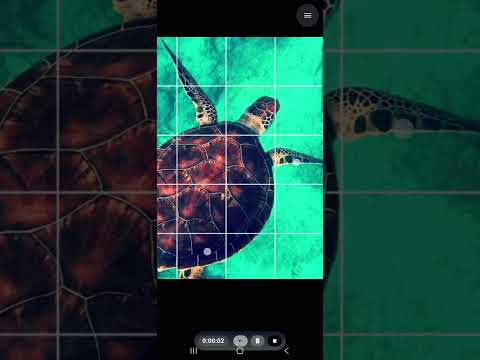
Drawing Grid is a drawing companion and project manager built for artists who work from reference photos. Overlay an adjustable grid on any image, size and position it exactly how you need, and use it to keep proportions and perspective accurate as you sketch — on paper or digitally.
Beyond the grid tool, Drawing Grid helps you manage your art from first reference to finished piece, so your projects, progress, and portfolio all live in one place.
GRID & REFERENCE TOOLS
- Load and crop any reference image
- Adjustable grid settings — size, spacing, and style to match your workflow
- Full-screen zoom and drag for close, accurate work
- Export and save your gridded reference for later or for printing
TRACING
- AR Sketch — float your reference over the camera view and trace it
straight onto paper
- Trace on Screen — draw over your reference on the screen with a finger
or stylus
- Move, pinch and zoom the reference to line it up exactly where you want it
- Undo and redo every stroke while you work
- Export your finished tracing to save, share, or add to a project
PROJECT MANAGEMENT
- Organize your artwork into a personal project library
- Track project timelines and hours spent, piece by piece
- Sync and store your projects securely in the cloud
AI-ASSISTED WORKFLOW
- Let AI suggest project titles so you can spend less time naming files and more time drawing
SHARE YOUR WORK
- Publish a public gallery to showcase finished pieces
- Optionally list and mark artwork as sold to share your work with buyers
Whether you're a hobbyist filling a sketchbook or a working artist managing a full slate of commissions, Drawing Grid gives you the drawing aids and the organization to see every project through.
Some features, including cloud sync, AI-assisted tools, and the public gallery, require an account and are intended for users aged 13 and over. In-app purchases may be available for additional storage or features.
Beyond the grid tool, Drawing Grid helps you manage your art from first reference to finished piece, so your projects, progress, and portfolio all live in one place.
GRID & REFERENCE TOOLS
- Load and crop any reference image
- Adjustable grid settings — size, spacing, and style to match your workflow
- Full-screen zoom and drag for close, accurate work
- Export and save your gridded reference for later or for printing
TRACING
- AR Sketch — float your reference over the camera view and trace it
straight onto paper
- Trace on Screen — draw over your reference on the screen with a finger
or stylus
- Move, pinch and zoom the reference to line it up exactly where you want it
- Undo and redo every stroke while you work
- Export your finished tracing to save, share, or add to a project
PROJECT MANAGEMENT
- Organize your artwork into a personal project library
- Track project timelines and hours spent, piece by piece
- Sync and store your projects securely in the cloud
AI-ASSISTED WORKFLOW
- Let AI suggest project titles so you can spend less time naming files and more time drawing
SHARE YOUR WORK
- Publish a public gallery to showcase finished pieces
- Optionally list and mark artwork as sold to share your work with buyers
Whether you're a hobbyist filling a sketchbook or a working artist managing a full slate of commissions, Drawing Grid gives you the drawing aids and the organization to see every project through.
Some features, including cloud sync, AI-assisted tools, and the public gallery, require an account and are intended for users aged 13 and over. In-app purchases may be available for additional storage or features.
Overlay a grid on reference photos, manage art projects, share your gallery.
Updated on
Safety starts with understanding how developers collect and share your data. Data privacy and security practices may vary based on your use, region, and age. The developer provided this information and may update it over time.
- No data shared with third partiesLearn more about how developers declare sharing
- No data collectedLearn more about how developers declare collection


Ratings and reviews
23.1K reviews

Jeff Riddle
- Flag inappropriate
August 20, 2023
Looks great on the outside, but the app will not save to my phone gallery. I allowed all access that was asked for, but it will not save to my gallery. The app does a beautiful job setting up a grid. I love it and was ready to give you all 5 stars, but its useless to me if I can't save my work. I'll keep it on my wish list and check back after an update. If I can save to my phone or tablet I change my review.
79 people found this review helpful
ButterflyRay Limited
August 21, 2026
Thank you for your feedback! This usually happens if photo access was declined when the app first asked for permission. To fix this, please enable gallery permissions in your device settings, and you'll be able to export your images smoothly. If you need any more help or have suggestions, feel free to reach out at https://drawinggrid.app.

Bee
- Flag inappropriate
March 12, 2023
Thank you, this app is exactly what I was looking for. With it, you can add grid lines onto a photo from your phone's gallery. It's perfect for drawing from a photo reference. You can change the colour & width of the lines and add numbers to each square. You are also able to adjust how large or small the grid is by selecting the number of columns and rows. Additionally, you can choose to have a diagonal grid; or instead of squares, your grid can be made up of rectangles.
111 people found this review helpful

sanjaykumar solanki
- Flag inappropriate
August 19, 2026
it is a very very good app for all beginners and professionals
1 person found this review helpful
What’s new
- New brushes for Trace on Screen: pencil, marker, ink and airbrush.
- Free drawing — open a blank page from the menu, draw, then save it or turn it into a project.
- Redesigned color picker with bigger swatches and a custom color control.
- AR Sketch now locks the reference to the corners of your paper.
- Fixes and improvements.
- Free drawing — open a blank page from the menu, draw, then save it or turn it into a project.
- Redesigned color picker with bigger swatches and a custom color control.
- AR Sketch now locks the reference to the corners of your paper.
- Fixes and improvements.
Everyone
Learn moreApp support
About the developer
BUTTERFLYRAY LIMITED
butterflyraynz@gmail.com
22 Haumako Place Otahuhu
Auckland 1062
New Zealand
+64 22 438 9075


