
GuitarTapp PRO - Tabs & Chords
3.2star
4.24K reviews
50K+
Downloads

Everyone
info



About this app
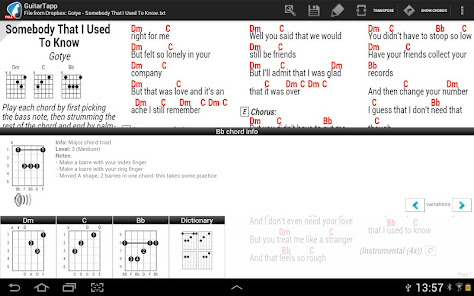
Throw away your song books and start jamming with GuitarTapp today! Search and view 850,000+ guitar tabs, chords, ChordPro files, power tabs, bass tabs and drum tabs. Has autoscroll feature, large chords dictionary with diagrams and variations, save, open and edit tabs on SD card, transpose songs, create setlists, jam along with local MP3's and watch YouTube video lessons.
You'll find no other app with so many features, NO additional purchases required, NO subscriptions, FREE tabs library updates.
Main features:
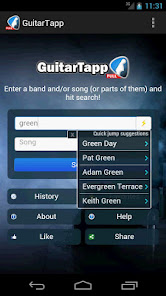
★ Quickly find chords, guitar tabs, power tabs, bass tabs and drum tabs for 500,000+ songs
★ Shows predictive search suggestions
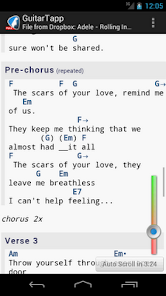
★ Autoscroll: play along from the screen, using the song's duration to determine scroll speed
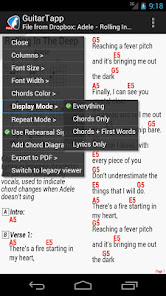
★ On-board chord dictionary: view chord diagrams and fingering alternatives for hundreds of guitar and ukulele chords, includes left-handed support.
★ Able to play the chords for reference
★ Transpose: quickly change the song key by transposing the chords up or down
★ IntelliWrap: eliminates horizontal scrolling by intelligently breaking up tabs and chords into screen-sized pieces
★ Able to play text tablature for quick reference
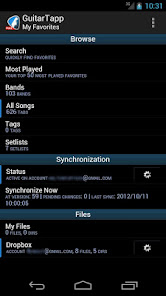
★ Favorites: save tabs on your SD card
★ Setlists: create and manage setlists for live performances
★ Power Tab support (are converted to text tabs)
★ ChordPro rendering engine for PDF-alike scores
★ NEW metronome
★ Find songs or video lessons on YouTube
★ Save and load tabs to/from SD card, and edit them!
★ Open your own files
★ 'White on black' option available for tab viewing; reduces battery consumption for some screens
★ Portrait and landscape modes supported
★ Adjustable tabs font size
★ Supports tablets: very useful as teleprompter / autocue for live performances on stage
★ Bluetooth pedals support for handsfree scrolling, turning pages, loading next song on setlist etc
★ Sync: synchronize your favorites and setlists to other devices running GuitarTapp
★ Send to e-mail
Buy now and get unlimited access to Android's ultimate guitar tabs collection!
You'll find no other app with so many features, NO additional purchases required, NO subscriptions, FREE tabs library updates.
Main features:
★ Quickly find chords, guitar tabs, power tabs, bass tabs and drum tabs for 500,000+ songs
★ Shows predictive search suggestions
★ Autoscroll: play along from the screen, using the song's duration to determine scroll speed
★ On-board chord dictionary: view chord diagrams and fingering alternatives for hundreds of guitar and ukulele chords, includes left-handed support.
★ Able to play the chords for reference
★ Transpose: quickly change the song key by transposing the chords up or down
★ IntelliWrap: eliminates horizontal scrolling by intelligently breaking up tabs and chords into screen-sized pieces
★ Able to play text tablature for quick reference
★ Favorites: save tabs on your SD card
★ Setlists: create and manage setlists for live performances
★ Power Tab support (are converted to text tabs)
★ ChordPro rendering engine for PDF-alike scores
★ NEW metronome
★ Find songs or video lessons on YouTube
★ Save and load tabs to/from SD card, and edit them!
★ Open your own files
★ 'White on black' option available for tab viewing; reduces battery consumption for some screens
★ Portrait and landscape modes supported
★ Adjustable tabs font size
★ Supports tablets: very useful as teleprompter / autocue for live performances on stage
★ Bluetooth pedals support for handsfree scrolling, turning pages, loading next song on setlist etc
★ Sync: synchronize your favorites and setlists to other devices running GuitarTapp
★ Send to e-mail
Buy now and get unlimited access to Android's ultimate guitar tabs collection!
Updated on
Safety starts with understanding how developers collect and share your data. Data privacy and security practices may vary based on your use, region, and age. The developer provided this information and may update it over time.

No data shared with third parties
Learn more about how developers declare sharing

This app may collect these data types
Personal info, Photos and videos and 2 others

Data isn’t encrypted

You can request that data be deleted
Ratings and reviews
2.7
3.24K reviews

J Jerg
- Flag inappropriate
- Show review history
October 1, 2023
Easily the app I've used most on a mobile device. I refer to this app daily. If I hear a tune on my playlists I never learned, a car speeds by with a riff I dig or in Walgreens that sparks my curiosity, I go to this app. I'm old and have played a bunch of covers and this app is such a great, quick resource, I'd keep it open on stage in case a request is made I never heard let alone never played. It's a modern fakebook with potentially more detail. 5 stars doesn't due it justice. 🤘🏽

A Google user
- Flag inappropriate
- Show review history
July 27, 2019
While there is a big white banner across the bottom of the song, the giant font issue can be addressed by adjusting the ui size in the app settings menu. This app does several important things that no other app does - intelliwrap, set-lists, and notes to self for each song are even possible through the rating and comments feature. Also no ads and it seems to have all the aame selection as its horrible competitor ultimate guitar - a terrible app that does not take no for an answer.
10 people found this review helpful
A Google user
- Flag inappropriate
February 13, 2019
The display problems since the latest Android update were fixed by updating the app through their website. However, the scrolling problems remain. It either scrolls extremely slow or extremely fast, with no in between. And if you mess with the scroll speed too much there's a glitch where it starts to scroll lightning fast, even on the menu pages, forcing you to exit and reopen the app. It is nearly unusable with these issues.
3 people found this review helpful
What's new
Additional Dropbox access fix