
GuitarTapp ChordPro
In-app purchases
1.9star
489 reviews
10K+
Downloads

Everyone
info





About this app
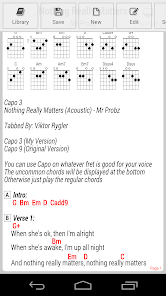
Throw away your song books and start jamming with GuitarTapp today! Search and view over 850,000+ guitar tabs and chords in the popular ChordPro format.
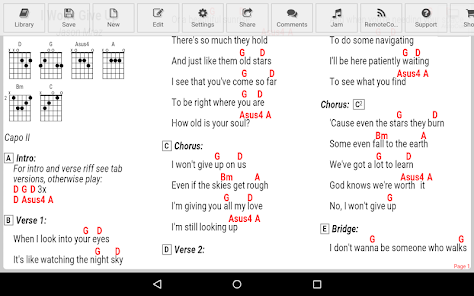
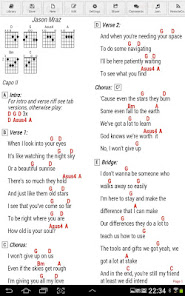
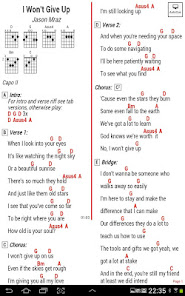
GuitarTapp is the only tab viewer capable of adjusting sheet music to always fit your screen using the innovative IntelliWrap technique. By displaying your songs in multiple columns, it also makes sure the maximum amount of screen real-estate is used.
Main features:
★ 850,000+ songs in the online library (in-app purchase for credits, free trial)
★ Open or create your own songs
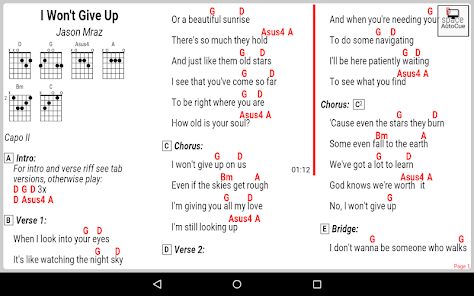
★ AutoCue: play along without touching the screen - includes song learning mode for perfect timing
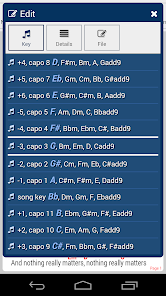
★ Transpose: quickly changes song key
★ Offline library: Save songs on your device
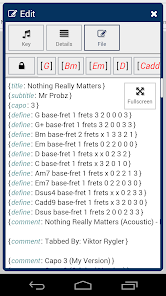
★ ChordPro file editor: Edit your songs right within the app (available as in-app purchase)
★ RemoteControl: control multiple devices running GuitarTapp ChordPro, sends songs and AutoCue commands to bluetooth connected devices. Keep all bandmembers on the same page! (control 1 device free, 2+ devices available as in-app purchase)
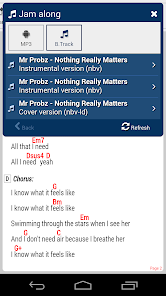
★ Jam along with MP3's on your device, or downloaded backing tracks
★ Create setlists
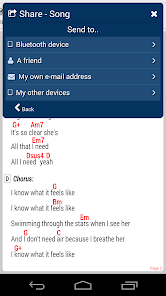
★ Share songs/setlists through bluetooth or e-mail
★ Dropbox integration: automatically synchronizes your songs/setlists with other devices.
★ Bluetooth pedal & keyboard support for true handsfree experience
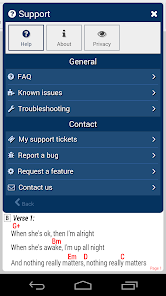
★ In-app support: FAQ, troubleshooting, request features, report bugs, ask questions, support ticketing
★ Pinch-zoom for fast text scaling
★ Day/night theme settings + custom colors
★ Settings to choose what to display: chords, lyrics, comments, chord diagrams, tablature etc
Device requirements:
- App supports Android 4.0+
- Android 4.4+ is recommended for best performance.
GuitarTapp is the only tab viewer capable of adjusting sheet music to always fit your screen using the innovative IntelliWrap technique. By displaying your songs in multiple columns, it also makes sure the maximum amount of screen real-estate is used.
Main features:
★ 850,000+ songs in the online library (in-app purchase for credits, free trial)
★ Open or create your own songs
★ AutoCue: play along without touching the screen - includes song learning mode for perfect timing
★ Transpose: quickly changes song key
★ Offline library: Save songs on your device
★ ChordPro file editor: Edit your songs right within the app (available as in-app purchase)
★ RemoteControl: control multiple devices running GuitarTapp ChordPro, sends songs and AutoCue commands to bluetooth connected devices. Keep all bandmembers on the same page! (control 1 device free, 2+ devices available as in-app purchase)
★ Jam along with MP3's on your device, or downloaded backing tracks
★ Create setlists
★ Share songs/setlists through bluetooth or e-mail
★ Dropbox integration: automatically synchronizes your songs/setlists with other devices.
★ Bluetooth pedal & keyboard support for true handsfree experience
★ In-app support: FAQ, troubleshooting, request features, report bugs, ask questions, support ticketing
★ Pinch-zoom for fast text scaling
★ Day/night theme settings + custom colors
★ Settings to choose what to display: chords, lyrics, comments, chord diagrams, tablature etc
Device requirements:
- App supports Android 4.0+
- Android 4.4+ is recommended for best performance.
Updated on
Safety starts with understanding how developers collect and share your data. Data privacy and security practices may vary based on your use, region, and age. The developer provided this information and may update it over time.

No data shared with third parties
Learn more about how developers declare sharing

This app may collect these data types
Personal info, Messages and 3 others

Data is encrypted in transit
Ratings and reviews
2.2
362 reviews

Bobby Lineberry
- Flag inappropriate
July 14, 2024
I use it every day. I've repeatedly adressed a few annoying issues. I would think after waiting years something would get better. The interface is clunky in my opinion . I'm not getting into it here. Seems complacency has set it with product improvement or updates. It must be perfect already or not worth being improved.

Gary Adams
- Flag inappropriate
June 20, 2023
Was a great app. Now,not so much. Recent update was a downgrade. All of the songs used to be free but now you have to pay for them. I don't mind the modest fee that they ask but the problem is that you can't see what songs you're buying until you buy them! The quality of the chord charts and tabs vary widely and most of what you buy sight unseen is worthless and you clutter up your library with poorly transcribed pieces of junk. The synchronization used to be seamless. Now it locks up.
1 person found this review helpful

Terry Brown
- Flag inappropriate
- Show review history
April 8, 2021
I if could give it 10 stars I would. When every other searches fail, this one comes through. Great app. It's awfu now. Where's my guitar tapp pro? It worked perfectly all the time. This version won't even let you just go back to home page smoothly. It's a clunky app that makes just shut it down and find a different app. This is barely a one star app. A little piece of advice if it ain't broke, don't fix it. You ripped me and several others off us off with it
19 people found this review helpful
What's new
• Added option to replace or merge local files when connecting to Dropbox, makes switching accounts possible
• Now also synchronizes generated PDF's
• Songs library is now also browsable by folders
• Editor: Added native/app switch to copy/cut/paste buttons
• Improved AutoCue animation smoothness
• Now also synchronizes generated PDF's
• Songs library is now also browsable by folders
• Editor: Added native/app switch to copy/cut/paste buttons
• Improved AutoCue animation smoothness