
CMB Mobile Banking Aruba
3.6star
550 reviews
10K+
Downloads

Everyone
info




About this app
CMB Mobile Banking brings the bank to the palm of your hand. Have real-time, 24/7 easy access to your personal accounts, from an Internet-enabled smartphone or tablet.
Mobile Banking Features
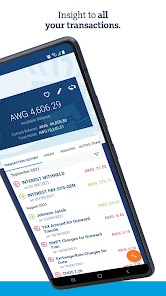
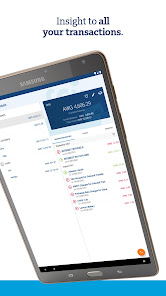
Get real-time account balances and transaction details on current and savings accounts. Stay up to date with all your credit cards, loans, time deposits and other accounts. View, print or share your current, savings and credit card account statements.
Make real-time transfers between your own accounts, day and night. Make payments – locally or internationally - to any beneficiary and immediately see the payment in your transactions overview after execution. View, download and/or email a PDF cyber receipt of executed and scheduled payments.
Create your own beneficiaries and templates with the option to pre-authorize the templates for easy and quick payment.
On the go? Increase your available credit card balance and top-up your mobile phone in real-time.
View the audit trail of all activity on your online and mobile banking account, see current exchange rates and secure mail from the bank.
Use our app’s ATM Locator to find a service point nearest to you. All MCB Group ATMs & branches on the ABC and SSS islands are listed. View opening hours, offered currencies and denominations and use your phone for directions.
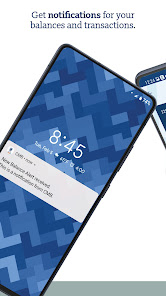
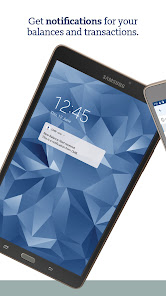
Create balance and transaction alerts and have them delivered to your secure mail inbox, email address or receive them as a push notification.
Add widgets to see your account balances and upcoming payments without the need of logging in to the Mobile Banking app, or create a Quick Access Template for easy access to frequently used payments.
Access
Start using our Mobile Banking app immediately – all you need is your Online Banking username and password. Your e-Code (soft token) will be activated during first login.
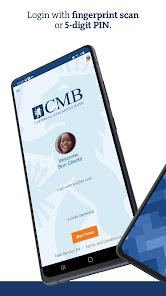
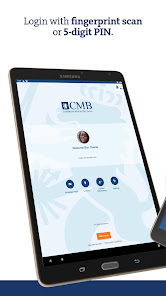
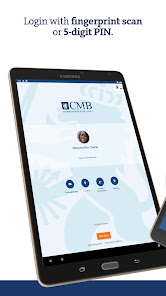
Not using Quick Login yet? During login choose your favorite Quick Login method and create your 5-digit PIN. After this logging into the app is easy peasy with just a fingerprint scan or self-chosen 5-digit PIN.
Use one of your registered devices to setup a second device. No need to visit a branch anymore. Your new e-Code (soft token) is activated remotely from any location.
Use the mobile friendly Self-Service Portal to reset your password, report your e-Pass lost or stolen, activate and manage your e-Code (soft token) and more.
Private and Secure
Banking via the Mobile Banking App is just as safe as via Online Banking in your browser. Your accounts are always safe with the app’s secured connection and multi factor authentication. Your personal information remains private and is always protected.
View and manage your registered devices directly from the app. Lost your phone? Login to another registered device – you can register up to three of your devices – and simply remove the lost phone from the list.
Language
The Mobile Banking app and alerts language can be set to English and Dutch. Use Mobile Banking in the language of your choice.
Mobile Banking Features
Get real-time account balances and transaction details on current and savings accounts. Stay up to date with all your credit cards, loans, time deposits and other accounts. View, print or share your current, savings and credit card account statements.
Make real-time transfers between your own accounts, day and night. Make payments – locally or internationally - to any beneficiary and immediately see the payment in your transactions overview after execution. View, download and/or email a PDF cyber receipt of executed and scheduled payments.
Create your own beneficiaries and templates with the option to pre-authorize the templates for easy and quick payment.
On the go? Increase your available credit card balance and top-up your mobile phone in real-time.
View the audit trail of all activity on your online and mobile banking account, see current exchange rates and secure mail from the bank.
Use our app’s ATM Locator to find a service point nearest to you. All MCB Group ATMs & branches on the ABC and SSS islands are listed. View opening hours, offered currencies and denominations and use your phone for directions.
Create balance and transaction alerts and have them delivered to your secure mail inbox, email address or receive them as a push notification.
Add widgets to see your account balances and upcoming payments without the need of logging in to the Mobile Banking app, or create a Quick Access Template for easy access to frequently used payments.
Access
Start using our Mobile Banking app immediately – all you need is your Online Banking username and password. Your e-Code (soft token) will be activated during first login.
Not using Quick Login yet? During login choose your favorite Quick Login method and create your 5-digit PIN. After this logging into the app is easy peasy with just a fingerprint scan or self-chosen 5-digit PIN.
Use one of your registered devices to setup a second device. No need to visit a branch anymore. Your new e-Code (soft token) is activated remotely from any location.
Use the mobile friendly Self-Service Portal to reset your password, report your e-Pass lost or stolen, activate and manage your e-Code (soft token) and more.
Private and Secure
Banking via the Mobile Banking App is just as safe as via Online Banking in your browser. Your accounts are always safe with the app’s secured connection and multi factor authentication. Your personal information remains private and is always protected.
View and manage your registered devices directly from the app. Lost your phone? Login to another registered device – you can register up to three of your devices – and simply remove the lost phone from the list.
Language
The Mobile Banking app and alerts language can be set to English and Dutch. Use Mobile Banking in the language of your choice.
Updated on
Safety starts with understanding how developers collect and share your data. Data privacy and security practices may vary based on your use, region, and age. The developer provided this information and may update it over time.

No data shared with third parties
Learn more about how developers declare sharing

No data collected
Learn more about how developers declare collection

Data is encrypted in transit

Data can’t be deleted
Ratings and reviews
3.6
546 reviews

Eric Davelaar
- Flag inappropriate
October 6, 2021
It was extremely confusing to upgrade to the Oct 5 2021 version. The app took me to the tthe same version on the playstore where obviously 'open' took me back to the upgrade message. So I uninstalled it and had to try to find the new version. Please! Remove the old reviews and comments so people know that this IS the latest version! It will decongest your helpdesk...
17 people found this review helpful
Caribbean Mercantile Bank N.V.
October 6, 2021
Dear Eric, thank you for your feedback! We will relay this to our technical team.

A Google user
- Flag inappropriate
August 30, 2019
Lacks options plus you don't get notifications if you take money out of your account only if it passes your limit Would be better if you could get them for every transaction. Plus the history doesn't last for a long time maybe a month or two.
8 people found this review helpful
Caribbean Mercantile Bank N.V.
September 5, 2019
Dear Angelo, we are sorry to hear that you are not completely satisfied with our Mobile Banking app. We will take your comments to the development team. About the transaction history, by default only the last 30 days are displayed. Use the filter option to go back in time much more. You can go back many months, even years.
A Google user
- Flag inappropriate
- Show review history
November 4, 2018
The app is easier to use and similar to my Citibank app. I can set notifications for my accounts and also receive email updates from either transactions or when my funds reach a low limit. Now you can stay up2date with your accounts activities. Love it! If you can't find your way around just check the demo at the start of your OB page.
26 people found this review helpful
What's new
Thank you for using our Mobile Banking app!
In this update, we have made several adjustments and improvements to further enhance the user experience.
In this update, we have made several adjustments and improvements to further enhance the user experience.