
Smart Transfer

Everyone
info
1K+
Downloads

Everyone
Learn more


About this app
Smart Transfer — Your Secure, Fast Phone Data Migration Solution
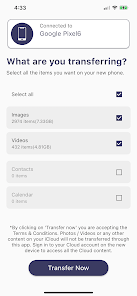
Smart Transfer makes moving your essential data between phones effortless. Our powerful, easy-to-use app ensures photos, videos, contacts, SMS messages, call logs, and more are transferred safely, quickly, and cable-free. Upgrade to a new Android, or move from iOS to Android — Smart Transfer handles your complete data migration with speed and security.
Comprehensive Data Migration (Backup & Restore)
Smart Transfer specializes in secure, seamless phone-to-phone data transfer. The app backs up your selected data — including photos, videos, contacts, SMS, and call logs — from your old device, then restores it to your new one. This guarantees smooth, reliable data transfer with zero loss.
All requested permissions directly support this core data migration process. We never store data on external servers or access it beyond what's required for user-initiated transfer. Smart Transfer is fully GDPR compliant, ensuring your data privacy and security.
Your Privacy Matters
We take your privacy seriously. Smart Transfer doesn't upload or store any data on external servers. All transfers happen directly between your two devices, keeping your data on your devices and under your control. We are fully GDPR compliant; all permissions are requested only when needed, with your explicit consent, and solely for your chosen data transfer.
Key Features
Cross-Platform: Move data between Android and iOS devices.
All-in-One: Transfer contacts, SMS, call logs, photos, videos, documents, and more.
Lightning-Fast: High-speed backup and restore, even for large files.
User-Friendly: Simple design, no technical skills needed.
Safe & Secure: Your data is never accessed, stored, or shared externally.
Permissions We Request (and Why)
We only ask for permissions strictly necessary for the features you choose. Here's what we request and how it's used:
SMS Permission & Temporary Default SMS App Status:
Purpose: To backup your SMS messages from your old phone and securely restore them to your new phone.
Usage: Only if you choose SMS transfer. On the new device, the app temporarily requests to become the default SMS app. This is an Android system requirement to write messages to the native database.
Control: Immediately after SMS restoration, you'll be prompted to switch back to your original SMS app. You remain in control.
Privacy: We don't store, send, or access messages beyond user-initiated transfer. This app is NOT a permanent default SMS application.
Call Log Permission:
Purpose: To securely transfer and restore your call history to your new phone.
Usage: Only during transfer if you include call logs. We read logs from the old device and write them to the new one.
Clarification: Our app does NOT function as a dialer, nor does it display or manage call history within a traditional dialer interface. Its sole purpose is data migration.
Privacy: This permission isn't used in the background or for any other purpose beyond user-initiated transfer.
Storage & Media Access (Photos, Videos, Files):
Purpose: To transfer your photos, videos, documents, and other files.
Usage: Only while transfer is ongoing.
Privacy: No files are uploaded or shared externally. Transfers happen directly between devices.
Nearby Devices & Location:
Purpose: To find and connect to nearby devices via Wi-Fi Direct or Bluetooth for direct transfer (e.g., QR codes).
Usage: Only during connection phase. Location permission on older Android versions facilitates Wi-Fi Direct discovery.
Privacy: Strictly for device pairing/transfer; no location data stored or tracked.
Smart Transfer makes moving your essential data between phones effortless. Our powerful, easy-to-use app ensures photos, videos, contacts, SMS messages, call logs, and more are transferred safely, quickly, and cable-free. Upgrade to a new Android, or move from iOS to Android — Smart Transfer handles your complete data migration with speed and security.
Comprehensive Data Migration (Backup & Restore)
Smart Transfer specializes in secure, seamless phone-to-phone data transfer. The app backs up your selected data — including photos, videos, contacts, SMS, and call logs — from your old device, then restores it to your new one. This guarantees smooth, reliable data transfer with zero loss.
All requested permissions directly support this core data migration process. We never store data on external servers or access it beyond what's required for user-initiated transfer. Smart Transfer is fully GDPR compliant, ensuring your data privacy and security.
Your Privacy Matters
We take your privacy seriously. Smart Transfer doesn't upload or store any data on external servers. All transfers happen directly between your two devices, keeping your data on your devices and under your control. We are fully GDPR compliant; all permissions are requested only when needed, with your explicit consent, and solely for your chosen data transfer.
Key Features
Cross-Platform: Move data between Android and iOS devices.
All-in-One: Transfer contacts, SMS, call logs, photos, videos, documents, and more.
Lightning-Fast: High-speed backup and restore, even for large files.
User-Friendly: Simple design, no technical skills needed.
Safe & Secure: Your data is never accessed, stored, or shared externally.
Permissions We Request (and Why)
We only ask for permissions strictly necessary for the features you choose. Here's what we request and how it's used:
SMS Permission & Temporary Default SMS App Status:
Purpose: To backup your SMS messages from your old phone and securely restore them to your new phone.
Usage: Only if you choose SMS transfer. On the new device, the app temporarily requests to become the default SMS app. This is an Android system requirement to write messages to the native database.
Control: Immediately after SMS restoration, you'll be prompted to switch back to your original SMS app. You remain in control.
Privacy: We don't store, send, or access messages beyond user-initiated transfer. This app is NOT a permanent default SMS application.
Call Log Permission:
Purpose: To securely transfer and restore your call history to your new phone.
Usage: Only during transfer if you include call logs. We read logs from the old device and write them to the new one.
Clarification: Our app does NOT function as a dialer, nor does it display or manage call history within a traditional dialer interface. Its sole purpose is data migration.
Privacy: This permission isn't used in the background or for any other purpose beyond user-initiated transfer.
Storage & Media Access (Photos, Videos, Files):
Purpose: To transfer your photos, videos, documents, and other files.
Usage: Only while transfer is ongoing.
Privacy: No files are uploaded or shared externally. Transfers happen directly between devices.
Nearby Devices & Location:
Purpose: To find and connect to nearby devices via Wi-Fi Direct or Bluetooth for direct transfer (e.g., QR codes).
Usage: Only during connection phase. Location permission on older Android versions facilitates Wi-Fi Direct discovery.
Privacy: Strictly for device pairing/transfer; no location data stored or tracked.
SmartTransfer is a premier phone data transfer app.
Updated on
Safety starts with understanding how developers collect and share your data. Data privacy and security practices may vary based on your use, region, and age. The developer provided this information and may update it over time.
- No data shared with third partiesLearn more about how developers declare sharing
- This app may collect these data typesApp info and performance and Device or other IDs
- Data is encrypted in transit
- Data can’t be deleted


What’s new
Bug fixes.
Everyone
Learn moreApp support
About the developer
CELLDE INNOVATION LABS PRIVATE LIMITED
accounts@cellde.com
# 622, Sector-10
Panchkula, Haryana 134113
India
+91 70099 87373