
Chess Scanner AI + GPT
In-app purchases


Everyone
info
500+
Downloads

Everyone
Learn more


About this app
Bring your chess books to life.
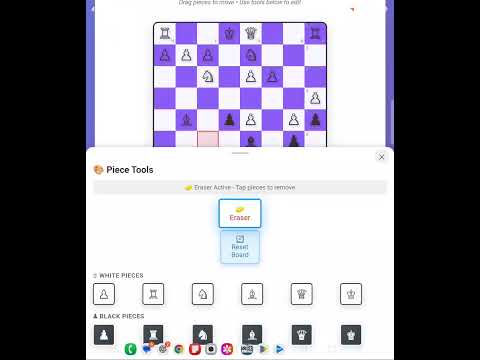
Chess Board Scanner helps you follow along with chess books, magazines, puzzles, ebooks, and chess.com by instantly turning printed positions or screenshots/pictures into a digital, playable board. No more setting up pieces by hand—just scan, crop, and start playing.
Whether you’re studying classic games, solving tactics, or reviewing openings, this app makes learning much easier by letting you interact with real positions directly instead of trying to visualize everything in your head.
NEW: Stockfish-Guided GPT Analysis
You can now scan a board and get an AI-assisted explanation powered by Stockfish evaluations combined with GPT’s natural-language insight.
This gives you clear, human-style analysis grounded in accurate engine lines—unlike sending a board to a general AI model, which can often give random or incorrect advice.
This feature is ideal for improving quickly, reviewing your games, or understanding unfamiliar positions at a glance.
Features
Instantly scan chess boards from books, PDFs, screenshots, or cameras
Fine-tune cropping for perfect recognition
Play through positions on a clean digital board
New Stockfish + GPT analysis for accurate, beginner-friendly explanations
Ideal for studying openings, puzzles, endgames, and full-game positions
Whether you’re studying classic games, working through puzzles, or reviewing openings, this app makes learning easier by letting you interact with positions directly instead of trying to visualize them in your head
Chess Board Scanner helps you follow along with chess books, magazines, puzzles, ebooks, and chess.com by instantly turning printed positions or screenshots/pictures into a digital, playable board. No more setting up pieces by hand—just scan, crop, and start playing.
Whether you’re studying classic games, solving tactics, or reviewing openings, this app makes learning much easier by letting you interact with real positions directly instead of trying to visualize everything in your head.
NEW: Stockfish-Guided GPT Analysis
You can now scan a board and get an AI-assisted explanation powered by Stockfish evaluations combined with GPT’s natural-language insight.
This gives you clear, human-style analysis grounded in accurate engine lines—unlike sending a board to a general AI model, which can often give random or incorrect advice.
This feature is ideal for improving quickly, reviewing your games, or understanding unfamiliar positions at a glance.
Features
Instantly scan chess boards from books, PDFs, screenshots, or cameras
Fine-tune cropping for perfect recognition
Play through positions on a clean digital board
New Stockfish + GPT analysis for accurate, beginner-friendly explanations
Ideal for studying openings, puzzles, endgames, and full-game positions
Whether you’re studying classic games, working through puzzles, or reviewing openings, this app makes learning easier by letting you interact with positions directly instead of trying to visualize them in your head
Scan chess boards instantly — now with Stockfish + GPT analysis
Updated on
Safety starts with understanding how developers collect and share your data. Data privacy and security practices may vary based on your use, region, and age. The developer provided this information and may update it over time.
- No data shared with third partiesLearn more about how developers declare sharing
- This app may collect these data typesPersonal info, Financial info, and Device or other IDs
- Data is encrypted in transit
- You can request that data be deleted


Everyone
Learn moreApp support
About the developer
Bret William Hogg
brethogg@frontier.com
14760 Northeast 31st Street, Bellevue
Duvall, WA 98019-6455
United States