Wake me up! Smart Alarm Clock
Contains adsIn-app purchases
4.1star
315 reviews
50K+
Downloads

Everyone
info


About this app
🌅 Wake me up! - Your Ultimate Smart Alarm Clock
⏰ Transform your mornings with "Wake me up!" – the intelligent alarm clock designed to elevate your wake-up routine. Experience a personalized and feature-rich waking experience that goes beyond the ordinary.
🔗 Key Features:
🚀 Tasker Integration:
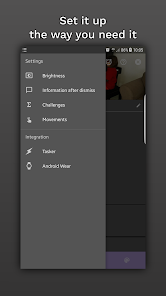
Unleash the power of Tasker! "Wake me up!" seamlessly integrates Tasker plugins, allowing you to create, activate, deactivate your alarms and much more.
⏰ Configurable Alarm Schedules:
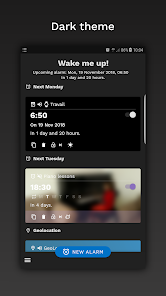
Tailor your alarm schedules to perfection. Whether it's a daily wake-up call, a one-time event, or a recurring alarm with specific intervals, "Wake me up!" has you covered.
📅 Calendar Sync:
Sync your alarms with your calendar effortlessly. Schedule, activate, or modify alarms based on your calendar events, ensuring your wake-up routine adapts to your dynamic lifestyle.
📍 Location-Based Alarms:
Take control of your alarms with location-based triggers. Activate or deactivate alarms based on your whereabouts, providing a tailored wake-up experience wherever you are.
🎶 Highly Customizable Alarms:
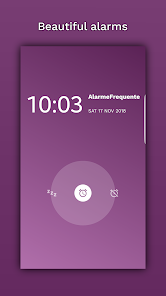
Personalize your wake-up experience with a plethora of options. Choose from various types of ringtones, your favorite music files, or let the app surprise you with random music. Add a personal touch with text-to-speech greetings!
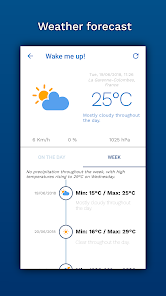
🌤️ Real-Time Weather Forecast:
Stay ahead of the day! "Wake me up!" provides up-to-date weather forecasts, ensuring you're prepared for whatever the weather brings.
🌐 Wear OS Companion App:
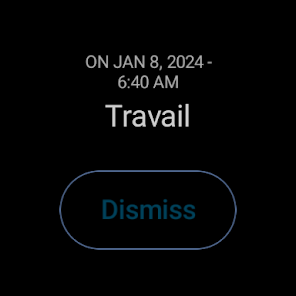
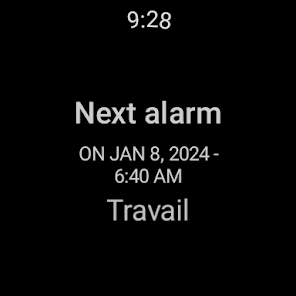
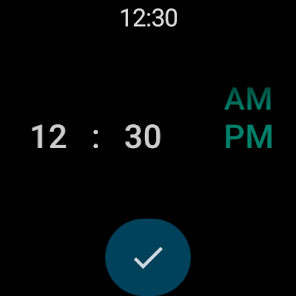
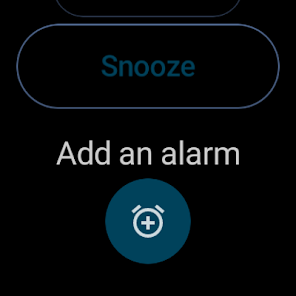
Use the "Wake me up!" Wear OS companion application for a unified wake-up experience on the go. Snooze or dismiss alarms right from your wrist.
⭐ Why "Wake me up!"?
Smart alarms with advanced features.
Tasker integration for ultimate control.
Calendar sync and location-based triggers.
Highly customizable alarms for a personalized wake-up.
Real-time weather updates to start your day informed.
💼 Some features need either ads to be activated or the Premium Pack to be purchased.
By default, ads are not activated. By activating non-intrusive ads, all premium features become available, except weather forecast. Weather forecast needs the purchase of the Premium Pack.
No personal data are collected or sent to a server. Everything is stored locally, on your device.
📲 Download "Wake me up!" now and redefine your mornings with the ultimate smart alarm experience.
⏰ Transform your mornings with "Wake me up!" – the intelligent alarm clock designed to elevate your wake-up routine. Experience a personalized and feature-rich waking experience that goes beyond the ordinary.
🔗 Key Features:
🚀 Tasker Integration:
Unleash the power of Tasker! "Wake me up!" seamlessly integrates Tasker plugins, allowing you to create, activate, deactivate your alarms and much more.
⏰ Configurable Alarm Schedules:
Tailor your alarm schedules to perfection. Whether it's a daily wake-up call, a one-time event, or a recurring alarm with specific intervals, "Wake me up!" has you covered.
📅 Calendar Sync:
Sync your alarms with your calendar effortlessly. Schedule, activate, or modify alarms based on your calendar events, ensuring your wake-up routine adapts to your dynamic lifestyle.
📍 Location-Based Alarms:
Take control of your alarms with location-based triggers. Activate or deactivate alarms based on your whereabouts, providing a tailored wake-up experience wherever you are.
🎶 Highly Customizable Alarms:
Personalize your wake-up experience with a plethora of options. Choose from various types of ringtones, your favorite music files, or let the app surprise you with random music. Add a personal touch with text-to-speech greetings!
🌤️ Real-Time Weather Forecast:
Stay ahead of the day! "Wake me up!" provides up-to-date weather forecasts, ensuring you're prepared for whatever the weather brings.
🌐 Wear OS Companion App:
Use the "Wake me up!" Wear OS companion application for a unified wake-up experience on the go. Snooze or dismiss alarms right from your wrist.
⭐ Why "Wake me up!"?
💼 Some features need either ads to be activated or the Premium Pack to be purchased.
By default, ads are not activated. By activating non-intrusive ads, all premium features become available, except weather forecast. Weather forecast needs the purchase of the Premium Pack.
No personal data are collected or sent to a server. Everything is stored locally, on your device.
📲 Download "Wake me up!" now and redefine your mornings with the ultimate smart alarm experience.
Updated on
Safety starts with understanding how developers collect and share your data. Data privacy and security practices may vary based on your use, region, and age. The developer provided this information and may update it over time.

No data shared with third parties
Learn more about how developers declare sharing

This app may collect these data types
App info and performance and Device or other IDs

Data is encrypted in transit
Ratings and reviews
4.2
301 reviews

Georgette Lee
- Flag inappropriate
- Show review history
January 9, 2026
NEW BUG: Snoozing somehow sets alarm for snoozed time the next day! Thank you so much for being such a responsive, dedicated developer! By far the best alarm anyone could wish for. :-)
19 people found this review helpful
FiveZ
May 8, 2025
Hello, thanks again for your feedback!
Update 2: The latest update adds a new option that, when enabled, should fix the issue. It is available in the general settings, "Advanced" subsection.

A Google user
- Flag inappropriate
- Show review history
December 24, 2019
Overall I've found this good, particularly with the Tasker integration. The only thing preventing me from giving it 5 start is that the "Prevent an alarm from ringing on days having "all-day" event" option appears to be missing for me (even after paying for the Premium Pack). I can create an alarm which is linked to a calendar (so the alarm goes off when there are calendar events) but for time scheduled alarms I am only able to add fixed deactivation periods or set location-based deactivation.
6 people found this review helpful
FiveZ
December 29, 2019
Hi, Thanks for your review!
Version 13 fixes this issue.

Julian Kozianski
- Flag inappropriate
- Show review history
February 26, 2024
I like that it integrates with Tasker but don't like that alarms starts ringing before I can dismiss them. I also don't like the non descriptive name of the app I always forget how to find it. The absolute worst part though is the little toast notification when an alarm goes off. I want a full screen to pop up so I can easily dismiss the alarm and not have to navigate to the app and then stop it. I want to be disturbed, that's why I set an alarm. P.s. Very impressed with the dev's communication
3 people found this review helpful
FiveZ
January 23, 2024
Hello, thanks for starting your review with one positive point.
Alarms appear fullscreen when the screen is off. Otherwise, by default, they appear as notification. You can change this with the options the application offers (you can't with other apps).
We can also exchange by email, if you'd like.
(I won't change the app name)
Best regards,
What’s new
Bugfixes
App support
About the developer
ZYSMAN DAVID
five.z.contact@gmail.com
9 Rue de Rouvray
92200 Neuilly-sur-Seine
France


