
Calendar Notes
In-app purchases


Everyone
info
100+
Downloads


About this app
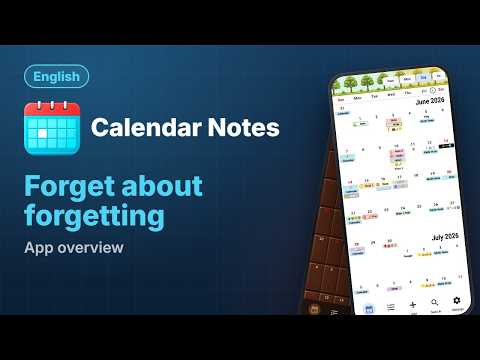
Calendar Notes is a calendar, task planner, notepad, organizer, and alarm clock — all in one app!
Home screen widget with a two-week calendar.
Built-in tutorial.
Shared notes.
Copying or transferring events from Google Calendar.
• No ads.
• Notes: A note without a date is stored in the "List" section. A note with a date is visible in the calendar. Any note and its text can be found in the "Search" menu using filters.
There are checkboxes to mark items and visually track progress.
Text can be formatted.
• Can be used as a regular alarm clock: You can set a custom melody and vibration for each alarm. A snooze function is available. Reminders and alarms can be set:
- by days of the week
- once a month
- once a year
- on a custom schedule.
• Daylight: A special visual bar in the calendar clearly shows the daylight and nighttime hours of every day of the year.
• Data sharing and export: Notes can be sent to another device. The recipient will load them into their Calendar Notes app with all settings and alarms. For security, sent notes can be password-protected.
All notes can be saved to an archive and transferred to another device.
• Shared notes: You can send a link to other devices to make a note shared. The recipient clicks on the link and imports this note into their app.
The shared note can be edited, and it will be synchronized across all devices.
In the first mode, only the owner makes changes to the note for other participants.
In the second mode, any participant can make changes to the shared note.
No account, no registration. For security, a password can be set.
• Shift schedule: Allows you to create a custom schedule of working days and days off (e.g., 2/2, 3/1, or a five-day week) in the calendar.
• Built-in counters: Counting data in recurrences and overall statistics in the main template.
• Basic features are free: Premium is only needed for advanced features and is a one-time purchase that's yours forever — no subscription. You can try all Premium features for free, within limits.
Home screen widget with a two-week calendar.
Built-in tutorial.
Shared notes.
Copying or transferring events from Google Calendar.
• No ads.
• Notes: A note without a date is stored in the "List" section. A note with a date is visible in the calendar. Any note and its text can be found in the "Search" menu using filters.
There are checkboxes to mark items and visually track progress.
Text can be formatted.
• Can be used as a regular alarm clock: You can set a custom melody and vibration for each alarm. A snooze function is available. Reminders and alarms can be set:
- by days of the week
- once a month
- once a year
- on a custom schedule.
• Daylight: A special visual bar in the calendar clearly shows the daylight and nighttime hours of every day of the year.
• Data sharing and export: Notes can be sent to another device. The recipient will load them into their Calendar Notes app with all settings and alarms. For security, sent notes can be password-protected.
All notes can be saved to an archive and transferred to another device.
• Shared notes: You can send a link to other devices to make a note shared. The recipient clicks on the link and imports this note into their app.
The shared note can be edited, and it will be synchronized across all devices.
In the first mode, only the owner makes changes to the note for other participants.
In the second mode, any participant can make changes to the shared note.
No account, no registration. For security, a password can be set.
• Shift schedule: Allows you to create a custom schedule of working days and days off (e.g., 2/2, 3/1, or a five-day week) in the calendar.
• Built-in counters: Counting data in recurrences and overall statistics in the main template.
• Basic features are free: Premium is only needed for advanced features and is a one-time purchase that's yours forever — no subscription. You can try all Premium features for free, within limits.
Calendar, smart notes, organizer, planner, alarm clock, shift schedule.
Updated on
Safety starts with understanding how developers collect and share your data. Data privacy and security practices may vary based on your use, region, and age. The developer provided this information and may update it over time.
- No data shared with third partiesLearn more about how developers declare sharing
- No data collectedLearn more about how developers declare collection


What’s new
1.8.0
• Starting with this update, all app features are free. You can separately buy additional themes and the shared notes feature (to cover server costs). You can create one shared note for free to try it. You can join other people's shared notes without limits.
• Improved the note text field.
• Alarms now correctly handle daylight saving time changes.
• Starting with this update, all app features are free. You can separately buy additional themes and the shared notes feature (to cover server costs). You can create one shared note for free to try it. You can join other people's shared notes without limits.
• Improved the note text field.
• Alarms now correctly handle daylight saving time changes.
App support
About the developer
OLENA PASHKINA
clickspace.supp@gmail.com
Ukraine, 54018, region Mykolaivska, city Mykolaiv, lane Kobera, building 13a
flat 101b
Mykolaiv
Миколаївська область
Ukraine
54018