Calendar Pro - Agenda
4.4star
14.6K reviews
500K+
Downloads

Everyone
info

About this app
📅 Elevate your scheduling game with Calendar Pro, where simplicity meets utility:
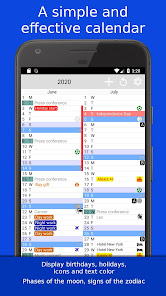
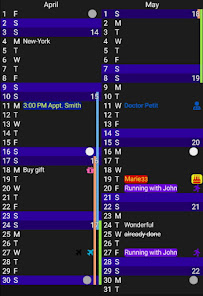
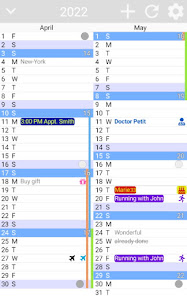
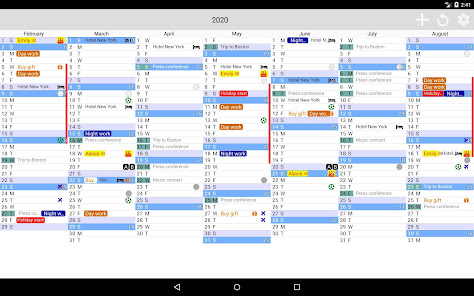
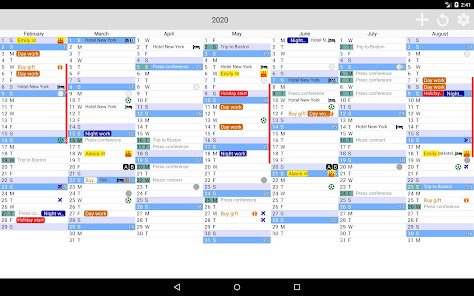
▪ Seamlessly customize events with text, background colors, icons, birthdays complete with age indicators 🎂, night shifts, and holidays marked with vertical bars – all directly within the calendar interface.
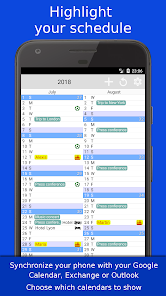
▪ Effortlessly sync your Google, Exchange, or Outlook agendas 📆 (ensure your phone is synchronized) for comprehensive planning.
▪ Navigate your schedule with ease through convenient Month and Week views, ensuring you never miss a beat.
▪ Print your calendar for tangible organization, and stay informed at a glance with the handy widget feature.
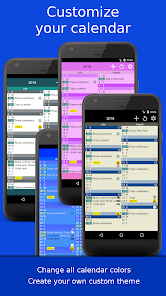
▪ Express your style with complete customization options, allowing you to personalize every color to suit your aesthetic preferences.
▪ Unlock a plethora of settings to tailor the calendar to your unique needs – explore and discover what works best for you!
▪ Stay connected by syncing birthdays with your Android contacts, ensuring you never forget a special day.
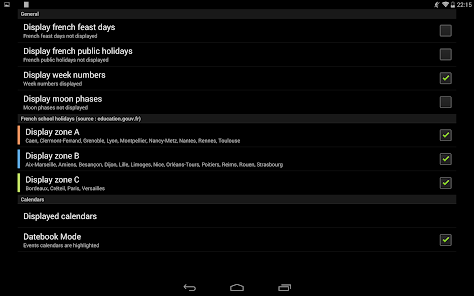
▪ Experience seamless navigation with vertical or horizontal scrolling, while keeping track of lunar cycles with built-in moon phase indicators 🌙.
▪ Enjoy an intuitive interface, effortlessly navigate through time by swiping your finger across the screen – making planning a breeze.
Enhance your productivity and organization !
▪ Seamlessly customize events with text, background colors, icons, birthdays complete with age indicators 🎂, night shifts, and holidays marked with vertical bars – all directly within the calendar interface.
▪ Effortlessly sync your Google, Exchange, or Outlook agendas 📆 (ensure your phone is synchronized) for comprehensive planning.
▪ Navigate your schedule with ease through convenient Month and Week views, ensuring you never miss a beat.
▪ Print your calendar for tangible organization, and stay informed at a glance with the handy widget feature.
▪ Express your style with complete customization options, allowing you to personalize every color to suit your aesthetic preferences.
▪ Unlock a plethora of settings to tailor the calendar to your unique needs – explore and discover what works best for you!
▪ Stay connected by syncing birthdays with your Android contacts, ensuring you never forget a special day.
▪ Experience seamless navigation with vertical or horizontal scrolling, while keeping track of lunar cycles with built-in moon phase indicators 🌙.
▪ Enjoy an intuitive interface, effortlessly navigate through time by swiping your finger across the screen – making planning a breeze.
Enhance your productivity and organization !
Updated on
Safety starts with understanding how developers collect and share your data. Data privacy and security practices may vary based on your use, region, and age. The developer provided this information and may update it over time.


Ratings and reviews
4.3
13.9K reviews

Fred
- Flag inappropriate
June 25, 2024
+ Best calender to get a monthly overview of planned activities, birthdays and tasks. + Sync's with your Google and Samsung calenders (among others) + You can add activities from this widget either in your main calender app pr in this one. + Easy to use - Nothing I can think of :) Wish I had found this calender years ago! Very happy with it!

A Google user
- Flag inappropriate
February 26, 2020
Brilliant and original design. Very generous dev for offering it free and no ads. The ONLY thing I would wish for is the ability to customize the colors of the synched calendars. It uses the colors I set on google calendar but only uses white text. So if I have a light color from google it becomes hard to read the event. Overall I love this app. There is nothing else like it.
18 people found this review helpful
Colorofbest
February 26, 2020
Hello, thank you very much !
For the white text color, I will check it, because I can change it to black, or white, depending on the background color.
Bye
A Google user
- Flag inappropriate
October 18, 2019
Not great at the moment, seems to be in it's infancy. needs work then it will improve. 1) It's not easy to find TODAY. should be one quick tap to jump to today. 2) It's very buggy. Can't get out of the set up menu without coming completely from the app. 3) only Agenda view is available. 4) etc etc But good effort from developer.
8 people found this review helpful
Colorofbest
October 18, 2019
Hello,
I don't understand your problems... Today has a different color, you can change it if you want. Click on the reload button to jump to today.
When installing, you click Next, Next, and Finish, that's all.
The calendar view is why this app exists, completely different from all other apps that are all the sames.
Free and no ad, enjoy :-)
Bye!
What's new
- Various corrections (continuously attempting to correct random empty months, contact me if you encounter any issues);
- Improved application fluidity;
Always free and ad-free ❤
- Improved application fluidity;
Always free and ad-free ❤
App support
About the developer
COLLE Romain
contact@colorofbest.com
France
undefined


