
Jre4Android-Java Runtime& J2ME
Contains ads
3.4star
95 reviews
10K+
Downloads

Everyone
info

About this app
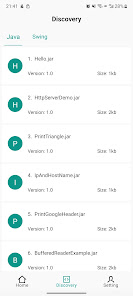
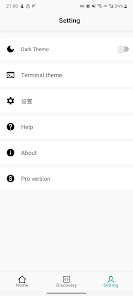
Jre4Android is a Java Runtime Environment (JRE) for Android that lets you run Java programs, old-school J2ME apps, and even desktop Swing GUI software — all directly on your phone. It also supports running JAR files in command-line (console) mode, making it useful for both developers and retro gamers.
✨ Key Features:
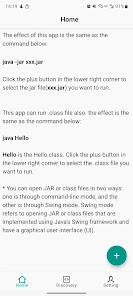
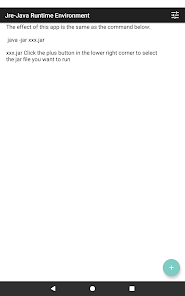
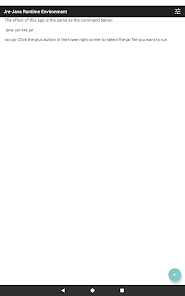
Run JAR files like java -jar xxx.jar
Run .class files directly (java Hello)
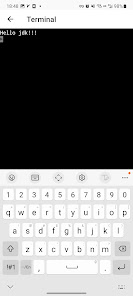
Run JARs in command-line (console) mode
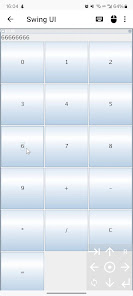
Support for Java Swing GUI applications
Full support for J2ME (Java ME) JAR files & games
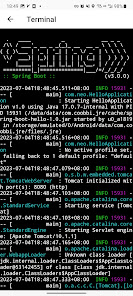
Run Spring Boot JARs on Android
Based on Java 17 (Pro version supports Java 25)
🎮 J2ME Support
Play your favorite classic Java ME mobile games and apps on Android.
Jre4Android also works as a J2ME emulator and runner, allowing you to launch MIDlet-based apps and enjoy retro mobile games seamlessly.
🖥 Swing GUI Support
Run desktop-style Swing applications with full graphical interface.
💻 Console Mode
Use Jre4Android just like a terminal to execute Java JARs and tools with command-line arguments.
👨💻 For Developers & Learners
Ideal for testing Java projects, running command-line tools, or learning Java programming on the go.
🔗 Pro Version (Java 25 Support)
For advanced users, check out Jre4Android Pro:
https://play.google.com/store/apps/details?id=com.coobbi.jre.pro
💬 Community Support
Questions or feedback? Join our community:
https://github.com/coobbi/Jre4android/discussions
This application includes functionality based on the open-source project J2ME-Loader (Apache License 2.0).
✨ Key Features:
Run JAR files like java -jar xxx.jar
Run .class files directly (java Hello)
Run JARs in command-line (console) mode
Support for Java Swing GUI applications
Full support for J2ME (Java ME) JAR files & games
Run Spring Boot JARs on Android
Based on Java 17 (Pro version supports Java 25)
🎮 J2ME Support
Play your favorite classic Java ME mobile games and apps on Android.
Jre4Android also works as a J2ME emulator and runner, allowing you to launch MIDlet-based apps and enjoy retro mobile games seamlessly.
🖥 Swing GUI Support
Run desktop-style Swing applications with full graphical interface.
💻 Console Mode
Use Jre4Android just like a terminal to execute Java JARs and tools with command-line arguments.
👨💻 For Developers & Learners
Ideal for testing Java projects, running command-line tools, or learning Java programming on the go.
🔗 Pro Version (Java 25 Support)
For advanced users, check out Jre4Android Pro:
https://play.google.com/store/apps/details?id=com.coobbi.jre.pro
💬 Community Support
Questions or feedback? Join our community:
https://github.com/coobbi/Jre4android/discussions
This application includes functionality based on the open-source project J2ME-Loader (Apache License 2.0).
Updated on
Safety starts with understanding how developers collect and share your data. Data privacy and security practices may vary based on your use, region, and age. The developer provided this information and may update it over time.

No data shared with third parties
Learn more about how developers declare sharing

This app may collect these data types
Location and Device or other IDs

Data is encrypted in transit
Ratings and reviews
3.6
87 reviews

Melinda Green
- Flag inappropriate
September 30, 2023
Full 5 stars for simply existing! Can't resize an app. The scroll buttons are painful. Fast scroll on long-press would help a lot. No support for drag gesture. Left clicking is nicely implemented. Just hover the cursor where you want to click and then tap anywhere on the screen. I can't however find a way to right-click or control-click. It also seems to run in a continuous loop which drains the battery. Hopefully these will be addressed in time. Thank you so much for the much needed tool!
Coobbi
September 30, 2023
Hello, thank you for your rating and feedback. I will consider optimizing it in the future to achieve a more convenient and user-friendly interaction.

Ralph (DarkMyst9)
- Flag inappropriate
November 20, 2024
I installed this app in an attempt to run the GpsPrune JAR on my phone and I'm impressed that it opens. Unfortunately the scaling is useless as it only applies to portrait view for some reason, which means you're left with a very small view of the program you're running. Then to add to that, when you click through the menus of whatever program you're running, e.g GpsPrune, the new popup windows are often halfway off the screen with no way to move them around. It's a good start though.

Rashed Carnain (Carnain, Rashed G.)
- Flag inappropriate
- Show review history
March 7, 2024
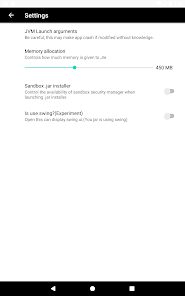
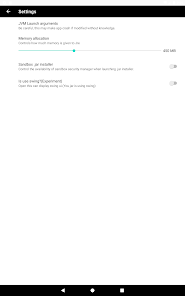
It does work on small projects! I will wait for update since some text in app doesn't show (Edit) In Setting>Settings>, only "Memory Allocation" appeared, the rest is white. Sometimes the app crashes but it's fine since at 2nd attempt to open jar, it works.
Coobbi
March 7, 2024
Does the phrase 'some text in app doesn't show' refer to instances where Chinese or Japanese text fails to display?
What’s new
You can now open the app directory directly from the app
App support
About the developer
崔文军
imzine.com@gmail.com
高营大街30号
长安区, 石家庄市, 河北省
China
050034


