
Salvatempo Coop
1K+
Downloads

Everyone
info
About this app
*** Coop Alleanza 3.0 app in the testing phase **
YOUR SPENDING ALWAYS SMARTER
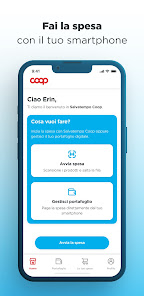
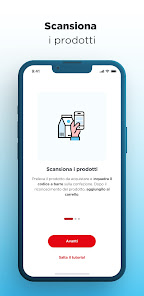
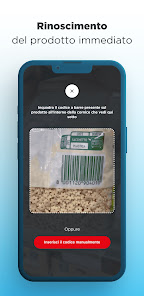
If you are a Coop member, register or access the Salvatempo Coop app with your Coop Alleanza 3.0 credentials, select the store you are in and start shopping. Choose the products you are interested in, scan the barcode you find on the package and add them to the cart.
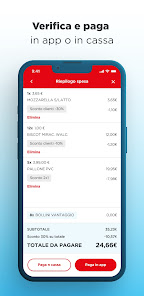
PAY FROM YOUR SMARTPHONE OR AT THE CHECKOUT
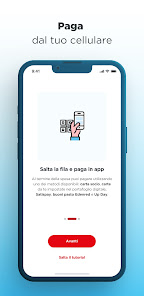
Pay directly in the app by scanning the QR code displayed in the exit area of the store, you will be able to use the payment methods you have saved in your digital wallet, the Edenred and Up Day electronic meal vouchers, or Satispay. Alternatively you can go to the cash registers and scan the exit QR code that you will find displayed.
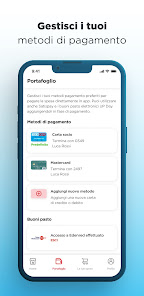
DIGITAL WALLET
Manage your digital wallet and add your credit or debit cards belonging to the Visa, V Pay, Maestro and Mastercard circuits in just a few minutes. If already enabled for payment, you can also set your Coop member card as the default payment method.
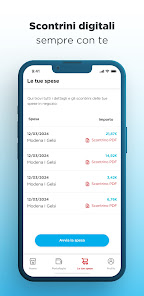
YOUR EXPENSES ALWAYS UNDER CONTROL
In the "Your expenses" area you can find the history of your expenses and download all the receipts for expenses paid in the app.
Salvatempo Coop is an experimental service, enabled only in some stores. Find out more on all.coop/salvatempo.
YOUR SPENDING ALWAYS SMARTER
If you are a Coop member, register or access the Salvatempo Coop app with your Coop Alleanza 3.0 credentials, select the store you are in and start shopping. Choose the products you are interested in, scan the barcode you find on the package and add them to the cart.
PAY FROM YOUR SMARTPHONE OR AT THE CHECKOUT
Pay directly in the app by scanning the QR code displayed in the exit area of the store, you will be able to use the payment methods you have saved in your digital wallet, the Edenred and Up Day electronic meal vouchers, or Satispay. Alternatively you can go to the cash registers and scan the exit QR code that you will find displayed.
DIGITAL WALLET
Manage your digital wallet and add your credit or debit cards belonging to the Visa, V Pay, Maestro and Mastercard circuits in just a few minutes. If already enabled for payment, you can also set your Coop member card as the default payment method.
YOUR EXPENSES ALWAYS UNDER CONTROL
In the "Your expenses" area you can find the history of your expenses and download all the receipts for expenses paid in the app.
Salvatempo Coop is an experimental service, enabled only in some stores. Find out more on all.coop/salvatempo.
Updated on
Safety starts with understanding how developers collect and share your data. Data privacy and security practices may vary based on your use, region, and age. The developer provided this information and may update it over time.

No data shared with third parties
Learn more about how developers declare sharing

This app may collect these data types
App activity and Device or other IDs

Data is encrypted in transit

You can request that data be deleted
What's new
Miglioramento delle prestazioni e della stabilità.