
Edsby
star
3.25K reviews

Everyone
info
500K+
Downloads




About this app
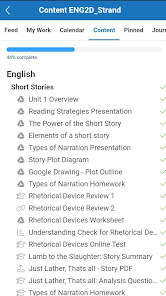
If your school uses Edsby, this free app lets you access some of its features on the go.
The Edsby app has many of the capabilities of the main Edsby web browser interface. Some complex features for certain types of users, such as the Edsby gradebook used by teachers, aren't available on devices with small screen sizes.
Edsby is helping education transform to the modern digital era. School districts, states, provinces, and countries adopt Edsby for community engagement, learning management, assessment & reporting, and student well-being.
Your education organization manages its own, private Edsby system. To log into it, you’ll need to know its Edsby server address. If you don’t know it, ask your school.
The Edsby app has many of the capabilities of the main Edsby web browser interface. Some complex features for certain types of users, such as the Edsby gradebook used by teachers, aren't available on devices with small screen sizes.
Edsby is helping education transform to the modern digital era. School districts, states, provinces, and countries adopt Edsby for community engagement, learning management, assessment & reporting, and student well-being.
Your education organization manages its own, private Edsby system. To log into it, you’ll need to know its Edsby server address. If you don’t know it, ask your school.
Empowering K-12
Updated on
Safety starts with understanding how developers collect and share your data. Data privacy and security practices may vary based on your use, region, and age. The developer provided this information and may update it over time.
- No data shared with third partiesLearn more about how developers declare sharing
- This app may collect these data typesPersonal info, Messages and 5 others
- Data is encrypted in transit
- You can request that data be deleted


Ratings and reviews
2.93K reviews

A Google user
- Flag inappropriate
- Show review history
November 7, 2018
I hate that not even half way thru three school year i have had to make a second accout because the app refuses to take my password and I have not been able to access it for about 2 months again because it will not accept either of my email addresses now. I refuse to create another login/ password for it to only work for a couple weeks. #getittogether
7 people found this review helpful

Ken Carpenter
- Flag inappropriate
January 14, 2025
Inconsistent App. Notifications were finally working and now they have quit working again this school year. I have clear data, cache and reset notifications and they are permanently blocked. Login on a computer, it is a great experience, this app is the polar opposite of that. Cannot find information. Click on a heading to get more information, end up going to a useless bio which in most cases is empty. I hope school divisions are not paying for this.
16 people found this review helpful
Edsby
January 16, 2025
You appear to be using the Android Edsby app v 2.2.4.2. Google recently made a change and Android apps now need to independently request notification permission now if they've been installed recently, and not grandfathered by an old system. We'll work around in an app update soon. Only affects some Android users. Doesn't affect web browser logins.

Sedaya Lee
- Flag inappropriate
- Show review history
September 7, 2022
This thing was horrible in all aspects, when I tried to delete a message to a teacher I can't do that, I shouldn't have to go through a guide that is COMPLETELY separate from the app, if u wanna delete something, it won't happen. I couldn't talk to other class mates, check my schedule properly, CHEACK FOR ANY UNDONE OR IN PROCESS ASSIGNMENTS and much less announcements from teacher so on. No matter the district it should be easier. Just improve the app over ALL. make it a 3.00 I may consider 🤣
7 people found this review helpful
Edsby
September 9, 2022
There's a newer version of the Edsby app available than the one you're using. It's just been released for iOS and is coming any day now to Android on Google Play. Upgrade your app when it comes available and give it a try.
What’s new
Notifications improvements
Improved compatibility with newer devices
Added support for new Activities workflow
Added support for Artboards
To ensure Notifications are configured, after the Android Edsby App has been downloaded and installed from the Android Play Store, users should check the following:
1. Open the Android Settings
2. Open Apps
3. Open App Management > Edsby
4. Under App Permissions > Edsby, check to see if Notifications are allowed
5. Make sure Notifications are Enabled
Improved compatibility with newer devices
Added support for new Activities workflow
Added support for Artboards
To ensure Notifications are configured, after the Android Edsby App has been downloaded and installed from the Android Play Store, users should check the following:
1. Open the Android Settings
2. Open Apps
3. Open App Management > Edsby
4. Under App Permissions > Edsby, check to see if Notifications are allowed
5. Make sure Notifications are Enabled
App support
About the developer
Corefour Inc
playstoresupport@edsby.com
200-68B Leek Cres
Richmond Hill, ON L4B 1H1
Canada
+1 437-561-6695


