Crosshair Custom Aiming (Safe)
Contains adsIn-app purchases
4.3star
10.7K reviews
1M+
Downloads

Everyone
info

About this app
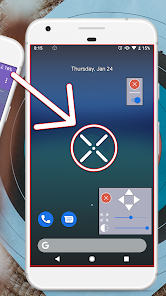
This is 100% SAFE and This is Crosshair Custom Aim for FPS Games. The App has Custom scope for All games. The Purpose is Better Aim in the Games and Better accuracy in the games. This App works for All Games and has Custom scope for All games. now you can enjoy your time using Crosshair Custom Aim for FPS Games App. while using this Crosshair aim for FPS Games you can improve your skills. this aim helper is for you and you can aim for games.
This aim controller helps you with playing in the games. we have so many cross hair design for you.
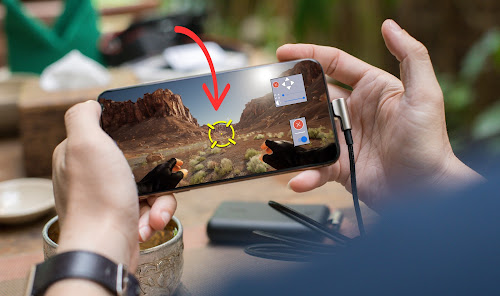
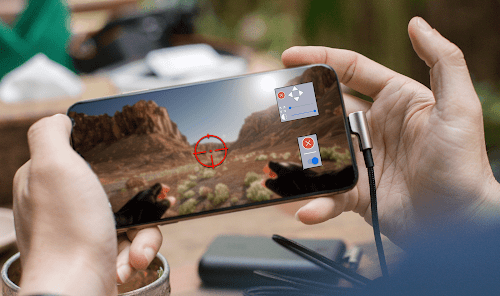
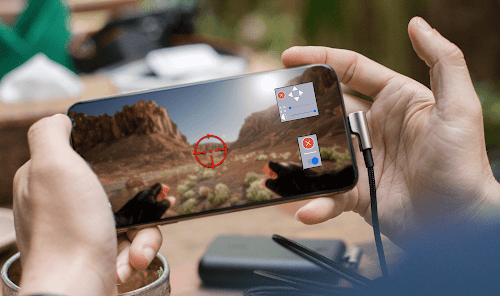
Now with custom aim Improve your skills for the perfect game with Crosshair Generator. Using this aim trainer you can add crosshair of any size and type on your favorite Apps and FPS games and allows you to test your reflexes and tactical skills.
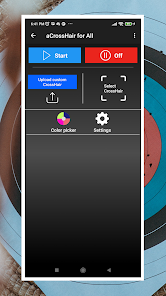
Become the best player and start playing like a pro! Custom scope and custom crosshair can also be upload to the App
🎯IMPROVE YOUR AIMING AND ACCURACY
If you are a little bit bored of the standard cross-hair in all the FPS games and you like to practice aim trainer in order to dominate on the battleground then you certainly need to try this incredible crosshair for fps games. With this easy to use aim trainer and high quality powerful crosshair tool you get the ability to improve your aiming and accuracy with all tools. Add this simple lightweight crosshair for fps games over your favorite FPS games to improve your sight in any FPS game you play. fire with custom aim
👆CUSTOMIZE YOUR OWN CROSS-HAIR
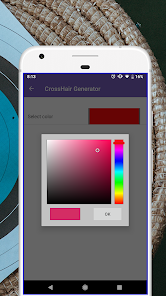
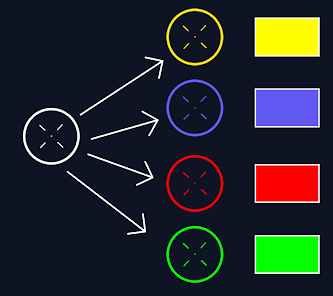
Use the game crosshair generator as your aim trainer and assistant. Start playing like a pro in battle and customize your own game crosshair by choice, choosing the color you like the most for the best personalized experience ever. With the support, you have the chance to practice, improve your accuracy, becoming an accurate player and kind of FPS with this game crosshair app. this is with custom aim
💡TEST YOUR REFLEXES AND TACTICAL SKILLS
Prepare yourself for the perfect game in your favorite games by improving your aiming skills. Make yourself the best player with this game crosshair practice in all the first person shooter games you play by testing your reflexes and tactical skills. Just use this amazing crosshair pro and customize it as you like and easily start playing like a pro with center point
💫CROSSHAIR GENERATOR FEATURES
✅ Simple, lightweight and powerful cross hair generator
✅ Improve your aiming accuracy with crosshair pro
✅ Customize your own cross hair center point
✅ Accurate for all tools aim
✅ Practice and become the king of FPS games
✅ Test your reflexes and tactical skills and custom aim
✅ Free for download
Add this crosshair pro with custom aim to your favorite FPS games to improve your accuracy and start playing like a pro.Download it now on Google Play for FREE!
This aim controller helps you with playing in the games. we have so many cross hair design for you.
Now with custom aim Improve your skills for the perfect game with Crosshair Generator. Using this aim trainer you can add crosshair of any size and type on your favorite Apps and FPS games and allows you to test your reflexes and tactical skills.
Become the best player and start playing like a pro! Custom scope and custom crosshair can also be upload to the App
🎯IMPROVE YOUR AIMING AND ACCURACY
If you are a little bit bored of the standard cross-hair in all the FPS games and you like to practice aim trainer in order to dominate on the battleground then you certainly need to try this incredible crosshair for fps games. With this easy to use aim trainer and high quality powerful crosshair tool you get the ability to improve your aiming and accuracy with all tools. Add this simple lightweight crosshair for fps games over your favorite FPS games to improve your sight in any FPS game you play. fire with custom aim
👆CUSTOMIZE YOUR OWN CROSS-HAIR
Use the game crosshair generator as your aim trainer and assistant. Start playing like a pro in battle and customize your own game crosshair by choice, choosing the color you like the most for the best personalized experience ever. With the support, you have the chance to practice, improve your accuracy, becoming an accurate player and kind of FPS with this game crosshair app. this is with custom aim
💡TEST YOUR REFLEXES AND TACTICAL SKILLS
Prepare yourself for the perfect game in your favorite games by improving your aiming skills. Make yourself the best player with this game crosshair practice in all the first person shooter games you play by testing your reflexes and tactical skills. Just use this amazing crosshair pro and customize it as you like and easily start playing like a pro with center point
💫CROSSHAIR GENERATOR FEATURES
✅ Simple, lightweight and powerful cross hair generator
✅ Improve your aiming accuracy with crosshair pro
✅ Customize your own cross hair center point
✅ Accurate for all tools aim
✅ Practice and become the king of FPS games
✅ Test your reflexes and tactical skills and custom aim
✅ Free for download
Add this crosshair pro with custom aim to your favorite FPS games to improve your accuracy and start playing like a pro.Download it now on Google Play for FREE!
Updated on
Safety starts with understanding how developers collect and share your data. Data privacy and security practices may vary based on your use, region, and age. The developer provided this information and may update it over time.

No data shared with third parties
Learn more about how developers declare sharing

No data collected
Learn more about how developers declare collection

Data is encrypted in transit

Data can’t be deleted
Ratings and reviews
4.3
10.3K reviews

William X
- Flag inappropriate
May 13, 2021
Good work. I have tried several others but couldn't get them to stay aligned. The window feature makes it easy.There are a lot of adds, but you only see them when you first start the app...
68 people found this review helpful
Selairus International
September 12, 2022
Dear user,
Thanks for supporting us and we are sorry for Ads. We will improve in the future and we will try to keep the Ads from interfering. Please let us know if you have any questions. Thank you.

Dev100 k
- Flag inappropriate
September 1, 2024
Is amazing for a development sniper it is nice for Sniper player in free fire
3 people found this review helpful

Lord Shiva Gaming
- Flag inappropriate
- Show review history
May 15, 2021
Awesome app, before I had tried many crosshair apps but they did not work, they work but when we moves our aim the crosshair did not move and we cant do awm sniping, but now with this I am able to do so, it locks our aim, now I headshot everyone with awm, just lock this at your mid of aim and enjoy.
69 people found this review helpful
Selairus International
September 12, 2022
Thanks for your kind feedback. We will add more feature in the coming updates. If you have any suggestions or questions, please feel free to contact us at selairusinternational@gmail.com.
What's new
New Crosshair Designs added
Premium Membership available now
Premium Membership available now


