
Notes Plus+
Contains adsIn-app purchases


Everyone
info
50+
Downloads


About this app
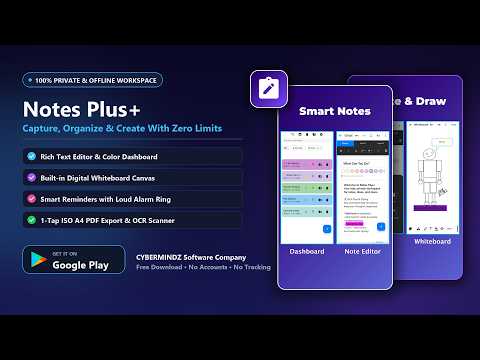
Notes Plus+ is a fast, private place to write, organise and plan — with no account, no sign-up, and no server. Everything you create stays on your device.
WRITE
• Rich text editing with markdown support
• Attach images and record audio straight into a note
• Checklist items with a single tap to tick off
CAPTURE
• Scan documents and images to text with built-in OCR
• Maths recognition for equations and formulas
ORGANISE
• Folders, tags and colour labels
• Fast search and filtering
• Trash with automatic cleanup after 30 days
• Calendar view with schedules and reminders
KEEP SAFE
• Optional biometric app lock and notes lock using your fingerprint or face
• No account required — nothing to sign up for
• Your notes are never uploaded to us or anyone else
EXPORT AND BACKUP
• Full offline ZIP backup and restore, including images and audio
• Export any note to PDF or TXT
• Optional backup through your own Android device backup settings
CUSTOMISE
• Dark mode and light mode
Free: everything above, with ads and a 10-note limit.
Plus: no ads, no note limit. One-time purchase or yearly, your choice.
Notes Plus+ works fully offline. Your notes do not need an internet connection to create, edit, or read.
WRITE
• Rich text editing with markdown support
• Attach images and record audio straight into a note
• Checklist items with a single tap to tick off
CAPTURE
• Scan documents and images to text with built-in OCR
• Maths recognition for equations and formulas
ORGANISE
• Folders, tags and colour labels
• Fast search and filtering
• Trash with automatic cleanup after 30 days
• Calendar view with schedules and reminders
KEEP SAFE
• Optional biometric app lock and notes lock using your fingerprint or face
• No account required — nothing to sign up for
• Your notes are never uploaded to us or anyone else
EXPORT AND BACKUP
• Full offline ZIP backup and restore, including images and audio
• Export any note to PDF or TXT
• Optional backup through your own Android device backup settings
CUSTOMISE
• Dark mode and light mode
Free: everything above, with ads and a 10-note limit.
Plus: no ads, no note limit. One-time purchase or yearly, your choice.
Notes Plus+ works fully offline. Your notes do not need an internet connection to create, edit, or read.
Private on-device notes with rich text, document scanning and a calendar.
Updated on
Safety starts with understanding how developers collect and share your data. Data privacy and security practices may vary based on your use, region, and age. The developer provided this information and may update it over time.
- This app may share these data types with third partiesLocation, App activity and 2 others
- No data collectedLearn more about how developers declare collection
- Data is encrypted in transit
- You can request that data be deleted


What’s new
• Scanned Text Proofreading: Scanned text softly highlights uncertain words in orange so you can review accuracy with a 1-tap Clear option.
• Block Reordering: Easily move any content block—paragraphs, lists, images, and audio-up or down in your notes.
• Ribbon Formatting: Bullet points, numbered lists, paragraph alignment, and expanded text color palette.
• Tag Enhancements: Improved tag management with quick chip removal and instant filtering.
• Block Reordering: Easily move any content block—paragraphs, lists, images, and audio-up or down in your notes.
• Ribbon Formatting: Bullet points, numbered lists, paragraph alignment, and expanded text color palette.
• Tag Enhancements: Improved tag management with quick chip removal and instant filtering.
App support
About the developer
KOHOLANA GEDARA IMESH KAVISHKA DULANJANA
gmail.cybermindz@gmail.com
32/2 25 MP Bendiwewa Polonnaruwa
Polonnaruwa 51024
Sri Lanka
+94 75 580 0715
