
Cyphervault


Everyone
info
10+
Downloads

Everyone
Learn more


About this app
Cypher Vault securely stores what matters to you, encrypted, on your phone. The app doesn't request internet access: it can't send your data anywhere, not by accident or oversight. There are no logs, no servers, no ads, and no tracking.
WHAT YOU'LL FIND INSIDE
- Password Vault. Store credentials, private notes, and two-step verification codes. It alerts you to weak or reused passwords and recognizes common services by their icons.
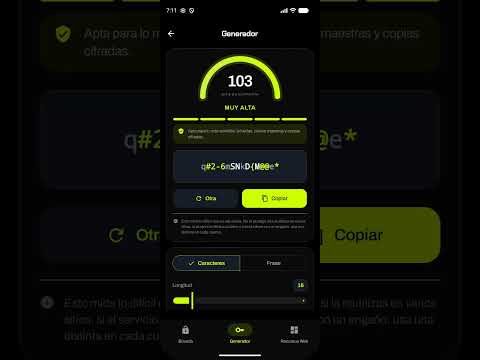
- Password Generator. Create long passwords or easy-to-remember phrases with a real-time strength meter.
- Web Resources. Your own shortcut board, organized by categories and folders. Links open in your usual browser.
- Encrypted Gallery. Photos and videos are kept out of reach of your system gallery, with a built-in camera for capturing directly within the Vault.
- Encrypted Recorder. Audio is encrypted as you record, so no file ever exists that another app can read.
- Metadata Sanitizer. See what your photos and documents are hiding (location, device model, date) and delete it before sharing them.
- Secure QR scanner. Read the code without opening it: it shows you the address in plain text and flags signs of fraud.
- Device audit. Review what permissions each installed app has and what each one entails, and check for signs of surveillance such as active accessibility services or apps without icons. All analysis happens on the phone.
HOW IT'S PROTECTED
- AES-256-GCM encryption, with the keys stored in the device's secure vault.
- Access with a PIN and, if you want, with fingerprint or face recognition.
- Each sensitive module also has its own password: no single key opens everything.
- Duress PIN. If someone forces you to open the app, a second PIN opens it empty, and your real data remains intact.
- Optional emergency wipe after several failed attempts.
- Automatic lock on exit and protection against screenshots.
PERMISSIONS AND THEIR USES
- Camera: QR code scanner and encrypted gallery camera.
- Microphone: Voice recorder.
- Installed app query: This allows you to audit the permissions of each app. The list never leaves your phone.
- Usage data access: Optional. It only tells you which app turned on the camera or microphone. Without it, everything else works the same.
- No internet or storage permissions are requested.
BEFORE YOU START
Your data resides only on this device and is not copied to any cloud service, nor to your Android backup. If you uninstall the app or reset your phone, your data will be lost. Use the encrypted exports included in each module to save your own copies wherever you choose.
No accounts. No ads. No in-app purchases.
WHAT YOU'LL FIND INSIDE
- Password Vault. Store credentials, private notes, and two-step verification codes. It alerts you to weak or reused passwords and recognizes common services by their icons.
- Password Generator. Create long passwords or easy-to-remember phrases with a real-time strength meter.
- Web Resources. Your own shortcut board, organized by categories and folders. Links open in your usual browser.
- Encrypted Gallery. Photos and videos are kept out of reach of your system gallery, with a built-in camera for capturing directly within the Vault.
- Encrypted Recorder. Audio is encrypted as you record, so no file ever exists that another app can read.
- Metadata Sanitizer. See what your photos and documents are hiding (location, device model, date) and delete it before sharing them.
- Secure QR scanner. Read the code without opening it: it shows you the address in plain text and flags signs of fraud.
- Device audit. Review what permissions each installed app has and what each one entails, and check for signs of surveillance such as active accessibility services or apps without icons. All analysis happens on the phone.
HOW IT'S PROTECTED
- AES-256-GCM encryption, with the keys stored in the device's secure vault.
- Access with a PIN and, if you want, with fingerprint or face recognition.
- Each sensitive module also has its own password: no single key opens everything.
- Duress PIN. If someone forces you to open the app, a second PIN opens it empty, and your real data remains intact.
- Optional emergency wipe after several failed attempts.
- Automatic lock on exit and protection against screenshots.
PERMISSIONS AND THEIR USES
- Camera: QR code scanner and encrypted gallery camera.
- Microphone: Voice recorder.
- Installed app query: This allows you to audit the permissions of each app. The list never leaves your phone.
- Usage data access: Optional. It only tells you which app turned on the camera or microphone. Without it, everything else works the same.
- No internet or storage permissions are requested.
BEFORE YOU START
Your data resides only on this device and is not copied to any cloud service, nor to your Android backup. If you uninstall the app or reset your phone, your data will be lost. Use the encrypted exports included in each module to save your own copies wherever you choose.
No accounts. No ads. No in-app purchases.
Passwords, photos, and encrypted notes on your mobile. No internet and no accounts required.
Updated on
Safety starts with understanding how developers collect and share your data. Data privacy and security practices may vary based on your use, region, and age. The developer provided this information and may update it over time.
- No data shared with third partiesLearn more about how developers declare sharing
- No data collectedLearn more about how developers declare collection


What’s new
Más protección: bloqueo real de ventanas superpuestas.
Abre la app y cada módulo con tu huella desde el primer día
Mejor en Android 16, plegables y tablets: el teclado ya no tapa los campos
Las fotos importadas se limpian siempre de ubicación y metadatos
Navegación más clara en Opciones y Seguridad, con botón de inicio
Requiere Android 11 o superior
Abre la app y cada módulo con tu huella desde el primer día
Mejor en Android 16, plegables y tablets: el teclado ya no tapa los campos
Las fotos importadas se limpian siempre de ubicación y metadatos
Navegación más clara en Opciones y Seguridad, con botón de inicio
Requiere Android 11 o superior
Everyone
Learn moreApp support
About the developer
LUCIA SIGNES ANGEL
Info.cyphervault@protonmail.com
Spain