
Ebook Converter
Contains adsIn-app purchases

star
13.7K reviews

Everyone
info
1M+
Downloads

Everyone
Learn more


About this app
Convert documents to eBook format (FB2, AZW3, LRF, TCR, SNB, RB, PML, PDB, OEB, MOBI, LIT, EPUB).
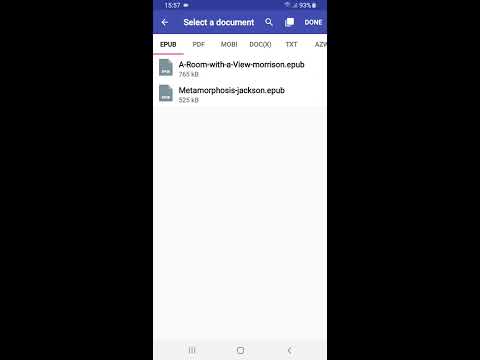
Simply select the files which you want to convert and click “Convert”.
After conversion, you can use eBook on your device or share it, for instance, send MOBI to Kindle by email.
We are constantly developing our app and pay attention to your wishes. Therefore, if you have any comments or suggestions — write to us, we will try to implement them (if possible).
For instance, we implemented such functions as:
1. Change the book author and title.
2. Change cover.
3. Send results at once.
4. SD card support.
In the free version, we have limited the number of files that can be used at once and the size of each file. We hope that you will appreciate our work and will be able to support us if you need our application.
You can use our eBook converter for such tasks:
* DOC to FB2 converter
* EPUB to MOBI converter
* EPUB to PDF converter
* MOBI to EPUB converter
* and more.
Or convert from one format to another:
* convert PDF to EPUB
* convert PDF to MOBI
* convert EPUB to MOBI
* convert TXT to EPUB
* convert CBR to PDF, CBZ to PDF
* and more.
Briefly about conversion:
*. Our server is where the conversion takes place. Therefore, your files will be downloaded to the server via the Internet. Accordingly, the application will not work if there is no internet.
*. The server will perform the conversion using Calibre.
*. The result will be downloaded automatically to your device in the specified folder.
*. The original file will be deleted at the end of the conversion, the result will be deleted after 1 hour.
We do not use your files in any way.
The Electronic Book Converter will help you to convert your (DOC, DOCX, PDF) documents or (FB2, EPUB, LIT, etc.) ebooks to formats supported by Kindle (TXT, PDF, AZW, MOBI): EPUB to MOBI, EPUB to PDF, PDF to MOBI, DOC to MOBI, EPUB to AZW.
You can convert almost any book format into one of the most common EPUB (Electronic PUBlishing) formats. We support conversions such as: PDF to EPUB, MOBI to EPUB, FB2 to EPUB, AZW3 to EPUB, DOC to EPUB, lit to EPUB, TXT to EPUB.
You can also convert your documents to FB2 format, for example: PDF to FB2, DOCX to FB2, DOC to FB2.
The resulting ebook's file can be larger than the original file, as well as not meet your expectations.
If you are not happy with the conversion result, please contact us. We will try to communicate your feedback to the Calibre developers.
If you have a PDF consisting of images — then both us and Calibre developers do not recommend converting it to any ebook format.
Small FAQ:
I can't convert images, I keep getting an error, what should I do?
Write to us, we will try to sort out this situation.
How many files can I convert at the same time?
In the free version, you can convert 5 files at a time. By paying a subscription - you can convert an unlimited number of files at a time.
What is the maximum size of a converted file?
The free version has a maximum file size of 20 MB. By paying a subscription - the maximum file size is 1 GB.
Simply select the files which you want to convert and click “Convert”.
After conversion, you can use eBook on your device or share it, for instance, send MOBI to Kindle by email.
We are constantly developing our app and pay attention to your wishes. Therefore, if you have any comments or suggestions — write to us, we will try to implement them (if possible).
For instance, we implemented such functions as:
1. Change the book author and title.
2. Change cover.
3. Send results at once.
4. SD card support.
In the free version, we have limited the number of files that can be used at once and the size of each file. We hope that you will appreciate our work and will be able to support us if you need our application.
You can use our eBook converter for such tasks:
* DOC to FB2 converter
* EPUB to MOBI converter
* EPUB to PDF converter
* MOBI to EPUB converter
* and more.
Or convert from one format to another:
* convert PDF to EPUB
* convert PDF to MOBI
* convert EPUB to MOBI
* convert TXT to EPUB
* convert CBR to PDF, CBZ to PDF
* and more.
Briefly about conversion:
*. Our server is where the conversion takes place. Therefore, your files will be downloaded to the server via the Internet. Accordingly, the application will not work if there is no internet.
*. The server will perform the conversion using Calibre.
*. The result will be downloaded automatically to your device in the specified folder.
*. The original file will be deleted at the end of the conversion, the result will be deleted after 1 hour.
We do not use your files in any way.
The Electronic Book Converter will help you to convert your (DOC, DOCX, PDF) documents or (FB2, EPUB, LIT, etc.) ebooks to formats supported by Kindle (TXT, PDF, AZW, MOBI): EPUB to MOBI, EPUB to PDF, PDF to MOBI, DOC to MOBI, EPUB to AZW.
You can convert almost any book format into one of the most common EPUB (Electronic PUBlishing) formats. We support conversions such as: PDF to EPUB, MOBI to EPUB, FB2 to EPUB, AZW3 to EPUB, DOC to EPUB, lit to EPUB, TXT to EPUB.
You can also convert your documents to FB2 format, for example: PDF to FB2, DOCX to FB2, DOC to FB2.
The resulting ebook's file can be larger than the original file, as well as not meet your expectations.
If you are not happy with the conversion result, please contact us. We will try to communicate your feedback to the Calibre developers.
If you have a PDF consisting of images — then both us and Calibre developers do not recommend converting it to any ebook format.
Small FAQ:
I can't convert images, I keep getting an error, what should I do?
Write to us, we will try to sort out this situation.
How many files can I convert at the same time?
In the free version, you can convert 5 files at a time. By paying a subscription - you can convert an unlimited number of files at a time.
What is the maximum size of a converted file?
The free version has a maximum file size of 20 MB. By paying a subscription - the maximum file size is 1 GB.
Convert your file (EPUB, FB2, MOBI, PDF, DOC and other) to EPUB, PDF, MOBI...
Updated on
Safety starts with understanding how developers collect and share your data. Data privacy and security practices may vary based on your use, region, and age. The developer provided this information and may update it over time.


Ratings and reviews
12.5K reviews

Josh Hulsey
- Flag inappropriate
July 20, 2026
One of the best file converters I've tried so far. I used the apps online file converter which opens up your browser and takes you to their website and from their you choose pdf and automatic. Your allowed 10 files at a time to convert so that is awesome! You can also delete the files off their server after completing the conversion. The app itself I believe only allows 5 conversions at a time.

Rebecca Peterson
- Flag inappropriate
March 22, 2025
It took a little bit of figuring out the first time using it, but it worked really well. I would suggest addind some kind of indicator showing that the file is in the process of converting. Even when you click on cover it sends you to the output tab as it is blank and I couldn't find a way to see if I should try converting it again.
8 people found this review helpful

Raven Gage
- Flag inappropriate
February 22, 2025
honestly amazed the ratings are so low. I've been using this for a few months now to convert files and change covers before uploading to my Google books. yea every now and then it has its issues but otherwise I honestly love this app. especially since it can change tags which i haven't found on any other apps
6 people found this review helpful
Everyone
Learn moreApp support
About the developer
fCoder Solutions Sp. z o.o.
support@fcoder.pl
15 Plac Solny
50-062 Wrocław
Poland
+48 574 337 727