
Easy Calendar
Contains ads
500+
Downloads

Teen
info
About this app
Easy Calendar – Your Calendar, Your Style
Make your calendar truly yours. Easy Calendar is a simple yet powerful planner that lets you customize colors, icons, fonts, and layouts to match your style and brighten your day.
🎨 Personalize Your Calendar
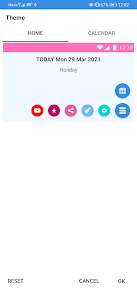
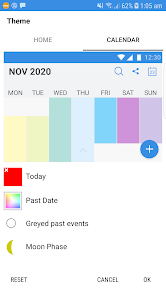
Customize background and font colors
Choose light or dark theme
Adjust calendar font size
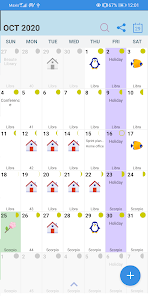
Color-coded events and filters
Beautiful icons for easy event recognition
🗓️ Widgets & Quick View
Weekly Calendar events widget
Clock widget with customizable font color
Count down widget
Christmas & New Year countdown widgets
📌 Events, Tasks & Planning
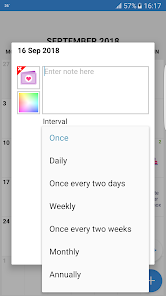
Create daily, weekly, monthly, or yearly events
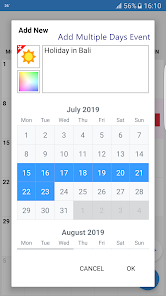
Add events with custom start and end dates
Repeating events with user-defined intervals
Categorize events (e.g. Birthdays)
Add tasks and track their status
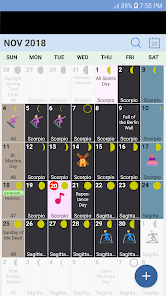
Monthly list view for events
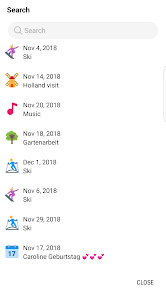
Powerful search with filters (events, birthdays, tasks, year range)
🌙 Extra Calendar Information
Enable or disable from Settings:
Week number
Zodiac sign
Moon phases
Multiple calendar systems:
- Buddhist
- Chinese
- Coptic
- Ethiopic
- Hebrew
- Indian
- Islamic
- Japanese
- Taiwanese
- Vietnamese
🔔 Notifications & Time Settings
Event notifications with optional sound
Daily notification time
Choose week start: Monday or Sunday
Lock time zone (useful when traveling)
🔒 Privacy, Backup & Security
Backup and restore events locally on your device
No data is stored on our servers
Biometric security option available, no hassle of remembering username or password
Google Calendar integration
To enable backup and restore, please allow Easy Calendar access to photos, media, and files on your device.
ℹ️ About Easy Calendar
Easy Calendar provides a clean and flexible canvas for planning your day.
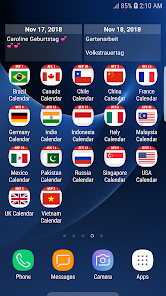
If you prefer calendars with built-in public holidays, visit dEventz Studio on Google Play.
If your country is not available, contact us and we’ll be happy to create it.
❤️ Credits
App icons courtesy of Icons8 (https://icons8.com/)
📱 Connect With Us
Facebook:
https://www.facebook.com/Deventz-Studio-309792656473878
Instagram:
https://www.instagram.com/deventz.studio/
YouTube:
https://www.youtube.com/channel/UC-y5PKkEw0qFHZaCts1Ol7g
Make your calendar truly yours. Easy Calendar is a simple yet powerful planner that lets you customize colors, icons, fonts, and layouts to match your style and brighten your day.
🎨 Personalize Your Calendar
Customize background and font colors
Choose light or dark theme
Adjust calendar font size
Color-coded events and filters
Beautiful icons for easy event recognition
🗓️ Widgets & Quick View
Weekly Calendar events widget
Clock widget with customizable font color
Count down widget
Christmas & New Year countdown widgets
📌 Events, Tasks & Planning
Create daily, weekly, monthly, or yearly events
Add events with custom start and end dates
Repeating events with user-defined intervals
Categorize events (e.g. Birthdays)
Add tasks and track their status
Monthly list view for events
Powerful search with filters (events, birthdays, tasks, year range)
🌙 Extra Calendar Information
Enable or disable from Settings:
Week number
Zodiac sign
Moon phases
Multiple calendar systems:
- Buddhist
- Chinese
- Coptic
- Ethiopic
- Hebrew
- Indian
- Islamic
- Japanese
- Taiwanese
- Vietnamese
🔔 Notifications & Time Settings
Event notifications with optional sound
Daily notification time
Choose week start: Monday or Sunday
Lock time zone (useful when traveling)
🔒 Privacy, Backup & Security
Backup and restore events locally on your device
No data is stored on our servers
Biometric security option available, no hassle of remembering username or password
Google Calendar integration
To enable backup and restore, please allow Easy Calendar access to photos, media, and files on your device.
ℹ️ About Easy Calendar
Easy Calendar provides a clean and flexible canvas for planning your day.
If you prefer calendars with built-in public holidays, visit dEventz Studio on Google Play.
If your country is not available, contact us and we’ll be happy to create it.
❤️ Credits
App icons courtesy of Icons8 (https://icons8.com/)
📱 Connect With Us
Facebook:
https://www.facebook.com/Deventz-Studio-309792656473878
Instagram:
https://www.instagram.com/deventz.studio/
YouTube:
https://www.youtube.com/channel/UC-y5PKkEw0qFHZaCts1Ol7g
Updated on
Safety starts with understanding how developers collect and share your data. Data privacy and security practices may vary based on your use, region, and age. The developer provided this information and may update it over time.


What’s new
- Added 2 new widgets with clock. Go to settings to define the font color.
- Added count down widgets for events of your choice.
- Added refresh button in widgets for manual refresh.
- Added capability to add Google calendar. Define the. account in Settings. The refresh may not be real time depending on the phone operating system.
- Added bulk update of events.
- Add and refine translation languages.
- Added new icons
- Fix some bugs.
- Added count down widgets for events of your choice.
- Added refresh button in widgets for manual refresh.
- Added capability to add Google calendar. Define the. account in Settings. The refresh may not be real time depending on the phone operating system.
- Added bulk update of events.
- Add and refine translation languages.
- Added new icons
- Fix some bugs.
App support
About the developer
PURPLE BERRY PLT
support@purpleberry.me
B-10-17 Blok B One Damansara Condominium
47830 Petaling Jaya
Malaysia
+60 11-2393 5033


