
Complete Linux Installer

Everyone
info
1K+
Downloads

Everyone
Learn more




About this app
Run genuine, full-featured Linux distributions natively on your Android phone or tablet: 100% rootless!
Complete Linux Installer (Linux on Android) brings a multi-distribution Linux ecosystem, concurrent multi-tab terminal, graphical XFCE desktop, and 1-click developer stacks to your device without root access, unlocked bootloaders, or custom ROMs.
Powered by a native PRoot user-space virtualization engine and POSIX PTY terminal bridge, Complete Linux Installer transforms your device into a portable Linux workstation, server host, desktop computer, or learning environment.
🔒 100% ROOTLESS & COMPLETELY SAFE
• Runs entirely in Android user-space via PRoot ptrace system call virtualization.
• Zero root access, unlocked bootloaders, or system partition modifications required.
• Completely sandboxed: cannot brick your device and never touches Android system partitions or personal files.
• First-launch welcome guide explaining container architecture and security.
🐧 MULTI-DISTRIBUTION LINUX CATALOG
Install, run, and switch between multiple independent Linux distributions:
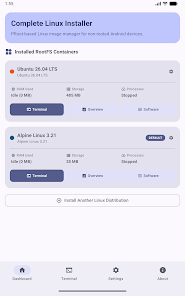
• Ubuntu 26.04 LTS: Official long-term support base for general computing and development.
• Debian 12: Rock-solid stability with vast package repositories.
• Alpine Linux 3.21: Minimalist musl/busybox environment (~10MB rootfs) with instant boot times and tiny memory footprint.
• Arch Linux ARM: Bleeding-edge rolling release with the pacman package manager.
• Kali Linux CLI Tools: Security auditing and network forensics environment.
• Void Linux: Independent general-purpose distribution with the fast XBPS package manager.
📑 CONCURRENT MULTI-TAB TERMINAL
• Run and manage multiple interactive terminal sessions simultaneously.
• Dynamic tab strip with live status indicators, session highlights, and custom tab renaming.
• Independent PTY subprocesses maintain full interactive state in the background.
• Pinned extra-keys toolbar with Ctrl, Alt, Esc, Tab, Paste, and directional arrows.
• Viewport resizing preserving cursor and prompt on software keyboard resize.
• Custom font families (JetBrains Mono, Ubuntu Mono) and 16-color ANSI themes.
🖥️ FULL GRAPHICAL DESKTOP (XFCE4 & VNC)
• Install a complete XFCE 4 Desktop Environment in one tap.
• Built-in TigerVNC server with 1-touch launch guidance.
• Connect via any Android VNC viewer app or external monitor for a windowed desktop PC experience on mobile.
🎛️ MULTI-CONTAINER DASHBOARD & SYSTEM MONITOR
• Manage multiple containers side-by-side with per-container storage tracking.
• Live animated RAM and storage gauge dials.
• Real-time child process inspector (ps aux) with 1-tap kill confirmation.
• Active TCP network port listener detecting SSH, VNC, NGINX, and web ports with 1-tap browser launcher.
• Dedicated container deletion screen with real-time progress feedback and back-gesture safety.
🛠️ 1-CLICK SOFTWARE & DEVELOPER STACKS
• Web Server & Database: NGINX HTTP server with unprivileged port 8080 binding + SQLite3.
• Remote Access: OpenSSH Server for remote logins from your PC or laptop over LAN/Wi-Fi.
• Python 3 Stack: Python 3, pip, virtualenv, and C/C++ GCC build-essential tools.
• Node.js Stack: Node.js, npm, Yarn, Git, build-essential GCC, and Neovim.
• Android Dev Tools: OpenJDK 17, Gradle, ADB, and Android platform-tools inside Linux.
• Native multi-package manager support across apt, apk, pacman, and xbps.
🌐 STORAGE & MULTI-ARCHITECTURE
• Native support for ARM64 (aarch64), x86_64 (amd64), and ARMv7 (armhf).
• Automatic external storage mounting for SD Card access (/sdcard).
• 1-tap container backup (.tar.gz) export and import.
• Custom DNS configuration (/etc/resolv.conf) with quick presets.
📜 15 YEARS OF OPEN-SOURCE HERITAGE
Evolved from the original Complete Linux Installer project launched on XDA Developers in 2011. Built with open-source Jetpack Compose Material 3 and modern C++ PRoot engine technology.
License: Released under GNU General Public License v2.0 (GPL-2.0).
Complete Linux Installer (Linux on Android) brings a multi-distribution Linux ecosystem, concurrent multi-tab terminal, graphical XFCE desktop, and 1-click developer stacks to your device without root access, unlocked bootloaders, or custom ROMs.
Powered by a native PRoot user-space virtualization engine and POSIX PTY terminal bridge, Complete Linux Installer transforms your device into a portable Linux workstation, server host, desktop computer, or learning environment.
🔒 100% ROOTLESS & COMPLETELY SAFE
• Runs entirely in Android user-space via PRoot ptrace system call virtualization.
• Zero root access, unlocked bootloaders, or system partition modifications required.
• Completely sandboxed: cannot brick your device and never touches Android system partitions or personal files.
• First-launch welcome guide explaining container architecture and security.
🐧 MULTI-DISTRIBUTION LINUX CATALOG
Install, run, and switch between multiple independent Linux distributions:
• Ubuntu 26.04 LTS: Official long-term support base for general computing and development.
• Debian 12: Rock-solid stability with vast package repositories.
• Alpine Linux 3.21: Minimalist musl/busybox environment (~10MB rootfs) with instant boot times and tiny memory footprint.
• Arch Linux ARM: Bleeding-edge rolling release with the pacman package manager.
• Kali Linux CLI Tools: Security auditing and network forensics environment.
• Void Linux: Independent general-purpose distribution with the fast XBPS package manager.
📑 CONCURRENT MULTI-TAB TERMINAL
• Run and manage multiple interactive terminal sessions simultaneously.
• Dynamic tab strip with live status indicators, session highlights, and custom tab renaming.
• Independent PTY subprocesses maintain full interactive state in the background.
• Pinned extra-keys toolbar with Ctrl, Alt, Esc, Tab, Paste, and directional arrows.
• Viewport resizing preserving cursor and prompt on software keyboard resize.
• Custom font families (JetBrains Mono, Ubuntu Mono) and 16-color ANSI themes.
🖥️ FULL GRAPHICAL DESKTOP (XFCE4 & VNC)
• Install a complete XFCE 4 Desktop Environment in one tap.
• Built-in TigerVNC server with 1-touch launch guidance.
• Connect via any Android VNC viewer app or external monitor for a windowed desktop PC experience on mobile.
🎛️ MULTI-CONTAINER DASHBOARD & SYSTEM MONITOR
• Manage multiple containers side-by-side with per-container storage tracking.
• Live animated RAM and storage gauge dials.
• Real-time child process inspector (ps aux) with 1-tap kill confirmation.
• Active TCP network port listener detecting SSH, VNC, NGINX, and web ports with 1-tap browser launcher.
• Dedicated container deletion screen with real-time progress feedback and back-gesture safety.
🛠️ 1-CLICK SOFTWARE & DEVELOPER STACKS
• Web Server & Database: NGINX HTTP server with unprivileged port 8080 binding + SQLite3.
• Remote Access: OpenSSH Server for remote logins from your PC or laptop over LAN/Wi-Fi.
• Python 3 Stack: Python 3, pip, virtualenv, and C/C++ GCC build-essential tools.
• Node.js Stack: Node.js, npm, Yarn, Git, build-essential GCC, and Neovim.
• Android Dev Tools: OpenJDK 17, Gradle, ADB, and Android platform-tools inside Linux.
• Native multi-package manager support across apt, apk, pacman, and xbps.
🌐 STORAGE & MULTI-ARCHITECTURE
• Native support for ARM64 (aarch64), x86_64 (amd64), and ARMv7 (armhf).
• Automatic external storage mounting for SD Card access (/sdcard).
• 1-tap container backup (.tar.gz) export and import.
• Custom DNS configuration (/etc/resolv.conf) with quick presets.
📜 15 YEARS OF OPEN-SOURCE HERITAGE
Evolved from the original Complete Linux Installer project launched on XDA Developers in 2011. Built with open-source Jetpack Compose Material 3 and modern C++ PRoot engine technology.
License: Released under GNU General Public License v2.0 (GPL-2.0).
Run Ubuntu, Debian, Arch & Alpine with XFCE desktop & tabbed terminal. No root!
Updated on
Safety starts with understanding how developers collect and share your data. Data privacy and security practices may vary based on your use, region, and age. The developer provided this information and may update it over time.
- No data shared with third partiesLearn more about how developers declare sharing
- No data collectedLearn more about how developers declare collection


What’s new
• Alpine Linux: Fixed first-launch setup with guest symlink resolution.
• Terminal Tabs: Fixed switching between concurrent terminal tabs.
• Terminal UI: Fixed top bar overflow, added stop prompt, and fixed clear scrollback.
• Text Fields: Constrained process filter and hotkeys to single line.
• Security: Suppressed IME password suggestions & disabled autocorrect.
• Termux Hotkeys: Aligned extra keys into 7-column grid layout.
• Reliability: Added container grace period preventing drops.
• Terminal Tabs: Fixed switching between concurrent terminal tabs.
• Terminal UI: Fixed top bar overflow, added stop prompt, and fixed clear scrollback.
• Text Fields: Constrained process filter and hotkeys to single line.
• Security: Suppressed IME password suggestions & disabled autocorrect.
• Termux Hotkeys: Aligned extra keys into 7-column grid layout.
• Reliability: Added container grace period preventing drops.
Everyone
Learn moreApp support
About the developer
ZEDCEE LTD
devwithzachary@pm.me
50 Princes Street
IPSWICH
IP1 1RJ
United Kingdom
+44 7359 029401