
DictoKey: Voice Accessibility
Contains adsIn-app purchases


Everyone
info
500+
Downloads

Everyone
Learn more


About this app
DictoKey is a voice-to-text accessibility tool for Android. It lets you write with your voice, in any app, when typing on a touchscreen is painful, slow or impossible.
A touchscreen keyboard assumes steady hands, precise aim and good eyesight. When one of those is missing, writing on a phone becomes exhausting — or simply out of reach. DictoKey replaces the keyboard with your voice.
♿ Who DictoKey is for
- Motor impairments and limited hand mobility — when reaching small keys accurately is difficult
- Tremors, Parkinson's disease — when the finger does not land where it was aimed
- Arthritis, RSI, chronic pain — when repeated tapping hurts
- Dyslexia and ADHD — when spoken words come more easily than written ones
Full accessibility statement: https://dictokey.com/accessibility
🛠 What DictoKey does for accessibility
Implemented features, not intentions.
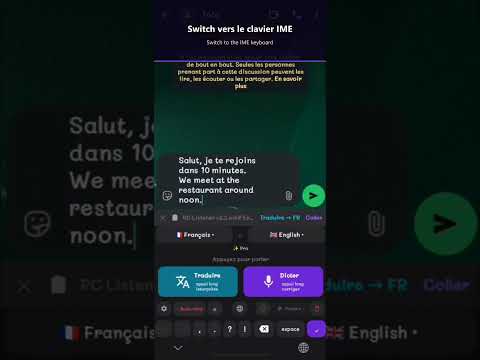
- Two independent ways to write by voice: a standard Android keyboard (IME), navigable with a screen reader, and a floating dictation bubble. If one is unavailable, the other still works.
- Coexistence with TalkBack. The bubble filters accessibility events so it does not fight the screen reader for control of the screen; a timing bug that degraded the experience under TalkBack was fixed.
- No typing required to correct text: Clean mode restores punctuation and capitalisation automatically, so a dictated message needs no manual editing.
- An adjustable bubble: size, opacity and anchored position match your reach and your grip, and it can be enabled per app.
- Works without an account: no sign-up form before you can use the app.
DictoKey also supports 52 languages with real-time translation.
🔒 Privacy: EU GDPR compliant, no recordings stored, no ads, no tracking.
♿ Android Accessibility Service disclosure (required)
Why this permission is technically necessary: Android provides no standard API that lets a third-party app know when and where you are typing. The AccessibilityService API is the only supported way to place the dictation bubble over the field you are writing in, and to insert your dictated text into it.
DictoKey uses this permission for one purpose only: to detect when a keyboard opens, display the bubble on top of that app, and insert dictated text into the active field — only after an explicit user action.
DictoKey DOES NOT use the Accessibility Service to:
- Read or record screen content
- Log keystrokes
- Monitor background activity
- Transmit accessibility data to third-party servers
DictoKey does not work around Android's built-in privacy controls, does not change system settings without your permission, and does not use deceptive interface practices. It never initiates or performs actions on its own. Banking apps, password managers and crypto wallets are blocked automatically.
The permission can be revoked at any time in Android Settings > Accessibility > DictoKey. The app keeps working as a voice keyboard without the bubble.
🔊 With a screen reader: enable DictoKey Voice in Android Settings > Languages & input > On-screen keyboard. That alone is enough to dictate everywhere.
💎 Premium: 7-day free trial, then a monthly or annual subscription.
📱 Android 10+, all brands.
Write with your voice. In any app.
A touchscreen keyboard assumes steady hands, precise aim and good eyesight. When one of those is missing, writing on a phone becomes exhausting — or simply out of reach. DictoKey replaces the keyboard with your voice.
♿ Who DictoKey is for
- Motor impairments and limited hand mobility — when reaching small keys accurately is difficult
- Tremors, Parkinson's disease — when the finger does not land where it was aimed
- Arthritis, RSI, chronic pain — when repeated tapping hurts
- Dyslexia and ADHD — when spoken words come more easily than written ones
Full accessibility statement: https://dictokey.com/accessibility
🛠 What DictoKey does for accessibility
Implemented features, not intentions.
- Two independent ways to write by voice: a standard Android keyboard (IME), navigable with a screen reader, and a floating dictation bubble. If one is unavailable, the other still works.
- Coexistence with TalkBack. The bubble filters accessibility events so it does not fight the screen reader for control of the screen; a timing bug that degraded the experience under TalkBack was fixed.
- No typing required to correct text: Clean mode restores punctuation and capitalisation automatically, so a dictated message needs no manual editing.
- An adjustable bubble: size, opacity and anchored position match your reach and your grip, and it can be enabled per app.
- Works without an account: no sign-up form before you can use the app.
DictoKey also supports 52 languages with real-time translation.
🔒 Privacy: EU GDPR compliant, no recordings stored, no ads, no tracking.
♿ Android Accessibility Service disclosure (required)
Why this permission is technically necessary: Android provides no standard API that lets a third-party app know when and where you are typing. The AccessibilityService API is the only supported way to place the dictation bubble over the field you are writing in, and to insert your dictated text into it.
DictoKey uses this permission for one purpose only: to detect when a keyboard opens, display the bubble on top of that app, and insert dictated text into the active field — only after an explicit user action.
DictoKey DOES NOT use the Accessibility Service to:
- Read or record screen content
- Log keystrokes
- Monitor background activity
- Transmit accessibility data to third-party servers
DictoKey does not work around Android's built-in privacy controls, does not change system settings without your permission, and does not use deceptive interface practices. It never initiates or performs actions on its own. Banking apps, password managers and crypto wallets are blocked automatically.
The permission can be revoked at any time in Android Settings > Accessibility > DictoKey. The app keeps working as a voice keyboard without the bubble.
🔊 With a screen reader: enable DictoKey Voice in Android Settings > Languages & input > On-screen keyboard. That alone is enough to dictate everywhere.
💎 Premium: 7-day free trial, then a monthly or annual subscription.
📱 Android 10+, all brands.
Write with your voice. In any app.
Updated on
Safety starts with understanding how developers collect and share your data. Data privacy and security practices may vary based on your use, region, and age. The developer provided this information and may update it over time.

No data shared with third parties
Learn more about how developers declare sharing

This app may collect these data types
Device or other IDs

Data is encrypted in transit

You can request that data be deleted
What’s new
- Stability improvements.
- Various fixes.
- Various fixes.
Everyone
Learn moreApp support
About the developer
Soukhasing Quang
quangapps.dev@gmail.com
457 Rte de la Place
74300 Thyez
France