
Packing List
Contains ads

star
969 reviews

Everyone
info
100K+
Downloads

Everyone
Learn more


About this app
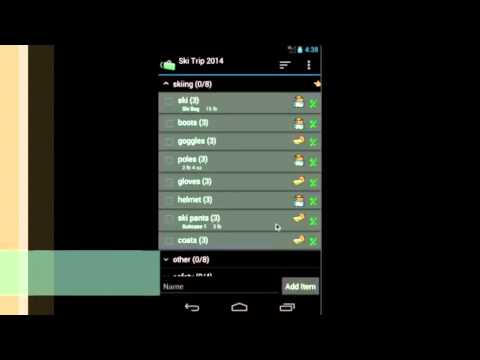
Packing List helps you create and maintain packing lists. It not only lets the user create a list from scratch, but also allows you to generate lists from an existing one. This application comes with several pre-loaded packing master lists. You can simply open the master list(or any existing list). Click on “Generate List/Mass Change” menu item. Check the items you want for your trip and you will have a new packing list ready in no time.
You can group items by category, location, and luggage. Each item also has note, quantity and weight fields. Mass change features allow you to edit lists more easily. You may also email and share your lists. Printing out a copy of the lists helps you in case of lost luggage.
Key features include:
• Pre-loaded master lists(for general use, international travel, travel with kids and etc.)
• Create a new list from scratch or generate from existing one
• Support Multiple lists
• Reorder categories/items using drag/drop
• Mass change for easy editing
• Group by location/luggage for easy packing
• Backup/Restore lists locally to/from SD card
• Email/Share lists
• Shortcut to a particular list from home screen
This lite version displays ads in the app.
When you upgrade from lite to full version, you don't need to re-enter your data. They will be automatically loaded into the full version.
Please check the help file for detailed information.
***Upgrade from Lite to Full app:
When you upgrade from lite to full, you can use the "Backup and Restore" feature to migrate your data.
To backup your lists, open the lite app and click on "Menu"->"Backup and Restore"->"Backup" in Routine View. Then click on "Backup" to use the default folder or "Select Folder" to choose a different location.
Then open the full version, click on "Menu"->"Backup and Restore"->"Restore". It will open default backup location. Choose the folder which contains backup files and click on "Restore". If you have chosen different backup location, then navigate to that location and click on "Restore".
You can group items by category, location, and luggage. Each item also has note, quantity and weight fields. Mass change features allow you to edit lists more easily. You may also email and share your lists. Printing out a copy of the lists helps you in case of lost luggage.
Key features include:
• Pre-loaded master lists(for general use, international travel, travel with kids and etc.)
• Create a new list from scratch or generate from existing one
• Support Multiple lists
• Reorder categories/items using drag/drop
• Mass change for easy editing
• Group by location/luggage for easy packing
• Backup/Restore lists locally to/from SD card
• Email/Share lists
• Shortcut to a particular list from home screen
This lite version displays ads in the app.
When you upgrade from lite to full version, you don't need to re-enter your data. They will be automatically loaded into the full version.
Please check the help file for detailed information.
***Upgrade from Lite to Full app:
When you upgrade from lite to full, you can use the "Backup and Restore" feature to migrate your data.
To backup your lists, open the lite app and click on "Menu"->"Backup and Restore"->"Backup" in Routine View. Then click on "Backup" to use the default folder or "Select Folder" to choose a different location.
Then open the full version, click on "Menu"->"Backup and Restore"->"Restore". It will open default backup location. Choose the folder which contains backup files and click on "Restore". If you have chosen different backup location, then navigate to that location and click on "Restore".
Preparing a trip can be stressful, but packing shouldn't be
Updated on
Safety starts with understanding how developers collect and share your data. Data privacy and security practices may vary based on your use, region, and age. The developer provided this information and may update it over time.
- No data shared with third partiesLearn more about how developers declare sharing
- No data collectedLearn more about how developers declare collection
- Data is encrypted in transit
- You can request that data be deleted


Ratings and reviews
893 reviews

Elizabeth O
- Flag inappropriate
August 30, 2025
Currently a glitch where the keyboard covers the typing area so I can't see what I've typed until I minimize the keyboard again. Annoying. Love this app for helping to take away the anxiety of travel. I travel a lot for work but always feel like I'm going to forget things since each trip is different. I use this app to keep track of what I want to pack as I think of it a week or so prior to my trip.
DotNetIdeas
August 31, 2025
Thank you for your feedback. Are you using the latest version of the app? We have fixed this issue in v4.3.6. Please get the latest version from the Google play store. Please feel free to contact us directly at dotnetideas@gmail.com if you have any questions.

Kerry H
- Flag inappropriate
December 26, 2021
Extremely Happy with it. I have the F full version. They give you a few robust sample lists, which I copied, then edited for my use and way of thinking. I have 1 list for taking my daughter's to college, 1 for when I fly, 1 for beach vacation, 1 for weekend visit. Easy to check of items, easy to clear all the checkmarks when starting to pack for a new vacation.
3 people found this review helpful

Sierra Bravo
- Flag inappropriate
January 31, 2025
It's a great app until you get a new phone and then you find out that this app doesn't back up your lists and won't restore the lists so then you need to waste time copying files from one device to the other. Sure you can also send that file to Google Drive but you need to do that constantly as you change things. If you want to keep your lists for future packing don't buy this app or even the pro version as you will be disappointed by the lack of backup
DotNetIdeas
January 31, 2025
Thank you for your feedback. Please consider upgrading to Packing List 2 if you want the auto sync to the cloud and between devices. You can migrate your lists from the old Packing List lite or full app if you have it installed on your device. Please check out https://packinglist.dotnetideas.com/ for more info. Thanks.
What’s new
7/31/2025 -v4.3.6(71)
Fix keyboard covering the input issue
Fix keyboard covering the input issue
Everyone
Learn moreApp support
About the developer
DotNetIdeas LLC
dotnetideas@gmail.com
3 Shardue Ln
Saint Louis, MO 63141
United States
+1 314-666-0453


