
Doxify: PDF Scanner & Editor
Contains ads


Everyone
info
10+
Downloads

Everyone
Learn more


About this app
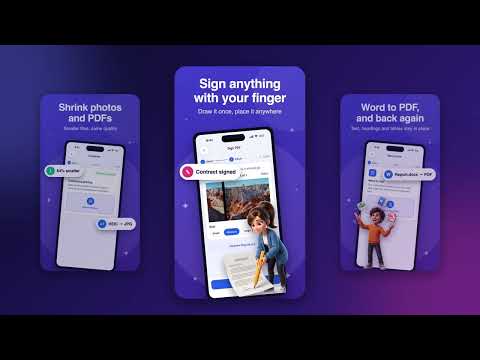
Doxify is the all-in-one PDF scanner, PDF editor and PDF converter for Android. Scan documents with your camera, convert Word to PDF and JPG to PDF, sign PDF forms, merge, split and compress PDF files, extract text with OCR and create QR codes. More than 25 document and photo tools in one free app, and your files never leave your phone.
📄 DOCUMENT SCANNER: SCAN TO PDF
• Fast document scanner with automatic edge detection, crop and perspective fix
• Scan multi-page documents, receipts, bills, notes, ID cards, books, forms and whiteboards into one clean PDF
• Import photos from your gallery or file manager and turn them into PDF
• QR code scanner and barcode reader: open links, join Wi-Fi, save email addresses and phone numbers
✏️ PDF EDITOR
• Edit PDF: add text, highlight, draw and annotate on any page
• Sign PDF: draw your signature and place it anywhere, e-sign contracts, forms and letters
• Merge PDF: combine several PDF files into one document
• Split PDF: save only the pages you choose as a new PDF
• Organize PDF: reorder, rotate or delete pages
• Rotate PDF pages in one tap
• Compress PDF: reduce PDF size for email, WhatsApp and online forms
• Watermark PDF: add your own text to every page
• Protect PDF with a password, or unlock a PDF you own
🔄 PDF CONVERTER AND IMAGE CONVERTER
• Word to PDF: convert .docx documents to PDF
• PDF to Word: get the text as an editable .docx file
• Image to PDF / JPG to PDF / photo to PDF
• PDF to JPG: save PDF pages as images
• Image converter: HEIC to JPG, PNG, WEBP, TIFF, BMP and GIF
• Batch convert: change many photos at once
• Choose the quality (Best, High, Medium, Small) and size (Original, 4K, 2K, HD)
• OCR text scanner: extract text from images and scans, copy it or save it as Word
🖼️ PHOTO TOOLS
• Compress images: make photos smaller without losing quality
• Resize image to an exact size
• Crop photos: square, portrait, wide or free
• Photo editor: rotate, filters, brightness, contrast and color
• Remove background from photos of people, pets and objects in one tap
• Remove location (GPS) data from photos before you share them
🔳 QR CODE GENERATOR AND BARCODE MAKER
• Create QR codes for links, text, Wi-Fi, email and phone numbers
• Create Code 128 barcodes for labels and products
• Save them to your gallery or share them as images
📁 FILE MANAGER FOR YOUR DOCUMENTS
• Every scan and result is saved in Files, with folders and search
• Rename files and move them into folders
• Select many files to delete or merge at once
• Recycle Bin keeps deleted files for 30 days, so nothing is lost by mistake
• Share several files as one ZIP, print, save to your gallery or open them in other apps
• Share any PDF, Word file or photo to Doxify from WhatsApp, Gmail, Files and Gallery
🔒 PRIVATE AND SECURE
• Files are processed on your phone and never uploaded to a server
• No sign-up and no account needed
• App lock with fingerprint or face unlock
• Keep the screen on while you work
• Notifications when your file is ready, plus quick daily tips
👩🎓 FOR STUDENTS, OFFICE AND HOME
• Students: scan notes, homework and assignments, then merge them into one PDF
• Office and business: sign contracts, fill forms, compress reports and convert Word to PDF
• Teachers: scan worksheets and share them as PDF
• Everyday life: scan receipts, bills and ID cards, share documents, make a Wi-Fi QR code for guests
• 12 languages: English, اردو, العربية, हिन्दी, Español, Português, Français, Deutsch, Türkçe, Bahasa Indonesia, Русский, 中文
• Light and dark theme
⭐ WHY DOXIFY
• One app instead of many: scanner, PDF editor, converter and QR code maker together
• Simple steps: pick a file, choose options, done
• Fast, light and free
Doxify is free and supported by ads. A few advanced tools (Remove Background, Word to PDF, PDF to Word, Edit PDF, Unlock PDF) open after a short video.
Questions or ideas? Email info@nexttabagency.com
📄 DOCUMENT SCANNER: SCAN TO PDF
• Fast document scanner with automatic edge detection, crop and perspective fix
• Scan multi-page documents, receipts, bills, notes, ID cards, books, forms and whiteboards into one clean PDF
• Import photos from your gallery or file manager and turn them into PDF
• QR code scanner and barcode reader: open links, join Wi-Fi, save email addresses and phone numbers
✏️ PDF EDITOR
• Edit PDF: add text, highlight, draw and annotate on any page
• Sign PDF: draw your signature and place it anywhere, e-sign contracts, forms and letters
• Merge PDF: combine several PDF files into one document
• Split PDF: save only the pages you choose as a new PDF
• Organize PDF: reorder, rotate or delete pages
• Rotate PDF pages in one tap
• Compress PDF: reduce PDF size for email, WhatsApp and online forms
• Watermark PDF: add your own text to every page
• Protect PDF with a password, or unlock a PDF you own
🔄 PDF CONVERTER AND IMAGE CONVERTER
• Word to PDF: convert .docx documents to PDF
• PDF to Word: get the text as an editable .docx file
• Image to PDF / JPG to PDF / photo to PDF
• PDF to JPG: save PDF pages as images
• Image converter: HEIC to JPG, PNG, WEBP, TIFF, BMP and GIF
• Batch convert: change many photos at once
• Choose the quality (Best, High, Medium, Small) and size (Original, 4K, 2K, HD)
• OCR text scanner: extract text from images and scans, copy it or save it as Word
🖼️ PHOTO TOOLS
• Compress images: make photos smaller without losing quality
• Resize image to an exact size
• Crop photos: square, portrait, wide or free
• Photo editor: rotate, filters, brightness, contrast and color
• Remove background from photos of people, pets and objects in one tap
• Remove location (GPS) data from photos before you share them
🔳 QR CODE GENERATOR AND BARCODE MAKER
• Create QR codes for links, text, Wi-Fi, email and phone numbers
• Create Code 128 barcodes for labels and products
• Save them to your gallery or share them as images
📁 FILE MANAGER FOR YOUR DOCUMENTS
• Every scan and result is saved in Files, with folders and search
• Rename files and move them into folders
• Select many files to delete or merge at once
• Recycle Bin keeps deleted files for 30 days, so nothing is lost by mistake
• Share several files as one ZIP, print, save to your gallery or open them in other apps
• Share any PDF, Word file or photo to Doxify from WhatsApp, Gmail, Files and Gallery
🔒 PRIVATE AND SECURE
• Files are processed on your phone and never uploaded to a server
• No sign-up and no account needed
• App lock with fingerprint or face unlock
• Keep the screen on while you work
• Notifications when your file is ready, plus quick daily tips
👩🎓 FOR STUDENTS, OFFICE AND HOME
• Students: scan notes, homework and assignments, then merge them into one PDF
• Office and business: sign contracts, fill forms, compress reports and convert Word to PDF
• Teachers: scan worksheets and share them as PDF
• Everyday life: scan receipts, bills and ID cards, share documents, make a Wi-Fi QR code for guests
• 12 languages: English, اردو, العربية, हिन्दी, Español, Português, Français, Deutsch, Türkçe, Bahasa Indonesia, Русский, 中文
• Light and dark theme
⭐ WHY DOXIFY
• One app instead of many: scanner, PDF editor, converter and QR code maker together
• Simple steps: pick a file, choose options, done
• Fast, light and free
Doxify is free and supported by ads. A few advanced tools (Remove Background, Word to PDF, PDF to Word, Edit PDF, Unlock PDF) open after a short video.
Questions or ideas? Email info@nexttabagency.com
Scan to PDF, sign & merge PDFs, Word to PDF, JPG & HEIC converter, QR code maker
Updated on
Safety starts with understanding how developers collect and share your data. Data privacy and security practices may vary based on your use, region, and age. The developer provided this information and may update it over time.


What’s new
- Share Doxify with friends: the share message now includes the download link
- Rate Doxify opens the store page directly
- Help answers updated
- Small fixes and improvements
- Rate Doxify opens the store page directly
- Help answers updated
- Small fixes and improvements
Everyone
Learn moreApp support
About the developer
Hamza Ishfaq
hamzaaustralia86@gmail.com
u9/19-29 Taylor St
Eagleby QLD 4207
Australia
+61 491 000 094