
Zombie Live Wallpaper

4.0star
40 reviews

Teen
info
500+
Downloads


About this app
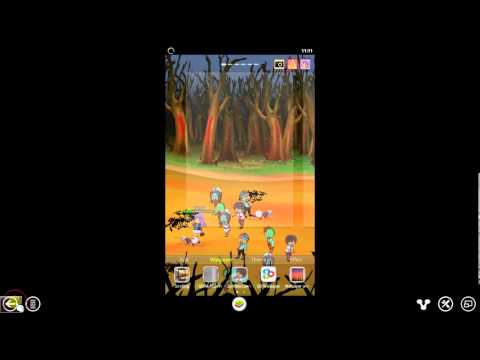
Well, watching zombies wondering around on home screen maybe boring. How about dropping some human to feeds them? You can even set these human profile, what's their name and how strong they are. See whether they can survive the zombie apocalypse!
★★★★★ Zombies ★★★★★
This zombie live wallpaper come with four kinds of zombie. Each zombie have their own characteristic. Different zombie have different sensitivity, speed, and attack level. You can tap on the zombie to show these information. You can also drag the zombie. This come handy when you want to move some zombie away from survivor.
★★★★★ Survivor ★★★★★
These poor human have a limited strength. When their strength drop, their speed will slow down, and the change they got caught just get higher. The only way they can survive and escape from these zombies is by run out of your home screen.
★★★★★ Control ★★★★★
There are three control button on top corner on this live wallpaper. Tap the survivor button to decide who you gonna drop next or you can just set to random. Tap the attack button to choose what action when you tap on zombie. Either show information, attack with fire to burn zombie, or attack with lighting hit. You can also take a screenshot of these walking dead by tapping on camera icon. Your screenshot will be saved on ZombieLiveWallpaper folder.
(This is why we need EXTERNAL_STORAGE permission.)
★★★★★ Customization ★★★★★
This is a fully customize live wallpaper, you can choose the theme (Highway, Forest, and City). Set the number of zombies. Set the position of control button. Set the strength level and name of these survivor. Try to set to your friend's name, take a screenshot, and share to him/her :)
★★★★★ Feature ★★★★★
~ Various zombies and survivor (will update more)
~ Tap to attack zombie by fire or lighting
~ Tap and drag zombie
~ Tap to drop survivor
~ Theme
~ Survivor profile setting
~ Screenshot
~ Portrait and Landscape orientation support
~ Tablet support
~ Small battery usage
~ MoveToSD support
To open and setting up your live wallpaper: Home-> Press menu-> wallpapers-> Live Wallpapers.
If you are a fans of the walking dead, then this would be the best zombie live wallpaper for you =)
★★★★★ Zombies ★★★★★
This zombie live wallpaper come with four kinds of zombie. Each zombie have their own characteristic. Different zombie have different sensitivity, speed, and attack level. You can tap on the zombie to show these information. You can also drag the zombie. This come handy when you want to move some zombie away from survivor.
★★★★★ Survivor ★★★★★
These poor human have a limited strength. When their strength drop, their speed will slow down, and the change they got caught just get higher. The only way they can survive and escape from these zombies is by run out of your home screen.
★★★★★ Control ★★★★★
There are three control button on top corner on this live wallpaper. Tap the survivor button to decide who you gonna drop next or you can just set to random. Tap the attack button to choose what action when you tap on zombie. Either show information, attack with fire to burn zombie, or attack with lighting hit. You can also take a screenshot of these walking dead by tapping on camera icon. Your screenshot will be saved on ZombieLiveWallpaper folder.
(This is why we need EXTERNAL_STORAGE permission.)
★★★★★ Customization ★★★★★
This is a fully customize live wallpaper, you can choose the theme (Highway, Forest, and City). Set the number of zombies. Set the position of control button. Set the strength level and name of these survivor. Try to set to your friend's name, take a screenshot, and share to him/her :)
★★★★★ Feature ★★★★★
~ Various zombies and survivor (will update more)
~ Tap to attack zombie by fire or lighting
~ Tap and drag zombie
~ Tap to drop survivor
~ Theme
~ Survivor profile setting
~ Screenshot
~ Portrait and Landscape orientation support
~ Tablet support
~ Small battery usage
~ MoveToSD support
To open and setting up your live wallpaper: Home-> Press menu-> wallpapers-> Live Wallpapers.
If you are a fans of the walking dead, then this would be the best zombie live wallpaper for you =)
Updated on
Safety starts with understanding how developers collect and share your data. Data privacy and security practices may vary based on your use, region, and age. The developer provided this information and may update it over time.

This app may share these data types with third parties
Location and Device or other IDs

No data collected
Learn more about how developers declare collection

Data is encrypted in transit
Ratings and reviews
35 reviews

Cameron Daw
- Flag inappropriate
- Show review history
September 21, 2020
Have used this for years and years and go to down load it again and can't apply it or find the paid version that i have already paid for Update. New phone still can't apply live wallpaper
2 people found this review helpful

A Google user
- Flag inappropriate
September 6, 2013
I have a nexus 4 and the 3 control buttons on the app are only able to position on the top of the screen where the mandatory Google search bar is placed. I can't move that search bar so I can't play with my zombies because I can't press the buttons because they are hidden under said search bar. An update to be able reposition buttons to side and/or below the screen would be great. I wanna feed my dead.
4 people found this review helpful
Moratun
September 6, 2013
Hi Isoan, thanks for your feedback. We will add options to set control button position on next update. Maybe in 2-3 days. Cheers :)
A Google user
- Flag inappropriate
April 23, 2014
Wasn't sure about this one, at 1st?! But put the right name on a victim, and it feels so right! Die! Die! Die! The most dead victims I've been able to get on a screen at once is 10?! They disappear after that?! Screen shot makes it fun to share!!! Should be a little lower, tho?! Right under the Google bar!?
1 person found this review helpful
What’s new
Version 2:
~ Added new control button to choose touch action
~ Added feature tap to attack zombie (by fire or lighting hit)
~ Fixed bugs
~ Added new control button to choose touch action
~ Added feature tap to attack zombie (by fire or lighting hit)
~ Fixed bugs
App support
About the developer
YULIYANTI
dutadev@gmail.com
SUKAMULYA
PRINGSEWU
Lampung 35674
Indonesia


