Video Object Watermark Remover

25.4K reviews
Content rating
Everyone
1M+
Downloads
Content rating
Everyone
Learn more
Screenshot image
Screenshot image
Screenshot image
Screenshot image
Screenshot image
Screenshot image
Screenshot image
Screenshot image
Screenshot image
Screenshot image
Screenshot image
Screenshot image
Screenshot image
Screenshot image
Screenshot image

About this app

Video Eraser: The ultimate AI-powered video editing tool for removing objects, logos, and enhancing your videos

Are you looking for a seamless solution to remove watermarks, logos, or unwanted objects from your videos? Do you want to enhance blurry videos or transform them into stunning animations or anime-style creations? Look no further. Video Eraser is the ultimate app designed to meet all your video editing needs with precision, powered by advanced AI technology.

EFFORTLESS WATERMARK REMOVAL
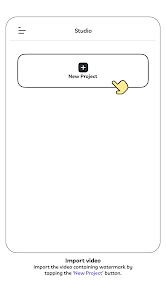
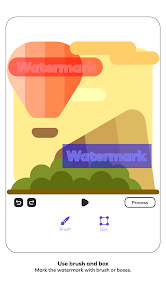
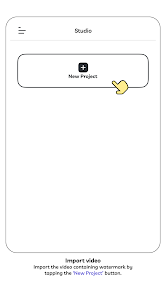
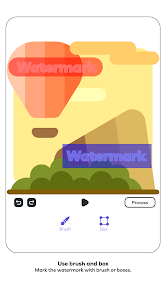
Video Eraser specializes in removing watermarks and logos from videos and photos with ease. Whether it's a text watermark, a logo, or any other distracting element, our AI-powered watermark remover handles the task quickly and efficiently. Simply upload your video or image, and let Video Eraser take care of the rest. No more dealing with unwanted branding or cluttered visuals—just clean, professional-looking results.

AI-POWERED OBJECT REMOVAL
With the object remover feature, you can eliminate any undesired objects from your videos or photos. Whether it's a stray person in the background, an unwanted logo, or unnecessary text, the AI object remover analyzes the content and intelligently fills the space, ensuring a seamless finish. Perfect for cleaning up your media and making it look flawless.

RESTORE AND SHARPEN VIDEOS
Have old or blurry videos that need a touch-up? Video Eraser includes an advanced video enhancement tool to sharpen and restore videos. Bring clarity and vibrancy to your content, making it look as good as new. Whether it's a cherished memory or a professional project, you can rely on Video Eraser to breathe new life into your videos.

TRANSFORM VIDEOS INTO ANIMATIONS AND ANIME
Take your creativity to the next level by transforming your videos into animations or anime-style visuals. With the help of AI-driven editing tools, Video Eraser lets you create dynamic, eye-catching videos that stand out. Whether you’re an aspiring animator or just want to add a unique flair to your content, this feature has got you covered.

KEY FEATURES OF VIDEO ERASER
● Watermark and logo remover: Remove watermarks, logos, and text from videos or photos effortlessly.
● AI object remover: Delete any unwanted objects with advanced AI algorithms that ensure smooth edits.
● Video enhancer: Restore clarity and sharpen blurry videos to give them a polished look.
● Video to animation: Convert videos into animated or anime-style visuals for unique and creative results.
● Text remover: Easily cut out text watermarks or captions from your videos.
● Background cleaner: Remove distractions and clean up your video’s background seamlessly.
● User-friendly interface: A clean and intuitive design makes editing videos easy, even for beginners.

WHY CHOOSE VIDEO ERASER
● Precision editing: Advanced AI ensures every edit looks professional and natural.
● Versatility: Whether you’re removing watermarks, restoring videos, or creating animations, the app has it all.
● Fast processing: Get your edits done quickly without compromising on quality.
● Free and premium options: Enjoy basic features for free, with premium upgrades available for advanced tools.
● Cross-platform compatibility: Works with all video formats and resolutions, making it perfect for any project.
USE CASES
● For content creators: Clean up your videos by removing logos or watermarks, making them perfect for social media or professional use.
● For personal use: Enhance home videos, remove unwanted elements, or create unique anime-style videos for fun.
● For professionals: Use advanced tools to edit videos for marketing, presentations, or creative projects with ease.

✓ Download Video Eraser today
Don’t let watermarks, logos, or blurry footage ruin your videos anymore. Download Video Eraser today and discover a new world of video editing possibilities.
AI Video Eraser remove objects, watermark, text, logo, enhance & upscale videos
Updated on
Aug 25, 2026

Data safety

Safety starts with understanding how developers collect and share your data. Data privacy and security practices may vary based on your use, region, and age. The developer provided this information and may update it over time.
  • This app may share these data types with third parties
    Device or other IDs
  • This app may collect these data types
    Personal info, Photos and videos, and Device or other IDs
  • Data is encrypted in transit
  • You can request that data be deleted
  • Committed to follow the Play Families Policy

Ratings and reviews

24.9K reviews
Couch Pirate
March 7, 2025
Amended review: The watermark remover feature works extremely well. I had previously posted about not being able to download the files, even though it clearly said "saved to gallery". It did not save them to download as expected, it made a folder called DCIM and saved them there...I found this later by accident. I'm on android, for reference if anyone else has this issue.
65 people found this review helpful
Did you find this helpful?
Creatix Technology Co., Ltd
June 10, 2025
Thank you for the updated review! We're glad the watermark remover works well for you. And thanks for sharing the tip about the DCIM folder on Android! Could you update your rating to 5 stars if you're happy with the app now?
Varinder Singh
July 10, 2025
Very nice, but it doesn't work 5 out of 10 times. Kindly add this into your selection tool. For example, I use a stylus on my phone, but upon zooming in on a photo or video, the selection tool's thickness remains too thick. I wish you could add more thinness to your slider tool so we can precisely draw on the thing which we want to remove.
8 people found this review helpful
Did you find this helpful?
Creatix Technology Co., Ltd
July 11, 2025
Thank you for your valuable feedback! We're sorry to hear about the issues you're facing and would appreciate more details about when it doesn't work. Your suggestion for a thinner selection tool for precise editing with a stylus is fantastic. We'll definitely pass this on to our team for future updates!
Pritvate Aacount
August 29, 2026
I like the feature of this app it helps to remove watermarks it is good editing app also we can make the pic clear😎
1 person found this review helpful
Did you find this helpful?

What’s new

Fix bugs and optimize performance