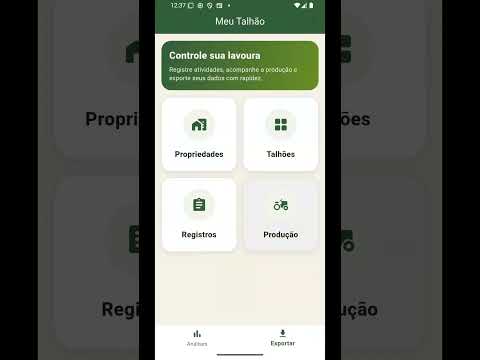

Meu Talhão Controle da Lavoura
Contains adsIn-app purchases


Everyone
info
10+
Downloads

Everyone
Learn more


About this app
My Plot is an agricultural management application developed to organize and monitor operations carried out on rural properties, focusing on detailed control by plot.
The application allows you to register agricultural activities, control inputs used, track production costs, record production, and maintain a complete crop history, including operational records, photos, and location of activities performed in the field.
With My Plot, rural producers, agricultural technicians, and managers can centralize property information in a single system, facilitating production analysis and decision-making.
The system organizes data by property and plot, allowing you to clearly visualize everything that has been done in each productive area.
🌱 Complete management of the rural property
The application allows you to register rural properties with information such as:
property name
location
total area
description and observations
Each property can contain several plots, which represent specific areas of agricultural production.
🌾 Detailed Plot Control
For each plot, it is possible to record:
plot name and code
crop planted
variety
planted area
planting date
technical observations
This allows you to monitor the evolution of each productive area separately.
🚜 Agricultural Activity Log
The app allows you to record various activities performed in the field, such as:
planting
fertilization
spraying
irrigation
harvesting
maintenance
technical inspection
Each record can include:
date and time of the activity
responsible person
description of the operation
quantity used
unit of measurement
cost of the operation
additional observations
geographic location (optional)
🧪 Input Control
The system allows you to register agricultural inputs used in production, including:
input name
category
brand or manufacturer
unit of measurement
unit cost
These inputs can be linked to operational records, allowing you to track consumption and production costs.
🌽 Production Control
It's also possible to record the production obtained in each plot, including:
harvest date
type of production
quantity produced
unit of measurement
product quality
sale value
destination of production
observations
This allows you to track the productive performance of the crop over time.
📷 Visual record with photos
The application allows you to attach photos to records, productions, and plots, creating a visual history of the operations performed in the field.
The images can be used to:
document activities performed
record crop conditions
monitor crop development
maintain evidence of operations performed
📊 Production indicators and analysis
With the recorded data, the application allows you to track important indicators such as:
costs per plot
history of activities
production obtained
operational records
crop evolution
This information helps in the planning and management of the rural property. 📁 Data Export
My Plot allows you to export property data in different formats:
CSV
XLSX
PDF
These reports can be used for:
administrative control
technical monitoring
production analysis
accountability
👨🌾 Who is My Plot for?
The application was developed for:
rural producers
farm managers
agricultural technicians
agribusiness consultants
field teams
🎯 Application Objective
The objective of My Plot is to facilitate the operational, productive, and financial control of the crop, organizing all property information in a simple and accessible system.
Main features of Meu Talhão:
✔ Property management
✔ Plot organization
✔ Activity log
✔ Input control
✔ Production log
✔ Cost control
✔ Photographic record
✔ Complete history
✔ Production and operations indicators
✔ Export in CSV, XLSX and PDF
The application allows you to register agricultural activities, control inputs used, track production costs, record production, and maintain a complete crop history, including operational records, photos, and location of activities performed in the field.
With My Plot, rural producers, agricultural technicians, and managers can centralize property information in a single system, facilitating production analysis and decision-making.
The system organizes data by property and plot, allowing you to clearly visualize everything that has been done in each productive area.
🌱 Complete management of the rural property
The application allows you to register rural properties with information such as:
property name
location
total area
description and observations
Each property can contain several plots, which represent specific areas of agricultural production.
🌾 Detailed Plot Control
For each plot, it is possible to record:
plot name and code
crop planted
variety
planted area
planting date
technical observations
This allows you to monitor the evolution of each productive area separately.
🚜 Agricultural Activity Log
The app allows you to record various activities performed in the field, such as:
planting
fertilization
spraying
irrigation
harvesting
maintenance
technical inspection
Each record can include:
date and time of the activity
responsible person
description of the operation
quantity used
unit of measurement
cost of the operation
additional observations
geographic location (optional)
🧪 Input Control
The system allows you to register agricultural inputs used in production, including:
input name
category
brand or manufacturer
unit of measurement
unit cost
These inputs can be linked to operational records, allowing you to track consumption and production costs.
🌽 Production Control
It's also possible to record the production obtained in each plot, including:
harvest date
type of production
quantity produced
unit of measurement
product quality
sale value
destination of production
observations
This allows you to track the productive performance of the crop over time.
📷 Visual record with photos
The application allows you to attach photos to records, productions, and plots, creating a visual history of the operations performed in the field.
The images can be used to:
document activities performed
record crop conditions
monitor crop development
maintain evidence of operations performed
📊 Production indicators and analysis
With the recorded data, the application allows you to track important indicators such as:
costs per plot
history of activities
production obtained
operational records
crop evolution
This information helps in the planning and management of the rural property. 📁 Data Export
My Plot allows you to export property data in different formats:
CSV
XLSX
These reports can be used for:
administrative control
technical monitoring
production analysis
accountability
👨🌾 Who is My Plot for?
The application was developed for:
rural producers
farm managers
agricultural technicians
agribusiness consultants
field teams
🎯 Application Objective
The objective of My Plot is to facilitate the operational, productive, and financial control of the crop, organizing all property information in a simple and accessible system.
Main features of Meu Talhão:
✔ Property management
✔ Plot organization
✔ Activity log
✔ Input control
✔ Production log
✔ Cost control
✔ Photographic record
✔ Complete history
✔ Production and operations indicators
✔ Export in CSV, XLSX and PDF
Crop management with records, production and costs.
Updated on
Safety starts with understanding how developers collect and share your data. Data privacy and security practices may vary based on your use, region, and age. The developer provided this information and may update it over time.
- No data shared with third partiesLearn more about how developers declare sharing
- No data collectedLearn more about how developers declare collection


What’s new
✨ Novidades e melhorias desta versão
🔹 Nova visualização de detalhes
Reformulamos completamente as telas de detalhes de:
Registros
Talhões
Produções
Agora com:
Layout mais moderno e organizado
Informações agrupadas em seções
Destaques visuais para dados importantes
Melhor leitura em campo
🔹 Nova visualização de detalhes
Reformulamos completamente as telas de detalhes de:
Registros
Talhões
Produções
Agora com:
Layout mais moderno e organizado
Informações agrupadas em seções
Destaques visuais para dados importantes
Melhor leitura em campo
Everyone
Learn moreApp support
About the developer
Daniel Valverde Silva
dvs.meusapp@gmail.com
Av. Rubens Fraga de Toledo Arruda, 730
Ap 6
Engenheiro Goulart
SÃO PAULO - SP
03726-000
Brazil


