
Easy Scanner: PDF & Document
Contains adsIn-app purchases
star
28K reviews

Everyone
info
1M+
Downloads

Everyone
Learn more




About this app
Easy Scanner is a powerful PDF scanner and document scanner that turns your phone into a pocket scanner. Scan documents, receipts, IDs, notes, and books into crisp, professional PDFs in seconds — then extract text with OCR, e-sign, share, and back them up to the cloud. Fast, accurate, and simple, it is everything you need to scan to PDF on the go.
SCAN ANYTHING TO PDF
* Smart edge detection finds document borders and crops automatically
* Auto-enhance filters make text and graphics clean, sharp, and easy to read
* Batch scanning: capture many pages and export them as a single PDF
* Import photos from your library, or start straight from your Home Screen — touch and hold the app icon to scan or import in one tap
TEXT RECOGNITION (OCR)
* Accurate OCR extracts text from any scan, so you can edit, copy, and search it
* Turn printed documents, receipts, and notes into editable, shareable text
ID PHOTO MAKER
* Create passport, visa, and ID photos sized to official requirements for your country
* AI cropping and background replacement give you a clean, compliant result
* Save a single photo or print a full sheet
QR & BARCODE SCANNER
* Scan QR codes and barcodes instantly
* Keep a searchable history and manage it with multi-select
SIGN & SHARE
* Sign contracts on the go with your own handwritten signature
* Create and style custom signatures in vibrant colors (premium)
* Export high-quality PDFs or images and share via email, messages, and social media
* Print to nearby printers automatically
BACK UP & SYNC
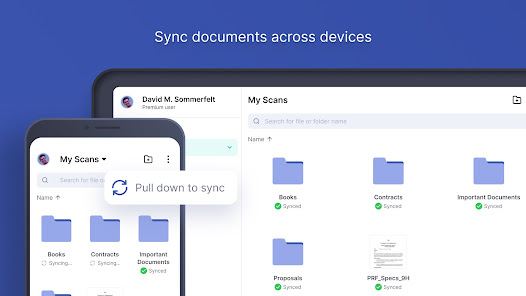
* Sync to Google Drive, Dropbox, or Box so your scans are safe and on every device
DARK MODE
* A clean, comfortable look that's easy on your eyes
Easy Scanner is perfect for scanning receipts, invoices, contracts, business cards, certificates, IDs, whiteboards, notes, books, and more — a complete document scanner and PDF maker in your pocket.
Questions or ideas? Email support@easyscanner.io
Facebook: @easyscanner.io — TikTok: @easyscanner
PREMIUM
Unlock everything with an Easy Scanner subscription:
* Batch scanning and unlimited folders
* No ads and no "Scanned by Easy Scanner" watermark
* Unlimited custom signatures
* +10GB cloud storage
Choose a monthly, 6-month, or yearly plan, each with a 3-day free trial. Your subscription auto-renews unless auto-renew is turned off at least 24 hours before the trial ends; manage or cancel anytime in your Google Play account settings. Any unused trial time is forfeited when you buy a subscription.
Privacy Policy: https://www.easyscanner.io/privacy-policy
EULA: https://www.easyscanner.io/term-of-services
SCAN ANYTHING TO PDF
* Smart edge detection finds document borders and crops automatically
* Auto-enhance filters make text and graphics clean, sharp, and easy to read
* Batch scanning: capture many pages and export them as a single PDF
* Import photos from your library, or start straight from your Home Screen — touch and hold the app icon to scan or import in one tap
TEXT RECOGNITION (OCR)
* Accurate OCR extracts text from any scan, so you can edit, copy, and search it
* Turn printed documents, receipts, and notes into editable, shareable text
ID PHOTO MAKER
* Create passport, visa, and ID photos sized to official requirements for your country
* AI cropping and background replacement give you a clean, compliant result
* Save a single photo or print a full sheet
QR & BARCODE SCANNER
* Scan QR codes and barcodes instantly
* Keep a searchable history and manage it with multi-select
SIGN & SHARE
* Sign contracts on the go with your own handwritten signature
* Create and style custom signatures in vibrant colors (premium)
* Export high-quality PDFs or images and share via email, messages, and social media
* Print to nearby printers automatically
BACK UP & SYNC
* Sync to Google Drive, Dropbox, or Box so your scans are safe and on every device
DARK MODE
* A clean, comfortable look that's easy on your eyes
Easy Scanner is perfect for scanning receipts, invoices, contracts, business cards, certificates, IDs, whiteboards, notes, books, and more — a complete document scanner and PDF maker in your pocket.
Questions or ideas? Email support@easyscanner.io
Facebook: @easyscanner.io — TikTok: @easyscanner
PREMIUM
Unlock everything with an Easy Scanner subscription:
* Batch scanning and unlimited folders
* No ads and no "Scanned by Easy Scanner" watermark
* Unlimited custom signatures
* +10GB cloud storage
Choose a monthly, 6-month, or yearly plan, each with a 3-day free trial. Your subscription auto-renews unless auto-renew is turned off at least 24 hours before the trial ends; manage or cancel anytime in your Google Play account settings. Any unused trial time is forfeited when you buy a subscription.
Privacy Policy: https://www.easyscanner.io/privacy-policy
EULA: https://www.easyscanner.io/term-of-services
Your pocket PDF scanner: scan documents, OCR, e-sign, ID photos and QR codes
Updated on
Safety starts with understanding how developers collect and share your data. Data privacy and security practices may vary based on your use, region, and age. The developer provided this information and may update it over time.


Ratings and reviews
27.6K reviews

A Google user
- Flag inappropriate
October 13, 2019
Easy to use!!! However the downside to this is once you have finished you can NOT go back an edit the pdf file. You can delete it but no re color, no resize, no crop, no able way to fix. I will say it's easy to use, does a great job on making a pdf. To make more then 3 in a day for a free trial. That's a downside, but monthly is like 5 dollars. Then you could cancel, so not a bad price. I do recommend this program even with the few issues.
72 people found this review helpful
A Google user
- Flag inappropriate
- Show review history
February 24, 2020
Previously I'd given this app 5 stars... "Best phone app/scanner I've used-- the computer scanner I own is obsolete now." But with recent updates, I can no longer upload the files I scan to Drive or even share them to my own damn email. I get the first page only ('root file') with no ability to edit or access the rest of the scan. Hugely disappointed.
101 people found this review helpful

Fred and Agnes
- Flag inappropriate
September 23, 2024
I've been using this application for a long time, then suddenly it updated and I don't like the update. It needs to log in into an account which I did and after it, it has a lot of trouble in saving or downloading your scans. It will force close and you can't save the scan anymore. Now, it is worse because my account is automatically logged out, and I can't log in anymore. My scans are saved there how can I recover it again? Please do something about this.
3 people found this review helpful
What’s new
In this update:
• Bug fixes — squashed crashes and glitches for a more reliable app.
• Performance improvements — faster, smoother scanning and syncing.
Thanks for scanning with Easy Scanner! A quick review really makes a difference.
• Bug fixes — squashed crashes and glitches for a more reliable app.
• Performance improvements — faster, smoother scanning and syncing.
Thanks for scanning with Easy Scanner! A quick review really makes a difference.
Everyone
Learn moreApp support
phone
Phone number
+84903461119
About the developer
WELLRITY JOINT STOCK COMPANY
support@easyscanner.io
No. 41, Lane 127, Alley 29, Group No. 3,
Trung Van Ward,
Hà Nội
Vietnam
+84 903 461 119