
DCC Commander
Contains adsIn-app purchases


Everyone
info
100+
Downloads

Everyone
Learn more


About this app
DCC Commander 2.0 lets you operate and manage your model railroad from your Android device using a compatible DCC Command Station. Requires a DCC-EX Command Station or JMRI WiThrottle server with compatible DCC Command Station.
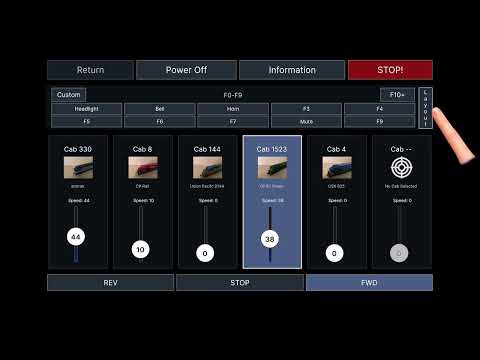
Built for hands-on layout operation, DCC Commander combines multi-cab throttle control, layout viewing, route selection, cab management, turnout definitions, custom throttle creation, and programming track tools in one app.
Features include:
- Control multiple throttles from one screen in landscape mode
- Use a focused single-throttle view in portrait mode
- Assign cabs to throttles with cab IDs, names, and photo images
- Configure function buttons, including toggle and momentary behavior
- Use software momentum modes for smoother speed changes
- View your attached layout directly from the Throttle screen
- Swipe across tracks and turnouts to select routes visually
- Save and reuse route definitions
- Activate turnout routes from the Layout view
- Build and edit layout designs with tracks, turnouts, and reusable definitions
- Manage turnout templates, turnout definitions, and route definitions
- Program cab addresses and CV values on the programming track
- Configure saved Command Stations for quick reconnect
- Supports DCC-EX network Command Stations
- Supports JMRI WiThrottle for compatible throttle operations
- Built-in help pages for throttle, cabs, programming, network, builder, settings, workflow, and app information
- First-time setup wizard
- Custom Throttle and Color Theme builders
- Backup and restore portability
- Custom portrait throttles and color themes
- DCC Commander is free to use after watching a rewarded advertisement, which unlocks throttle access for a 3 hours time. A subscription option is available to remove advertising gates and provide full access.
Note: DCC Commander requires compatible model railroad DCC hardware. For DCC-EX Command Station details, visit:
https://dcc-ex.com/ex-commandstation/index.html
Note: JMRI WiThrottle requires JMRI installation, visit https://www.jmri.org/help/en/html/setup/index.shtml
Built for hands-on layout operation, DCC Commander combines multi-cab throttle control, layout viewing, route selection, cab management, turnout definitions, custom throttle creation, and programming track tools in one app.
Features include:
- Control multiple throttles from one screen in landscape mode
- Use a focused single-throttle view in portrait mode
- Assign cabs to throttles with cab IDs, names, and photo images
- Configure function buttons, including toggle and momentary behavior
- Use software momentum modes for smoother speed changes
- View your attached layout directly from the Throttle screen
- Swipe across tracks and turnouts to select routes visually
- Save and reuse route definitions
- Activate turnout routes from the Layout view
- Build and edit layout designs with tracks, turnouts, and reusable definitions
- Manage turnout templates, turnout definitions, and route definitions
- Program cab addresses and CV values on the programming track
- Configure saved Command Stations for quick reconnect
- Supports DCC-EX network Command Stations
- Supports JMRI WiThrottle for compatible throttle operations
- Built-in help pages for throttle, cabs, programming, network, builder, settings, workflow, and app information
- First-time setup wizard
- Custom Throttle and Color Theme builders
- Backup and restore portability
- Custom portrait throttles and color themes
- DCC Commander is free to use after watching a rewarded advertisement, which unlocks throttle access for a 3 hours time. A subscription option is available to remove advertising gates and provide full access.
Note: DCC Commander requires compatible model railroad DCC hardware. For DCC-EX Command Station details, visit:
https://dcc-ex.com/ex-commandstation/index.html
Note: JMRI WiThrottle requires JMRI installation, visit https://www.jmri.org/help/en/html/setup/index.shtml
DCC throttle, layout routes, cab control, and CV programming.
Updated on
Featured stories

Safety starts with understanding how developers collect and share your data. Data privacy and security practices may vary based on your use, region, and age. The developer provided this information and may update it over time.


What’s new
First-time setup wizard
Custom Throttle and Color Theme builders
Backup and restore portability
Import/export custom throttles and layouts to share, transfer, or backup
User interface clean-up and usability features
Custom Throttle and Color Theme builders
Backup and restore portability
Import/export custom throttles and layouts to share, transfer, or backup
User interface clean-up and usability features
Everyone
Learn moreApp support
About the developer
ELECTRONGOO, LLC
support@electrongoo.com
4928 High Pass Dr
Sparks, NV 89436
United States
+1 805-457-3885