
Cashflow - Expense Management
Contains ads

Everyone
info
10+
Downloads

Everyone
Learn more


About this app
Cashflow App – Smart Cashflow & Expense Tracking App
Stay in control of your money with the Cashflow Android App, a simple expense management app designed to help you track spending, monitor income, and manage cashflow effortlessly. With its clean design and offline functionality, CashflowApp makes expense tracking fast, secure, and reliable.
Key Features:
• Cashflow & Spending Tracker – Record income and expenses with ease.
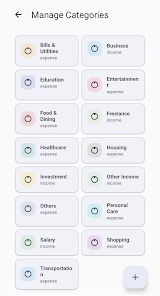
• Expense Manager – Categorize transactions for clear insights.
• Money Tracker – Stay on top of your budget with detailed summaries.
• Smart Expense Tracking App – Add notes, attach bill images, or use speech to text for quick entry.
• Offline & Secure – No sign up required. Your data stays private on your device.
• Backup Options – Save your records locally for peace of mind.
Cashflow App focuses on simplicity and privacy. You don’t need an account, and all your records remain stored locally on your device. Whether you’re tracking daily spending, managing household budgets, or keeping receipts organized, this cashflow app gives you the flexibility you need.
Cashflow Android App is built for students, professionals, and business owners who want a reliable expense tracking without unnecessary complexity. With features like speech to text input, image attachments, and local backups, you can manage your money smarter and faster.
App Permissions
CashflowApp only requests essential permissions to provide its core features:
• Internet – Required for displaying AdMob ads and Firebase services.
• Biometric – Optional device‑level security for protecting your data.
• Camera & Gallery – To attach bill images or receipts to your transactions.
• Microphone – For speech‑to‑text input when adding transaction descriptions.
• Storage Access – To save and back up your records locally on your device.
• Media Access (Android 13+) – For selecting and attaching images securely.
All data stays private on your device. No sign‑up is required, and we do not collect or share personal information.
Start organizing your spending today with Cashflow – Expense Management, the money tracker App that keeps you in control.
Stay in control of your money with the Cashflow Android App, a simple expense management app designed to help you track spending, monitor income, and manage cashflow effortlessly. With its clean design and offline functionality, CashflowApp makes expense tracking fast, secure, and reliable.
Key Features:
• Cashflow & Spending Tracker – Record income and expenses with ease.
• Expense Manager – Categorize transactions for clear insights.
• Money Tracker – Stay on top of your budget with detailed summaries.
• Smart Expense Tracking App – Add notes, attach bill images, or use speech to text for quick entry.
• Offline & Secure – No sign up required. Your data stays private on your device.
• Backup Options – Save your records locally for peace of mind.
Cashflow App focuses on simplicity and privacy. You don’t need an account, and all your records remain stored locally on your device. Whether you’re tracking daily spending, managing household budgets, or keeping receipts organized, this cashflow app gives you the flexibility you need.
Cashflow Android App is built for students, professionals, and business owners who want a reliable expense tracking without unnecessary complexity. With features like speech to text input, image attachments, and local backups, you can manage your money smarter and faster.
App Permissions
CashflowApp only requests essential permissions to provide its core features:
• Internet – Required for displaying AdMob ads and Firebase services.
• Biometric – Optional device‑level security for protecting your data.
• Camera & Gallery – To attach bill images or receipts to your transactions.
• Microphone – For speech‑to‑text input when adding transaction descriptions.
• Storage Access – To save and back up your records locally on your device.
• Media Access (Android 13+) – For selecting and attaching images securely.
All data stays private on your device. No sign‑up is required, and we do not collect or share personal information.
Start organizing your spending today with Cashflow – Expense Management, the money tracker App that keeps you in control.
Track cashflow & expenses easily with this smart offline money tracker.
Updated on
Safety starts with understanding how developers collect and share your data. Data privacy and security practices may vary based on your use, region, and age. The developer provided this information and may update it over time.


What’s new
Track expenses & income easily. Cashflow manager with backup & voice input.
Everyone
Learn moreApp support
About the developer
Shahzada Sultan Mahmood
kiabatha@gmail.com
Pakistan


