
Explain Everything Whiteboard
In-app purchases
3.8star
3.6K reviews
500K+
Downloads

Everyone
info




About this app
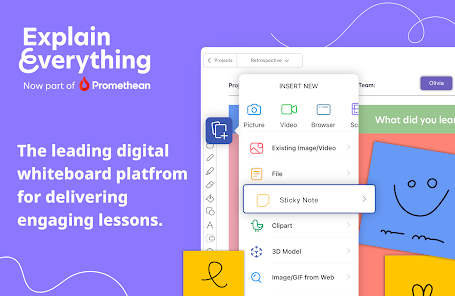
Explain Everything is an interactive whiteboard, built to enhance your physical whiteboard with an infinite digital canvas you can use anywhere.
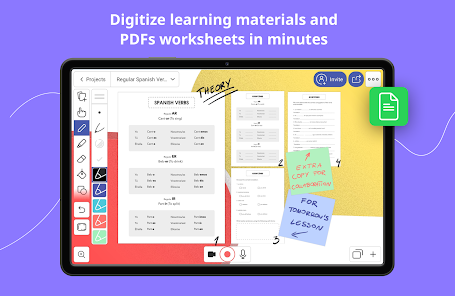
Explain concepts, draw, work with imported documents and PDFs for better engagement. Easily record the entire process of explaining a lesson for materials recap. Use real-time collaboration to stay on the same page with your students.
Our customers love using Explain Everything to:
• Record and edit whiteboard video lessons for effective blended learning.
• Create interactive presentations, work and edit PDFs and teaching materials.
• Draw, write, sketchnote, visualize, Scribble with Apple Pencil, explain, present materials both in-classroom or online.
• Enrich your materials with images and GIFs, Sticky Notes, Clipart, 3D Models, Shapes, Web Browser, Equations, hyperlinks, text boxes, different backgrounds.
• Digitize and store their materials in one place thanks to Explain Everything Cloud. Available from any device, anywhere.
• Collaborate with students, and hosting group assignments in the classroom and online.
• Broadcast through SharePlay or popular conferencing tools, including Zoom or Microsoft Teams.
Introducing Explain Everything Advanced Plan:
We’ve enhanced our product with new features that come with Promethean’s ever-popular Spinner, Timer, and Polling apps. All to improve your teaching experience in the classroom.
Polling – ask questions and receive responses from students instantly.
Timer – use clock and stopwatch to measure time.
Spinner – randomly select items from the built-in templates or your own lists.
If you enjoy using Explain Everything please leave us a review!
Terms of use: https://explaineverything.com/terms-of-use/
Explain concepts, draw, work with imported documents and PDFs for better engagement. Easily record the entire process of explaining a lesson for materials recap. Use real-time collaboration to stay on the same page with your students.
Our customers love using Explain Everything to:
• Record and edit whiteboard video lessons for effective blended learning.
• Create interactive presentations, work and edit PDFs and teaching materials.
• Draw, write, sketchnote, visualize, Scribble with Apple Pencil, explain, present materials both in-classroom or online.
• Enrich your materials with images and GIFs, Sticky Notes, Clipart, 3D Models, Shapes, Web Browser, Equations, hyperlinks, text boxes, different backgrounds.
• Digitize and store their materials in one place thanks to Explain Everything Cloud. Available from any device, anywhere.
• Collaborate with students, and hosting group assignments in the classroom and online.
• Broadcast through SharePlay or popular conferencing tools, including Zoom or Microsoft Teams.
Introducing Explain Everything Advanced Plan:
We’ve enhanced our product with new features that come with Promethean’s ever-popular Spinner, Timer, and Polling apps. All to improve your teaching experience in the classroom.
Polling – ask questions and receive responses from students instantly.
Timer – use clock and stopwatch to measure time.
Spinner – randomly select items from the built-in templates or your own lists.
If you enjoy using Explain Everything please leave us a review!
Terms of use: https://explaineverything.com/terms-of-use/
Updated on
Safety starts with understanding how developers collect and share your data. Data privacy and security practices may vary based on your use, region, and age. The developer provided this information and may update it over time.


Ratings and reviews
3.5
2.22K reviews

A Google user
- Flag inappropriate
March 29, 2020
Excellent concept and design. Implementation still needs a lot of work. On Samsung Tab S6, editing a slide recording with drawing and voice and other presentation elements ends up with data-loss. If I record for 15min and go back and delete the last two minutes, I lose random elements I drew in minutes 0-13. To the point where I have to save every few seconds and restore every time this happens. A task on any other recording system that should take me 15min, takes me an hour plus with EE Whiteboard.
59 people found this review helpful
Promethean Limited
April 10, 2020
Thank you for your review. We're very sorry to hear about your experience! Would you be able to reach out to us at support@explaineverything.com with some more information? We would be more than happy to look into the issues you faced and help resolve them.
A Google user
- Flag inappropriate
May 21, 2019
The customer service: Excellent. I had bought this app years ago (EE Classic) and wanted to use it again. To my surprise, the app had improved quite a lot so I contacted CS if I could get my paid account back. They got my account back in no time, within the day. Amazing! The app: Excellent. I'm still getting used to all its features. It's certainly got a learning curve, but that's probably 'coz it's got more great features packed in! Worth it for when I explain/share Math problems solutions.
84 people found this review helpful
Promethean Limited
May 28, 2019
Thank you so much for leaving your review, Rina! Please let us know if there's anything else we can help you with!

Graeme Turner
- Flag inappropriate
- Show review history
June 30, 2021
Updating review: Not too long after their response to my review in March, a significant stability/performance patch was finally put in for Android. Since then it seems it has been smooth sailing overall using the app. There are a few glitches that remain (importing images can get janky after a few are in one project, sometimes switching pages can lock it). I've wanted to wait a while to ensure things have remained functional since that update, and they have overall. There were a couple of months in-between my old review and now where I wasn't using it much (just based on tasks of the day, not the app) but it seems things are still in good shape. I'm going to leave this as 4-star for now until we see how the transition to Android 12 goes. I'm hoping we've seen the end of the neglect of Android users (app was originally iOS only, so focus is often there). The features of this app are good and powerful now that they are functioning - the intended functionality was always a strong selling point (paid version). Free version will be limited, of course. ###### Old review (March 26 2021): On a Galaxy Tab S7, this program is basically non-functional. They have not kept up on adequate support for this app with current builds of Android. Given the number of crashes, brutal slowdowns (2 minutes to save a blank file, more to load one in progress) and video export bugs this app currently experiences, I would consider this an alpha or early-beta build only, and not worth a subscription fee. The only solution they were able to provide was to do the work using the Cloud feature, and even there the typical crashing issues occurs (in particular, when you delete handwriting that was recorded). In its current form, you cannot reliably use this app as intended. On iPads, this is from most accounts, a great product. And the features that are advertised are great, when they work. But they don't work well on Android, they haven't fixed the backend on Android after significant back and forth with their support and over 6 weeks since then. When they do their typical reply on the play store, don't pay it much attention - I've been in touch with their support, and their support has failed. Until significant stability updates have been implemented, I would avoid this on Android.
68 people found this review helpful
Promethean Limited
June 30, 2021
Thank you for updating your review! We really appreciate your thorough feedback!
What's new
Mini-map styles
You can now set the mini-map to show the exact content of your canvas instead of abstract representations. To choose your mini-map style, select the ○○○Main menu, choose Settings, and head to the Editing tab.
You can now set the mini-map to show the exact content of your canvas instead of abstract representations. To choose your mini-map style, select the ○○○Main menu, choose Settings, and head to the Editing tab.


