
BarePlanner: Deep Work Planner


Everyone
info
10+
Downloads

Everyone
Learn more


About this app
BarePlanner is a time-blocking planner built for deep work. Plan the week in blocks, run each one behind a full-screen focus timer, and see at the end how many hours it gave you back.
Free, offline, no account and no calendar connection. Your plan never leaves your phone.
Deep work is the cognitively heavy stuff: the code, the thesis chapter, the design, the thing you can only do with your phone face down. It gets scheduled first, in protected blocks, at the hours you actually think best.
Light work is everything else. Email, admin, forms, replies, ten-minute errands, the groceries. It doesn't disappear, it gets batched into its own
windows so it stops leaking into the hours you needed for the hard thing.
Recovery is sleep, food, a walk, a workout. It gets a block like anything else, because it's what makes the deep work possible, and no metric in the app counts it as work.
WHAT'S IN IT
• Weekly plan as a 7-day grid, a 3-day view, a month calendar or an agenda list. Start from a template or a blank week.
• Deep and light blocks, each with its own default duration you can override per block.
• Recovery block: sleep, food, a walk, a workout.
• A nudge, not a wall: book light work over a deep block and it tells you how much deep time you're giving up, then lets you decide.
• Focus windows. Declare your peak hours, and anything light booked inside them gets flagged.
• A full-screen focus timer with more than a typical Pomodoro can do: Do Not Disturb, background sound, and automatic work/break cycles on long blocks.
• Hold-to-end. Starting a session takes a tap. Quitting one early takes a deliberate press and hold.
• Quick capture for whatever arrives mid-flow. It lands in an unscheduled tray until you give it a time.
• Reminders before a block starts, so a plan you made on Sunday still reaches you on Wednesday.
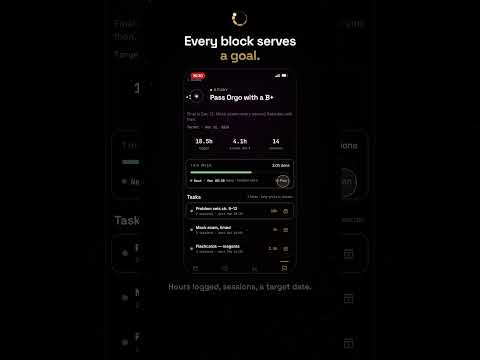
• Review: the hours your deep work gave back, planned versus completed deep hours, consistency, current streak, best day, and the blocks you missed with the reason why.
• Works offline. No account, no calendar connection, no sync. Your plan stays on your phone.
WHY BOTHER
Focus is a multiplier. One uninterrupted hour on something demanding is worth several hours of the same work sliced up by notifications and context switches. Finish the hard thing in the morning and the rest of the day is yours: the hobby, the side project, the run, the people you live with. Getting more done in less time is only worth it because of the time you get back.
It also makes room for more than one thing at once. When every goal has its own protected block instead of competing for whatever attention is left over, you can carry a job, a degree and a side project in the same week without one quietly eating the others.
And the boring, necessary work still gets done. Renewing documents, chasing an application, the paperwork you need to survive the system and nobody thanks you for. None of it is your real work, but skipping it leads to extra trouble and time waste or costs you opportunities. A batched light block gives it a slot instead of leaving it to guilt and memory.
WHAT IT ISN'T
Not a to-do list. Capture is one line of text, because capturing is not the work. Not an AI scheduler that rearranges your week, you control the flow. Not just a nice-looking Pomodoro that makes you feel that you are working, while you are just busy. Not a habit tracker with flames and shame. You plan the week, the app defends it.
Built on the deep work / shallow work distinction from Cal Newport's Deep Work. In the app, shallow work is called light work.
Free, offline, no account and no calendar connection. Your plan never leaves your phone.
Deep work is the cognitively heavy stuff: the code, the thesis chapter, the design, the thing you can only do with your phone face down. It gets scheduled first, in protected blocks, at the hours you actually think best.
Light work is everything else. Email, admin, forms, replies, ten-minute errands, the groceries. It doesn't disappear, it gets batched into its own
windows so it stops leaking into the hours you needed for the hard thing.
Recovery is sleep, food, a walk, a workout. It gets a block like anything else, because it's what makes the deep work possible, and no metric in the app counts it as work.
WHAT'S IN IT
• Weekly plan as a 7-day grid, a 3-day view, a month calendar or an agenda list. Start from a template or a blank week.
• Deep and light blocks, each with its own default duration you can override per block.
• Recovery block: sleep, food, a walk, a workout.
• A nudge, not a wall: book light work over a deep block and it tells you how much deep time you're giving up, then lets you decide.
• Focus windows. Declare your peak hours, and anything light booked inside them gets flagged.
• A full-screen focus timer with more than a typical Pomodoro can do: Do Not Disturb, background sound, and automatic work/break cycles on long blocks.
• Hold-to-end. Starting a session takes a tap. Quitting one early takes a deliberate press and hold.
• Quick capture for whatever arrives mid-flow. It lands in an unscheduled tray until you give it a time.
• Reminders before a block starts, so a plan you made on Sunday still reaches you on Wednesday.
• Review: the hours your deep work gave back, planned versus completed deep hours, consistency, current streak, best day, and the blocks you missed with the reason why.
• Works offline. No account, no calendar connection, no sync. Your plan stays on your phone.
WHY BOTHER
Focus is a multiplier. One uninterrupted hour on something demanding is worth several hours of the same work sliced up by notifications and context switches. Finish the hard thing in the morning and the rest of the day is yours: the hobby, the side project, the run, the people you live with. Getting more done in less time is only worth it because of the time you get back.
It also makes room for more than one thing at once. When every goal has its own protected block instead of competing for whatever attention is left over, you can carry a job, a degree and a side project in the same week without one quietly eating the others.
And the boring, necessary work still gets done. Renewing documents, chasing an application, the paperwork you need to survive the system and nobody thanks you for. None of it is your real work, but skipping it leads to extra trouble and time waste or costs you opportunities. A batched light block gives it a slot instead of leaving it to guilt and memory.
WHAT IT ISN'T
Not a to-do list. Capture is one line of text, because capturing is not the work. Not an AI scheduler that rearranges your week, you control the flow. Not just a nice-looking Pomodoro that makes you feel that you are working, while you are just busy. Not a habit tracker with flames and shame. You plan the week, the app defends it.
Built on the deep work / shallow work distinction from Cal Newport's Deep Work. In the app, shallow work is called light work.
Time blocking for deep work. Plan your week, protect focus, reclaim hours.
Updated on
Featured stories

Safety starts with understanding how developers collect and share your data. Data privacy and security practices may vary based on your use, region, and age. The developer provided this information and may update it over time.
- No data shared with third partiesLearn more about how developers declare sharing
- This app may collect these data typesApp activity, App info and performance, and Device or other IDs
- Data is encrypted in transit
- You can request that data be deleted


What’s new
First Production version optimized


