Photo Curves - Color Grading
Contains adsIn-app purchases
4.3star
3.25K reviews
500K+
Downloads

Everyone
info

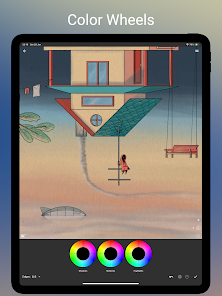
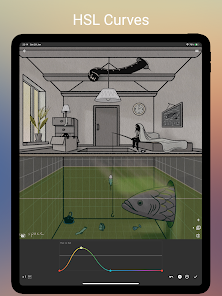

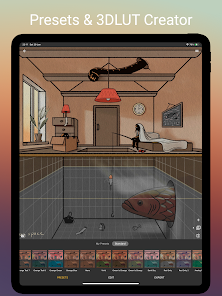
About this app
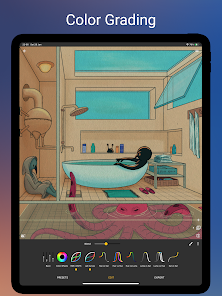
Photo Curves is a color grading app for photos and videos. Create your own filters instead of searching through hundreds of apps with predefined presets, which you can't change. Each preset in Photo Curves is fully adjustable. You can easily create your custom presets too using flexible color grading tools. With this app you can correct, enhance or replace colors, change Hue, fix white balance or create cinematic Orange and Teal look, create 3DLUT files, resize images, adjust jpeg quality, and more.
The following tools are currently supported:
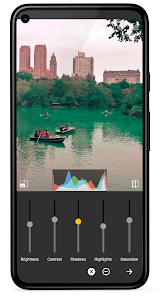
- Basic controls (brightness, contrast, shadows, highlights, saturation)
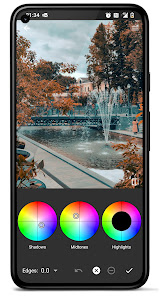
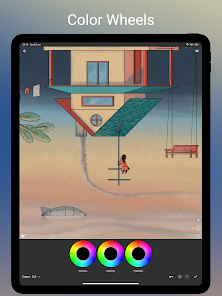
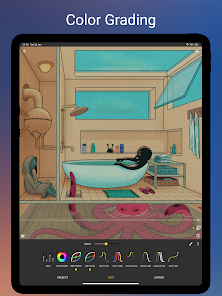
- Color wheels (shadows, midtones, highlights)
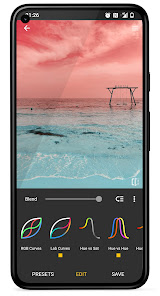
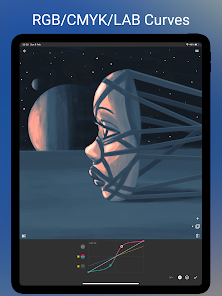
- RGB curves
- CMYK curves
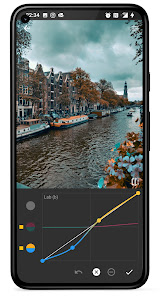
- Lab curves
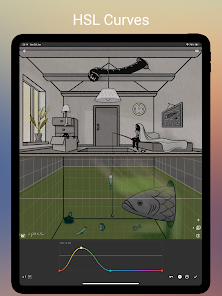
- Hue vs Saturation curve
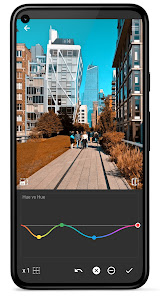
- Hue vs Hue curve
- Hue vs Luma (Lightness) curve
- Luma vs Saturation curve
- Luma vs Hue curve
- Saturation vs Saturation curve
- Masking tool
- Adjustment layers
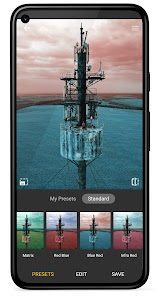
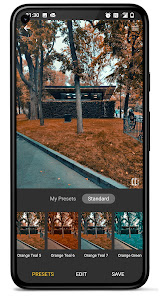
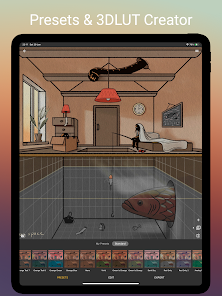
Export your color grading as 3DLUT (.cube) file or to your preset library to use it later or share with others. You can use build-in presets (filters) as is or as a starting point for your next color grading experiment. Remember - every preset is fully editable!
Preset library:
- Create your own presets or edit existing
- Export your presets to a file to share or import presets created by others
- Export presets as 3DLUT (.cube) files
- Library includes standard pre-defined presets too, including popular Orange Teal and other artistic filters
Color grading hints:
Basic Controls - brightness, contrast, shadows, highlights, saturation.
Color Wheels - mix a color into shadows, midtones, or highlights of an image.
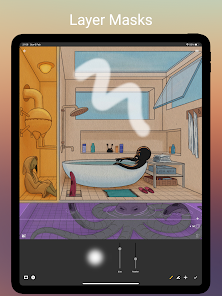
Layer Masks - create adjustment layers and draw masks to apply color grading manipulations to a selected area of an image.
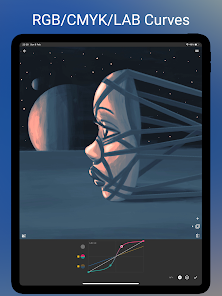
RGB curves - control red, green, and blue channels independently.
CMYK curves - control cyan, magenta, yellow, and key channels of CMYK color space.
LAB curves - manipulate brightness (L), and A, B color channels of LAB color space - unlike RGB, LAB color channels don't affect brightness component, enabling more creative color manipulations.
Hue vs Saturation curve - increase or decrease saturation of a color or a HUE range.
Hue vs Hue curve - change colors by selective HUE shift.
Hue vs Luma curve - adjust brightness of a color or a HUE range.
Luma vs Saturation curve - adjust saturation of shades, midtones, and highlights.
Luma vs Hue curve - shift HUE of shades, midtones, or highlights.
Saturation vs Saturation curve - boost unsaturated and decrease over-saturated colors to create evenly saturated HDR like images.
The following tools are currently supported:
- Basic controls (brightness, contrast, shadows, highlights, saturation)
- Color wheels (shadows, midtones, highlights)
- RGB curves
- CMYK curves
- Lab curves
- Hue vs Saturation curve
- Hue vs Hue curve
- Hue vs Luma (Lightness) curve
- Luma vs Saturation curve
- Luma vs Hue curve
- Saturation vs Saturation curve
- Masking tool
- Adjustment layers
Export your color grading as 3DLUT (.cube) file or to your preset library to use it later or share with others. You can use build-in presets (filters) as is or as a starting point for your next color grading experiment. Remember - every preset is fully editable!
Preset library:
- Create your own presets or edit existing
- Export your presets to a file to share or import presets created by others
- Export presets as 3DLUT (.cube) files
- Library includes standard pre-defined presets too, including popular Orange Teal and other artistic filters
Color grading hints:
Basic Controls - brightness, contrast, shadows, highlights, saturation.
Color Wheels - mix a color into shadows, midtones, or highlights of an image.
Layer Masks - create adjustment layers and draw masks to apply color grading manipulations to a selected area of an image.
RGB curves - control red, green, and blue channels independently.
CMYK curves - control cyan, magenta, yellow, and key channels of CMYK color space.
LAB curves - manipulate brightness (L), and A, B color channels of LAB color space - unlike RGB, LAB color channels don't affect brightness component, enabling more creative color manipulations.
Hue vs Saturation curve - increase or decrease saturation of a color or a HUE range.
Hue vs Hue curve - change colors by selective HUE shift.
Hue vs Luma curve - adjust brightness of a color or a HUE range.
Luma vs Saturation curve - adjust saturation of shades, midtones, and highlights.
Luma vs Hue curve - shift HUE of shades, midtones, or highlights.
Saturation vs Saturation curve - boost unsaturated and decrease over-saturated colors to create evenly saturated HDR like images.
Updated on
Safety starts with understanding how developers collect and share your data. Data privacy and security practices may vary based on your use, region, and age. The developer provided this information and may update it over time.

No data shared with third parties
Learn more about how developers declare sharing

This app may collect these data types
App info and performance

Data is encrypted in transit

Data can’t be deleted
Ratings and reviews
4.3
3.19K reviews

Jake McCoy
- Flag inappropriate
June 20, 2022
Handy for graphic professionals. Precision tweaks with powerful sliders. Doesn't integrate with the Android system very well. Requires you to use their photo browser for some reason, which is clumsy and slows work flow. In fact, this is why I've decided not to buy the premium version and will stick to Lightroom instead. Fix the photo browser and I'll buy the premium version.
73 people found this review helpful
Curved Nebula
July 16, 2022
Thanks for your feedback!

Dani Marzano
- Flag inappropriate
February 19, 2023
This is such a great app and worth the $5 for the full export, etc. The grading tools are so much easier to use than Lightroom. It even has a mask tool. It gives you most of the color grading tools we're used to in video editing. The ONE thing I would love to have is the RGB Parade, Vectorscope, Luminance curves as a pop-up so we could do image analysis. Maybe in a new release? I hate having to switch between this and another app to do that.
74 people found this review helpful

youarenotaghost
- Flag inappropriate
May 15, 2022
I use Photo Curves to process film negatives on my Android device. It works perfectly, more than enough tools to get excellent results easily and efficiently. The interface is very straightforward. The way Photo Curves exports files is really nice, too; big ol' png or jpg. I'm usually too lazy to review, but this app just works so well for what I need it for.
36 people found this review helpful
What's new
- Android 14 support.
App support
About the developer
Illya Sikeryn
curvednebula@gmail.com
Łowicka 51
02-535 Warszawa
Poland
undefined


