
Solar Eclipse Timer
In-app purchases

4.2star
1.31K reviews
100K+
Downloads

Everyone
info


About this app
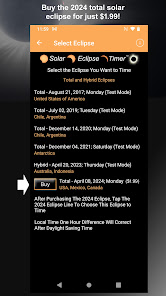
*After Buying the 2024 eclipse, TAP the 2024 eclipse line AGAIN to load the 2024 data set. You will get a dialogue box confirming timing that eclipse*
The Solar Eclipse Timer app was developed by me, an expert eclipse chaser and eclipse educator, to help people get the most enjoyment out of observing and photographing a total solar eclipse. It's a free to download and test and learn the features with an in-app purchase of only $1.99 to buy the 2024 eclipse. Equal to the cost of a single pair of eclipse glasses and just as important!
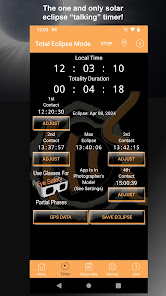
The app's unique feature is that it announces the countdowns to the contact times out loud. It reminds you to observe interesting eclipse phenomena like temperature changes, lighting changes, animal behavior, shadow bands, umbra approach, and more. It tells you when it is safe to take your glasses off and when to put them back on. There are spoken reminders for MAX eclipse, looking for planets and stars, and observing the horizon. You won't miss a thing because I become your personal eclipse astronomer, talking you through the eclipse!
It is so easy to use! Basically a "Two Tap Setup." Get into the path; 1 Tap to Geolocate. 2. Tap to Load the Contact Times. That's it! The app geolocates to find your position in the path and then calculates your precise contact times. It does not require internet access to do this. You are now timing the eclipse with me as your personal astronomer guide!
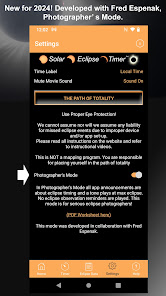
In collaboration with Fred Espenak (Mr. Eclipse), there is a new feature for 2024 called Photographer's Mode. In this mode, all spoken announcements are about the eclipse timing relative to the contact times. There are only three other essential reminders: two remove your solar filters, max eclipse, and replace solar filters. This mode was designed specifically for eclipse photographers.
#1 ECLIPSE TIMING APP It was the #1 eclipse timing app used during the 2017 total solar eclipse that crossed the United States. It was used successfully for solar eclipses in 2019, 2020, 2021, and, most recently, 2023, in Australia. It was featured in Sky and Telescope Magazine in 2002, 2003, 2017, and 2022.
FREE DOWNLOAD TO TEST AND ONLY $1.99 FOR THE 2024 ECLIPSE
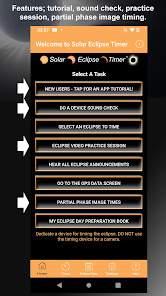
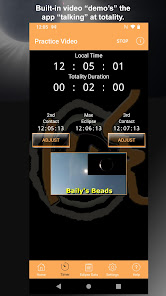
Know its benefits for Eclipse Day. Watch a built-in app tutorial that explains all of the app's functions. Watch a built-in eclipse observation site practice session to hear the app working as it will during the eclipse!
I PROVIDE THE TWO BEST TOOLS FOR ECLIPSE PREPARATION!
The Solar Eclipse Timer app is coordinated with my solar eclipse preparation book called "Eclipse Day - 2024 and More! How to enjoy, observe, and photograph a total solar eclipse." This unique book has its chapters organized by the progression of the eclipse on eclipse day, and the chapters also follow the sequence of announcements by the app. See my website, www.solareclipsetimer.com, for more information about the book.
OTHER FEATURES
Partial Eclipse Timing Mode - It can also time the eclipse as a partial eclipse if you are not in the path of totality. It displays your maximum percent coverage and then continuously shows the progress of the eclipse. The announcements are altered to be appropriate for your maximum eclipse percentage.
This app Is Ad Free! This app DOES NOT track user data in any form.
WHAT"S NEW IN THIS VERSION
Make the 2024 eclipse data set the default loaded eclipse after the purchase.
The Solar Eclipse Timer app was developed by me, an expert eclipse chaser and eclipse educator, to help people get the most enjoyment out of observing and photographing a total solar eclipse. It's a free to download and test and learn the features with an in-app purchase of only $1.99 to buy the 2024 eclipse. Equal to the cost of a single pair of eclipse glasses and just as important!
The app's unique feature is that it announces the countdowns to the contact times out loud. It reminds you to observe interesting eclipse phenomena like temperature changes, lighting changes, animal behavior, shadow bands, umbra approach, and more. It tells you when it is safe to take your glasses off and when to put them back on. There are spoken reminders for MAX eclipse, looking for planets and stars, and observing the horizon. You won't miss a thing because I become your personal eclipse astronomer, talking you through the eclipse!
It is so easy to use! Basically a "Two Tap Setup." Get into the path; 1 Tap to Geolocate. 2. Tap to Load the Contact Times. That's it! The app geolocates to find your position in the path and then calculates your precise contact times. It does not require internet access to do this. You are now timing the eclipse with me as your personal astronomer guide!
In collaboration with Fred Espenak (Mr. Eclipse), there is a new feature for 2024 called Photographer's Mode. In this mode, all spoken announcements are about the eclipse timing relative to the contact times. There are only three other essential reminders: two remove your solar filters, max eclipse, and replace solar filters. This mode was designed specifically for eclipse photographers.
#1 ECLIPSE TIMING APP It was the #1 eclipse timing app used during the 2017 total solar eclipse that crossed the United States. It was used successfully for solar eclipses in 2019, 2020, 2021, and, most recently, 2023, in Australia. It was featured in Sky and Telescope Magazine in 2002, 2003, 2017, and 2022.
FREE DOWNLOAD TO TEST AND ONLY $1.99 FOR THE 2024 ECLIPSE
Know its benefits for Eclipse Day. Watch a built-in app tutorial that explains all of the app's functions. Watch a built-in eclipse observation site practice session to hear the app working as it will during the eclipse!
I PROVIDE THE TWO BEST TOOLS FOR ECLIPSE PREPARATION!
The Solar Eclipse Timer app is coordinated with my solar eclipse preparation book called "Eclipse Day - 2024 and More! How to enjoy, observe, and photograph a total solar eclipse." This unique book has its chapters organized by the progression of the eclipse on eclipse day, and the chapters also follow the sequence of announcements by the app. See my website, www.solareclipsetimer.com, for more information about the book.
OTHER FEATURES
Partial Eclipse Timing Mode - It can also time the eclipse as a partial eclipse if you are not in the path of totality. It displays your maximum percent coverage and then continuously shows the progress of the eclipse. The announcements are altered to be appropriate for your maximum eclipse percentage.
This app Is Ad Free! This app DOES NOT track user data in any form.
WHAT"S NEW IN THIS VERSION
Make the 2024 eclipse data set the default loaded eclipse after the purchase.
Updated on
Safety starts with understanding how developers collect and share your data. Data privacy and security practices may vary based on your use, region, and age. The developer provided this information and may update it over time.

No data shared with third parties
Learn more about how developers declare sharing

No data collected
Learn more about how developers declare collection
Ratings and reviews
4.2
1.29K reviews

Phillip
- Flag inappropriate
April 19, 2024
App worked exactly as advertised during the 2024 eclipse. Set up was a snap and, when we decided at the last minute to move 60 miles north to avoid the clouds we were able to obtain our new coordinates with ease. If anything, it was intuitive enough that I found the tutorial to be more difficult than the actual use. Thanks for helping to make our experience amazing and representing our state so well!
1 person found this review helpful
Foxwood Astronomy
April 20, 2024
Great comment, thanks! It is incredibly accurate. The formula is in the app and it always matches the internet times. You can geolocate anywhere in the path and get new contact times. I have tested driving to the path continuously tapping for a new GPS. It gets to a 99.99% partial eclipse, then suddenly goes to 100% with a few seconds totality.

Mikko Wilson
- Flag inappropriate
- Show review history
April 9, 2024
Easy to use, and the timing was absolutely spot on! Like having a personal guide standing next to you with a stopwatch calling the show. I am very impressed at the work done behind the scenes to pull off the deceptively simple but crucial complex calculations to work so well in a "you only get one shot" situation. (Also thanks for the video with Destin to give a great preview of all the fun things to look out for today!) Suggestion: Consider adding visual countdowns to each contact time.
4 people found this review helpful
Foxwood Astronomy
April 12, 2024
Hi, it's amazing how people can use the same app and have completely different user experiences. For you it seemed simple, the way I designed it; load the 2024 eclipse, geolocate, time the eclipse. It should have been that way for everyone. I had the tutorial right in the app! Thank you for your great comment and appreciate the support.

Yehuda Goldberg
- Flag inappropriate
April 10, 2024
The apps features an functionality are great. The price is very cheap for what you get as well. Improvements I would like to see: 1) The ux/ui is not intuitive. It could really use some help. 2) During totality I was in a dream state, I wish there was more talking during that phase to help me focus on the actual eclipse/corona. I spent too much time watching the birds and looking at the 360 sunset and not enough time just taking in the eclipse/corona.
3 people found this review helpful
Foxwood Astronomy
April 13, 2024
I appreciate you taking the time to write a positive comment. It makes all the hard work worthwhile for me when I hear that I helped people enjoy the eclipse. Thanks for the 5 stars. Your comment is noted. The app is a sophisticated timing tool, so it is a balance between being simple, making sure it works, and having advanced features for some.