
PhotoNOTES – Site Photo Report
In-app purchases


Everyone
info
100+
Downloads

Everyone
Learn more


About this app
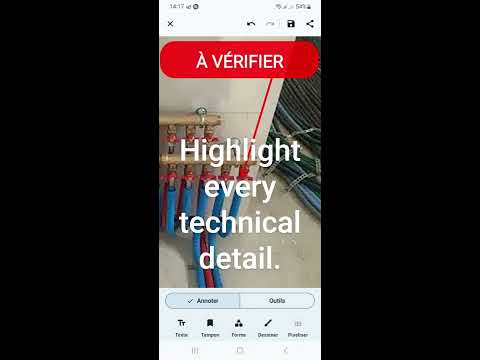
Turn a field photo into clear proof: annotate, compare BEFORE/AFTER and share a professional photo report in 30 seconds.
Photo NOTES is built for technicians, contractors, site managers, maintenance crews and inspectors who need to document their work without wasting time.
YOUR VISUAL PROOF IN 3 STEPS
• Shoot a photo, or import from your gallery or a PDF plan
• Annotate: arrows, text, trade symbols, time-stamped BEFORE / AFTER stamps
• Share it with your client, your team or the service file
FIELD USE CASES
• Service reports and documented after-sales support
• Snag lists and construction follow-up
• Move-in/move-out reports, inspections, surveys
• Preventive maintenance, network rollout, retail
• Before/after shots for quotes, disputes and client proof
PROFESSIONAL ANNOTATIONS
• Text, arrows, rectangles, circles and freehand drawing
• Standard trade symbols: electrical, network, HVAC, safety…
• Time-stamped BEFORE / AFTER stamps
• Automatic legend of the symbols you used
• Custom colors and stroke widths
ADVANCED TOOLS
• AI magic eraser: remove unwanted objects, 100% on-device
• Plan cleanup: glare removal, crisp white background
• Interactive before/after comparison (slider and side by side)
• Import and annotate PDFs (plans, diagrams)
• Timelapse and video export from your photo series
PROJECT ORGANIZATION
• Sort photos by job site or client (custom color and icon)
• Full ZIP export per project
• Save as JPG or PNG in the folder you choose
BUILT FOR THE FIELD
• Works with gloves (large touch targets)
• No account, no cloud: your photos stay on your device
• Works 100% offline
• Light and dark theme + Material You colors
TRY EVERYTHING, FREE
All Premium features are unlocked while you discover the app. Your first save or share starts a full 14-day trial. After that, the free version stays available forever: 18 symbols, 3 texts and 3 shapes per photo, sharing, export, comparison and timelapse.
NO SUBSCRIPTION
Premium is a one-time purchase, yours for life. It unlocks the AI magic eraser, PDF import, video export, automatic legend, 48 extra trade symbols (8 categories) and favorites.
Download Photo NOTES and turn every job into clear, professional proof.
Photo NOTES is built for technicians, contractors, site managers, maintenance crews and inspectors who need to document their work without wasting time.
YOUR VISUAL PROOF IN 3 STEPS
• Shoot a photo, or import from your gallery or a PDF plan
• Annotate: arrows, text, trade symbols, time-stamped BEFORE / AFTER stamps
• Share it with your client, your team or the service file
FIELD USE CASES
• Service reports and documented after-sales support
• Snag lists and construction follow-up
• Move-in/move-out reports, inspections, surveys
• Preventive maintenance, network rollout, retail
• Before/after shots for quotes, disputes and client proof
PROFESSIONAL ANNOTATIONS
• Text, arrows, rectangles, circles and freehand drawing
• Standard trade symbols: electrical, network, HVAC, safety…
• Time-stamped BEFORE / AFTER stamps
• Automatic legend of the symbols you used
• Custom colors and stroke widths
ADVANCED TOOLS
• AI magic eraser: remove unwanted objects, 100% on-device
• Plan cleanup: glare removal, crisp white background
• Interactive before/after comparison (slider and side by side)
• Import and annotate PDFs (plans, diagrams)
• Timelapse and video export from your photo series
PROJECT ORGANIZATION
• Sort photos by job site or client (custom color and icon)
• Full ZIP export per project
• Save as JPG or PNG in the folder you choose
BUILT FOR THE FIELD
• Works with gloves (large touch targets)
• No account, no cloud: your photos stay on your device
• Works 100% offline
• Light and dark theme + Material You colors
TRY EVERYTHING, FREE
All Premium features are unlocked while you discover the app. Your first save or share starts a full 14-day trial. After that, the free version stays available forever: 18 symbols, 3 texts and 3 shapes per photo, sharing, export, comparison and timelapse.
NO SUBSCRIPTION
Premium is a one-time purchase, yours for life. It unlocks the AI magic eraser, PDF import, video export, automatic legend, 48 extra trade symbols (8 categories) and favorites.
Download Photo NOTES and turn every job into clear, professional proof.
Annotated job site photos: symbols, before/after, client proof in 30 seconds.
Updated on
Featured stories

Safety starts with understanding how developers collect and share your data. Data privacy and security practices may vary based on your use, region, and age. The developer provided this information and may update it over time.
- No data shared with third partiesLearn more about how developers declare sharing
- This app may collect these data typesLocation, Financial info and 3 others
- Data is encrypted in transit


What’s new
Photo NOTES 2.5.13 — More reliable purchases
• More reliable Full version purchase: if Google Play is slow to respond, the purchase resumes on its own as soon as the connection is back.
• “Restore my purchase” available everywhere, always with a clear message about what was found.
• Clear messages instead of Google Play technical messages.
• More robust saving.
• Fixed a crash when returning to the gallery.
Thank you for your feedback!
• More reliable Full version purchase: if Google Play is slow to respond, the purchase resumes on its own as soon as the connection is back.
• “Restore my purchase” available everywhere, always with a clear message about what was found.
• Clear messages instead of Google Play technical messages.
• More robust saving.
• Fixed a crash when returning to the gallery.
Thank you for your feedback!
Everyone
Learn moreApp support
About the developer
INJALRAC Frédéric
contact@ifredz.ovh
22 Chem. de l'Arboux
30110 La Grand-Combe
France

