
Free Receipt Scanner
Contains ads


Everyone
info
100+
Downloads

Everyone
Learn more


About this app
Here’s a clean, dialog‑friendly version of your full description — same content, same tone, but formatted for easy pasting into an in‑app dialog, email, or Play Console text box.
No Markdown headers, no heavy formatting — just clean spacing and readable structure.
Free Receipt Scanner
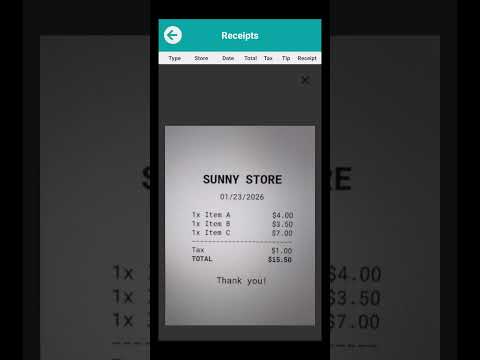
Free Receipt Scanner is a fast, simple, and privacy‑focused tool for organizing your receipts. It scans receipts using your device’s camera, extracts text with on‑device processing, and lets you export clean, structured CSV files for budgeting, tracking expenses, or record‑keeping. Everything happens offline on your device, so your data stays private and under your control.
This app is designed for users who want a straightforward way to digitize receipts without accounts, cloud storage, or complicated menus. Open the app, scan a receipt, review the extracted text, and export your data when you’re ready. Whether you track personal expenses, manage small business purchases, or simply want a cleaner way to store receipts, this tool keeps the process efficient and secure.
Key Features
• Fast receipt scanning with automatic image enhancement
• Accurate on‑device OCR (your receipts never leave your phone)
• Clean CSV export for budgeting and accounting
• Local storage only — no accounts, no cloud, no tracking
• Works fully offline
• Simple, minimal interface
• Easy sharing through your device’s share menu
• Lightweight and efficient, suitable for older devices
Why Choose Free Receipt Scanner?
The app focuses on privacy, clarity, and ease of use. There are no accounts to create, no subscriptions, and no hidden features behind paywalls. Your data stays on your device, and nothing is uploaded or analyzed externally.
Use Cases
• Track personal expenses
• Organize receipts for tax season
• Manage small business purchases
• Keep digital copies of paper receipts
• Export data for budgeting or accounting
• Reduce clutter and improve record‑keeping
Your Data, Your Control
All processing happens on your device. You choose when to export or delete your receipts, and you can clear stored data or reset your CSV file at any time.
Notes
• The app contains ads to support development
• Receipt details are shown only after watching two short ads (one interstitial and one rewarded). If either ad is skipped or closed early, the extracted receipt data will not be displayed
• No login or account required
• Internet access is not needed for scanning or exporting
Free Receipt Scanner provides a reliable, offline, and privacy‑respecting way to manage your receipts. If you want a simple tool that does exactly what it promises — scan, extract, and export — this app is built for you.
No Markdown headers, no heavy formatting — just clean spacing and readable structure.
Free Receipt Scanner
Free Receipt Scanner is a fast, simple, and privacy‑focused tool for organizing your receipts. It scans receipts using your device’s camera, extracts text with on‑device processing, and lets you export clean, structured CSV files for budgeting, tracking expenses, or record‑keeping. Everything happens offline on your device, so your data stays private and under your control.
This app is designed for users who want a straightforward way to digitize receipts without accounts, cloud storage, or complicated menus. Open the app, scan a receipt, review the extracted text, and export your data when you’re ready. Whether you track personal expenses, manage small business purchases, or simply want a cleaner way to store receipts, this tool keeps the process efficient and secure.
Key Features
• Fast receipt scanning with automatic image enhancement
• Accurate on‑device OCR (your receipts never leave your phone)
• Clean CSV export for budgeting and accounting
• Local storage only — no accounts, no cloud, no tracking
• Works fully offline
• Simple, minimal interface
• Easy sharing through your device’s share menu
• Lightweight and efficient, suitable for older devices
Why Choose Free Receipt Scanner?
The app focuses on privacy, clarity, and ease of use. There are no accounts to create, no subscriptions, and no hidden features behind paywalls. Your data stays on your device, and nothing is uploaded or analyzed externally.
Use Cases
• Track personal expenses
• Organize receipts for tax season
• Manage small business purchases
• Keep digital copies of paper receipts
• Export data for budgeting or accounting
• Reduce clutter and improve record‑keeping
Your Data, Your Control
All processing happens on your device. You choose when to export or delete your receipts, and you can clear stored data or reset your CSV file at any time.
Notes
• The app contains ads to support development
• Receipt details are shown only after watching two short ads (one interstitial and one rewarded). If either ad is skipped or closed early, the extracted receipt data will not be displayed
• No login or account required
• Internet access is not needed for scanning or exporting
Free Receipt Scanner provides a reliable, offline, and privacy‑respecting way to manage your receipts. If you want a simple tool that does exactly what it promises — scan, extract, and export — this app is built for you.
Scan receipts instantly and export clean CSV files—private and offline.
Updated on
Safety starts with understanding how developers collect and share your data. Data privacy and security practices may vary based on your use, region, and age. The developer provided this information and may update it over time.
- No data shared with third partiesLearn more about how developers declare sharing
- No data collectedLearn more about how developers declare collection


What’s new
• Added real AdMob interstitial and rewarded‑interstitial ads
• Improved OCR accuracy and image rotation handling
• Fixed minor UI bugs and optimized performance
• Updated version to 1.2.9
• Improved OCR accuracy and image rotation handling
• Fixed minor UI bugs and optimized performance
• Updated version to 1.2.9
Everyone
Learn moreApp support
About the developer
Mohammad Alwarawrah
freereceiptscanner@gmail.com
32941 Tulip Petal Ln
Wesley Chapel, FL 33545-5351
United States


