
Universal AV Control
In-app purchases


Everyone
info
10+
Downloads

Everyone
Learn more


About this app
Universal AV Control turns your phone into one remote for all your home entertainment devices. No more hunting for the right remote: open the app, tap a device and you're in control.
FIND YOUR DEVICES IN SECONDS
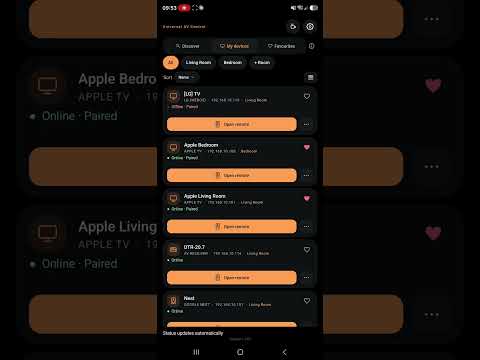
• Tap Scan and the app finds the devices on your Wi-Fi by itself
• Add any device by hand if you prefer
• Pair once and the app remembers it
ONE APP, EVERY REMOTE
• Swipe pad or arrow pad, whichever you like
• Play, pause, back, home, volume and power, right where you expect them
• See at a glance whether a device is on or off
• Open apps on your device straight from your phone
TYPE WITH YOUR PHONE KEYBOARD
• When a text box opens on your device, the app's keyboard pops up by itself, with your phone keyboard ready
• Text goes to the device as you type, so searching and signing in is quick
• No more spelling out passwords letter by letter with arrow keys
ORGANISED YOUR WAY
• Group devices by room: Living Room, Bedroom and any room you add
• Mark favourites with a heart to keep them on top
• Switch between remotes in one tap from the device name at the top
• Sort by name, newest or your own order by dragging
MAKE IT YOURS
• 15 themes, from AMOLED black to soft light
• Designed for phones and tablets
• Button vibration, phone volume buttons and other options in Settings
WORKS WITH
Apple TV, Android TV and Google TV, Roku, Samsung, LG, Sony, Integra, Onkyo, Pioneer, Denon, Marantz, Sonos, Chromecast and Google Nest. Some features depend on the device and its model.
Free and no ADS Forever!
HOW IT WORKS
The app talks to your devices over your home Wi-Fi, the same way their own apps do. Your phone and your devices need to be on the same network. No infrared needed.
Questions or ideas? Use Send feedback in the app.
FIND YOUR DEVICES IN SECONDS
• Tap Scan and the app finds the devices on your Wi-Fi by itself
• Add any device by hand if you prefer
• Pair once and the app remembers it
ONE APP, EVERY REMOTE
• Swipe pad or arrow pad, whichever you like
• Play, pause, back, home, volume and power, right where you expect them
• See at a glance whether a device is on or off
• Open apps on your device straight from your phone
TYPE WITH YOUR PHONE KEYBOARD
• When a text box opens on your device, the app's keyboard pops up by itself, with your phone keyboard ready
• Text goes to the device as you type, so searching and signing in is quick
• No more spelling out passwords letter by letter with arrow keys
ORGANISED YOUR WAY
• Group devices by room: Living Room, Bedroom and any room you add
• Mark favourites with a heart to keep them on top
• Switch between remotes in one tap from the device name at the top
• Sort by name, newest or your own order by dragging
MAKE IT YOURS
• 15 themes, from AMOLED black to soft light
• Designed for phones and tablets
• Button vibration, phone volume buttons and other options in Settings
WORKS WITH
Apple TV, Android TV and Google TV, Roku, Samsung, LG, Sony, Integra, Onkyo, Pioneer, Denon, Marantz, Sonos, Chromecast and Google Nest. Some features depend on the device and its model.
Free and no ADS Forever!
HOW IT WORKS
The app talks to your devices over your home Wi-Fi, the same way their own apps do. Your phone and your devices need to be on the same network. No infrared needed.
Questions or ideas? Use Send feedback in the app.
One remote for all your devices, right on your phone.
Updated on
Safety starts with understanding how developers collect and share your data. Data privacy and security practices may vary based on your use, region, and age. The developer provided this information and may update it over time.
- No data shared with third partiesLearn more about how developers declare sharing
- No data collectedLearn more about how developers declare collection


What’s new
Apple TV now wakes on the first press. Cleaner Volume goes to list grouped by room. Sound modes in an even grid on every device, with the same sliders for bass, treble, subwoofer, center and woofer. Scrolling no longer moves sliders by accident.
Everyone
Learn moreApp support
About the developer
GEORGE 0SHMAKASHVILI
xxemulexx@hotmail.com
אצל 18
חולון, 5820013
Israel