
GRESCharge


Everyone
info
100+
Downloads

Everyone
Learn more


About this app
The main functions of Network as follows:
1. User login, registration, and password recovery 2. Binding of charging piles, pile users, and cards 3. Remote start and stop of charging guns 4. Charging data statistics
The main functions of Bluetooth as follows:
1) Modify the default login password of the charging pile.
After clicking on the Bluetooth name of the charging pile in the App, it will jump to the login page. After successful login, if it is the default password, you can choose to modify the password or continue to use the default password;
2) Set the time of the charging pile.
Synchronize and set the time of the charging pile with the phone time.
3) Connect the charging pile to WiFi.
Click on the WiFi list to connect to the available WiFi and enter the password to send down the connection.
4) Add RFID card.
Scan or enter the card number of the charging card for binding operation;
Click on "Add Card Through Pile" to send down the command and add the card by swiping at the charging pile side.
5) Configure OCPP server.
Input or select OCPP server parameters and perform sending down configuration operation.
6) Configure APN.
Input or select APN server parameters and perform sending down configuration operation.
7) About charging pile.
You can view product model, serial number, manufacturer, rated power, rated current and phase number.
8) Firmware upgrade.
Perform control board and power board upgrades.
9) Factory reset.
Perform factory reset operation.
10)Set up master charger
Set the current charging pile as the main pile.
11)DLM parameters
Set load balancing related parameters.
12)Start energy meter
Start energy meter
1. User login, registration, and password recovery 2. Binding of charging piles, pile users, and cards 3. Remote start and stop of charging guns 4. Charging data statistics
The main functions of Bluetooth as follows:
1) Modify the default login password of the charging pile.
After clicking on the Bluetooth name of the charging pile in the App, it will jump to the login page. After successful login, if it is the default password, you can choose to modify the password or continue to use the default password;
2) Set the time of the charging pile.
Synchronize and set the time of the charging pile with the phone time.
3) Connect the charging pile to WiFi.
Click on the WiFi list to connect to the available WiFi and enter the password to send down the connection.
4) Add RFID card.
Scan or enter the card number of the charging card for binding operation;
Click on "Add Card Through Pile" to send down the command and add the card by swiping at the charging pile side.
5) Configure OCPP server.
Input or select OCPP server parameters and perform sending down configuration operation.
6) Configure APN.
Input or select APN server parameters and perform sending down configuration operation.
7) About charging pile.
You can view product model, serial number, manufacturer, rated power, rated current and phase number.
8) Firmware upgrade.
Perform control board and power board upgrades.
9) Factory reset.
Perform factory reset operation.
10)Set up master charger
Set the current charging pile as the main pile.
11)DLM parameters
Set load balancing related parameters.
12)Start energy meter
Start energy meter
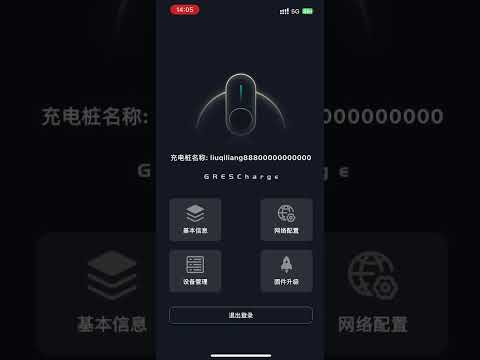
Use app to configure charging pile through Bluetooth And Network
Updated on
Safety starts with understanding how developers collect and share your data. Data privacy and security practices may vary based on your use, region, and age. The developer provided this information and may update it over time.
- No data shared with third partiesLearn more about how developers declare sharing
- No data collectedLearn more about how developers declare collection


What’s new
network mode: 1. User login, registration, and password recovery 2. Binding of charging piles, pile users, and cards 3. Remote start and stop of charging guns 4. Charging data statistics
Configure the following functions for the Bluetooth device, including modifying the default login password, setting the charging pile time, WiFi connection, binding VIP card, configuring OCPP server parameters, configuring VPN parameters, checking device model,
Configure the following functions for the Bluetooth device, including modifying the default login password, setting the charging pile time, WiFi connection, binding VIP card, configuring OCPP server parameters, configuring VPN parameters, checking device model,
Everyone
Learn moreApp support
About the developer
绿能慧充数字技术有限公司
yuanbb@gresgying.com
中国
陕西省西安市
西咸新区沣东新城凤栖路24号能源金贸区中小工业园3号院1号厂房
邮政编码: 712000
+86 177 9199 8147