

VenTrainer

10K+
Downloads

Everyone
info
About this app
EXPLORE, EXPERIMENT, LEARN. VIRTUAL TRAINING FOR HEALTHCARE PROFESSIONALS
Advance your ventilation knowledge with VenTrainer, the free virtual training app for clinicians. Dive into an immersive, easy‑to‑set up learning experience and:
- Explore our ventilators and their features with an interactive 360° animation
- Use the app to enhance the training experience for you or one of your team members
- Monitor how your ventilation strategy affects the patient outcome in real time, thanks to the physiologic patient model
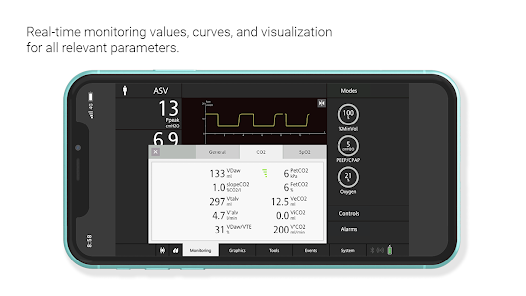
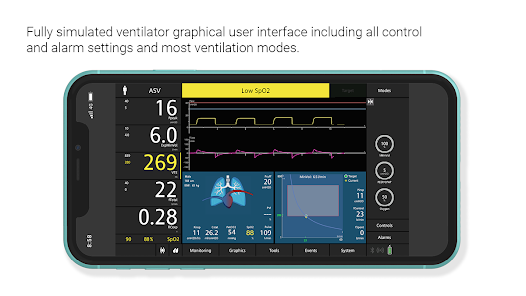
- Simulate real‑life ventilation with a GUI that displays real‑time monitoring values
A VENTILATOR SIMULATOR IN YOUR POCKET. WITH A COMPLETE USER INTERFACE
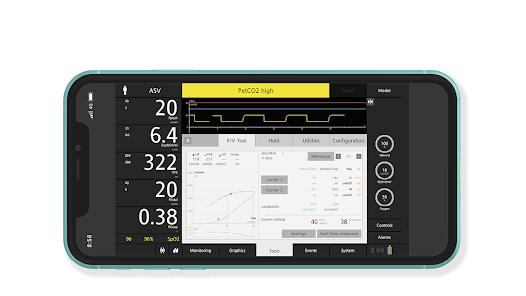
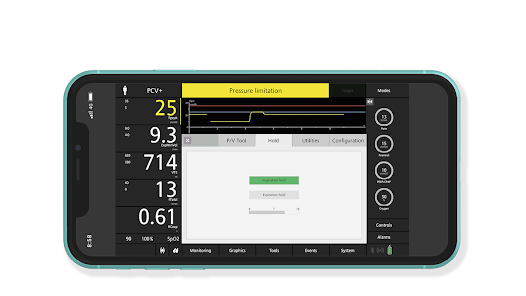
The VenTrainer App is like a ventilator simulator. It provides you with the unique opportunity to simulate the entire ventilator user interface on your mobile device or computer.
Explore all the functions and familiarize yourself with operating your ventilator.
Learn how to change the graphics, where to set the alarm limits, how to adjust the parameters, and how to use the tools.
THE PATIENT MIGHT BE VIRTUAL. BUT YOUR LEARNINGS ARE REAL
VenTrainer allows you to see direct outcomes from the decisions you make. This enables you to develop your skills and knowledge in a safe and controlled environment, while staying up to date with the latest methods in patient ventilation.
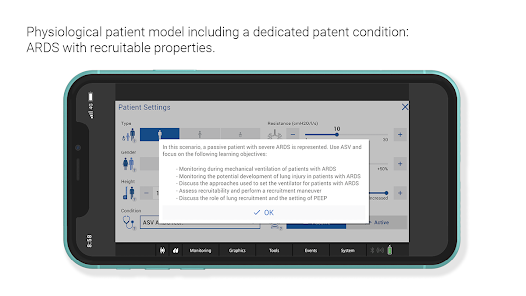
- Adjustable patient model with different lung conditions to choose from
- Pre‑configured patient conditions such as ARDS with recruitable properties
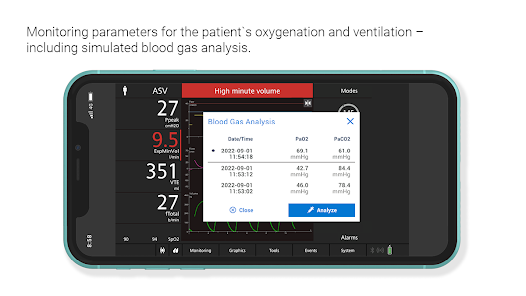
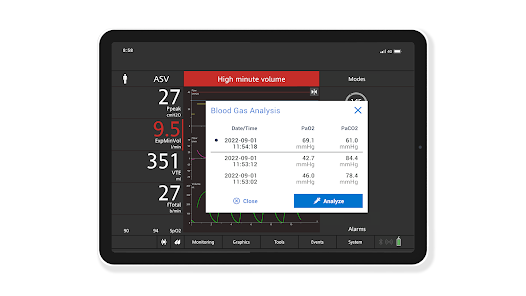
- ABG analysis to support your ventilation strategy
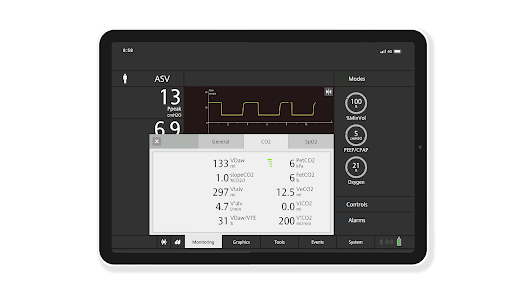
- Real‑time monitoring values for oxygenation and ventilation
- Realistic alarms
FROM ALL ANGLES. OUR VIRTUAL SHOWROOM
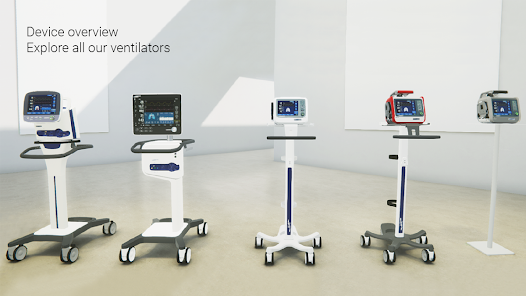
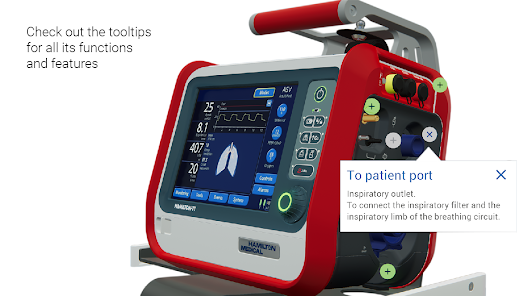
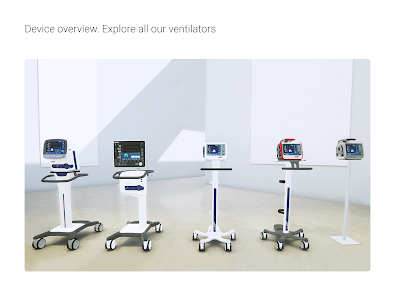
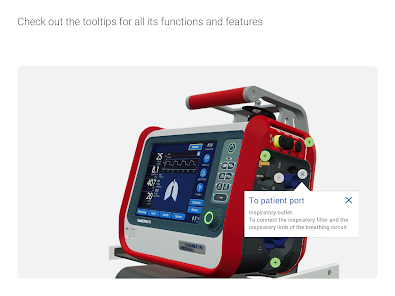
An interactive 3D animation allows you to explore all our ventilator models from every angle and learn about their functions and features through detailed tooltips. All at the touch of a finger.
INTERACTIVE LEARNING. MODERN TOOLS FOR EDUCATORS
If you are teaching mechanical ventilation, VenTrainer is an ideal tool to help create an immersive, easy‑to‑set up, time‑ and cost‑effective experience that enhances training for all your students.
With VenTrainer, your students can enjoy a virtual hands‑on learning experience, while following along as you demonstrate and explain ventilation techniques. The free app works on most desktop and mobile devices: no extra equipment is needed, and each student can directly experiment on their device.- Easy‑to‑set up
- Time and cost effective
- For class settings or individual learning
HAMILTON VENTILATOR SIMULATOR. NEW AND IMPROVED
VenTrainer was developed on the learnings and experiences accumulated with the Hamilton ventilator simulator and the HAMILTON-C6 simulation. The app is their latest evolution. For those familiar with the HAMILTON-G5 simulator or HAMILTON-T1 simulator, VenTrainer offers a sense of familiarity and an exciting new experience with the convenience of a modern application.
Advance your ventilation knowledge with VenTrainer, the free virtual training app for clinicians. Dive into an immersive, easy‑to‑set up learning experience and:
- Explore our ventilators and their features with an interactive 360° animation
- Use the app to enhance the training experience for you or one of your team members
- Monitor how your ventilation strategy affects the patient outcome in real time, thanks to the physiologic patient model
- Simulate real‑life ventilation with a GUI that displays real‑time monitoring values
A VENTILATOR SIMULATOR IN YOUR POCKET. WITH A COMPLETE USER INTERFACE
The VenTrainer App is like a ventilator simulator. It provides you with the unique opportunity to simulate the entire ventilator user interface on your mobile device or computer.
Explore all the functions and familiarize yourself with operating your ventilator.
Learn how to change the graphics, where to set the alarm limits, how to adjust the parameters, and how to use the tools.
THE PATIENT MIGHT BE VIRTUAL. BUT YOUR LEARNINGS ARE REAL
VenTrainer allows you to see direct outcomes from the decisions you make. This enables you to develop your skills and knowledge in a safe and controlled environment, while staying up to date with the latest methods in patient ventilation.
- Adjustable patient model with different lung conditions to choose from
- Pre‑configured patient conditions such as ARDS with recruitable properties
- ABG analysis to support your ventilation strategy
- Real‑time monitoring values for oxygenation and ventilation
- Realistic alarms
FROM ALL ANGLES. OUR VIRTUAL SHOWROOM
An interactive 3D animation allows you to explore all our ventilator models from every angle and learn about their functions and features through detailed tooltips. All at the touch of a finger.
INTERACTIVE LEARNING. MODERN TOOLS FOR EDUCATORS
If you are teaching mechanical ventilation, VenTrainer is an ideal tool to help create an immersive, easy‑to‑set up, time‑ and cost‑effective experience that enhances training for all your students.
With VenTrainer, your students can enjoy a virtual hands‑on learning experience, while following along as you demonstrate and explain ventilation techniques. The free app works on most desktop and mobile devices: no extra equipment is needed, and each student can directly experiment on their device.- Easy‑to‑set up
- Time and cost effective
- For class settings or individual learning
HAMILTON VENTILATOR SIMULATOR. NEW AND IMPROVED
VenTrainer was developed on the learnings and experiences accumulated with the Hamilton ventilator simulator and the HAMILTON-C6 simulation. The app is their latest evolution. For those familiar with the HAMILTON-G5 simulator or HAMILTON-T1 simulator, VenTrainer offers a sense of familiarity and an exciting new experience with the convenience of a modern application.
Updated on
Safety starts with understanding how developers collect and share your data. Data privacy and security practices may vary based on your use, region, and age. The developer provided this information and may update it over time.

No data shared with third parties
Learn more about how developers declare sharing

This app may collect these data types
Location, Personal info and 2 others

Data is encrypted in transit

You can request that data be deleted
What's new
PERFORMANCE IMPROVEMENTS
The 3D models of the ventilators have been updated to improve performance
PATIENT MODEL OPTIMIZATIONS AND NEW FEATURES
Two new patient conditions have been introduced: "Non-recruiter" and "Obstructive".
QUALITY OF LIFE IMPROVEMENTS
Changes and additions have been made to account management within the app.
OTHER BUGS FIXES
Resolved bugs related to the use of "Inches"
The 3D models of the ventilators have been updated to improve performance
PATIENT MODEL OPTIMIZATIONS AND NEW FEATURES
Two new patient conditions have been introduced: "Non-recruiter" and "Obstructive".
QUALITY OF LIFE IMPROVEMENTS
Changes and additions have been made to account management within the app.
OTHER BUGS FIXES
Resolved bugs related to the use of "Inches"