
Screamin' Eagle Street Tuner
star
145 reviews

Everyone
info
10K+
Downloads

Everyone
Learn more


About this app
The Screamin' Eagle Street Tuner App is for use exclusively with the Screamin’ Eagle® Pro Street Tuner Bluetooth communication module that is sold as an accessory for select Harley-Davidson® models.
The Screamin’ Eagle® Street Tuner App is designed to simplify management of engine operating parameters as performance modifications are made. Once the Tuner hardware module is installed, this app allows you to upload the latest Engine Control Module (ECM) calibrations to match your bike’s state-of-tune or perform a Smart Tune session to tailor the base calibration to your custom ride.
• Download Screamin’ Eagle® calibrations from a vast calibration library
• Perform a Smart Tune session* to tailor the calibration
• Store run-time data
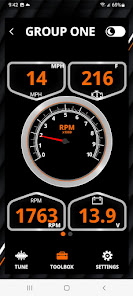
• View performance gauges and vehicle data
• View and clear diagnostics functions
*Smart Tune not available in all markets.
The Screamin’ Eagle® Street Tuner App is designed to simplify management of engine operating parameters as performance modifications are made. Once the Tuner hardware module is installed, this app allows you to upload the latest Engine Control Module (ECM) calibrations to match your bike’s state-of-tune or perform a Smart Tune session to tailor the base calibration to your custom ride.
• Download Screamin’ Eagle® calibrations from a vast calibration library
• Perform a Smart Tune session* to tailor the calibration
• Store run-time data
• View performance gauges and vehicle data
• View and clear diagnostics functions
*Smart Tune not available in all markets.
Next generation Harley-Davidson® performance tuning made even easier!
Updated on
Safety starts with understanding how developers collect and share your data. Data privacy and security practices may vary based on your use, region, and age. The developer provided this information and may update it over time.
- No data shared with third partiesLearn more about how developers declare sharing
- This app may collect these data typesApp activity and App info and performance
- Data is encrypted in transit
- Data can’t be deleted


Ratings and reviews
142 reviews

David Wuolle
- Flag inappropriate
- Show review history
July 17, 2026
Very easy to use. Just make sure to pair with your phone in the Bluetooth setting option in this app. I just started having an issue with the code reader portion of the tuner. it shows an error when I try to use it. everything else works fine. I've had the tuner for four plus years with zero issues until now. I'm still giving it 5 stars because harley will come out with a fix someday.
2 people found this review helpful
Harley-Davidson Motor Company
September 6, 2023
Thanks for the review, David.

Greg Rivera
- Flag inappropriate
May 16, 2023
App works but needs some work. Using a Galaxy S21 Ultra. Works fine but at times can be very buggy where it unpairs while being on the bike or just quits unexpectedly while flashing. Luckily crash recovery and data saving was coded well so its easy to continue where you left off. I'd like it if Harley will come out with a new race tuner like the old Orange ones. Many of us don't give 3 craps about the EPA or warranty. Don't get me wrong, included tunes are great. Us tinkerers like more power!
9 people found this review helpful
Harley-Davidson Motor Company
June 6, 2023
Hi Greg. Thanks for the review, we appreciate it! We are constantly working to find ways to improve upon the Street Tuner and mobile app. Keep an eye out for future firmware & app updates as we continue to improve upon the products!

Dave FireMan
- Flag inappropriate
June 5, 2023
This app is decent and works to program your bike 'in the field's without wires or needing a laptop. It takes just a couple of minutes to put the bike into tuning mode, then ride and record. The app will take any of the recordings you made and aggregate them into one, new, overall map for your bike. Huge step forward from the 'old' way.
7 people found this review helpful
Harley-Davidson Motor Company
June 6, 2023
Hi Dave. Thank you for the review. We appreciate it!
What’s new
Bug fixes.
Everyone
Learn moreApp support
About the developer
HARLEY-DAVIDSON MOTOR COMPANY, INC.
scot.zarkiewicz@harley-davidson.com
3700 W Juneau Ave
Milwaukee, WI 53208-2818
United States
+1 848-234-0102