Acapella Maker - Video Collage

Contains adsIn-app purchases
30.8K reviews
Content rating
Everyone
5M+
Downloads
Content rating
Everyone
In-App Purchases
Learn more
Screenshot image
Screenshot image
Screenshot image
Screenshot image
Screenshot image
Screenshot image
Screenshot image

About this app

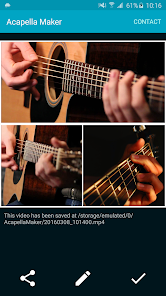
Sing every part yourself and share it as one acapella video. Acapella Maker is an acapella video maker for Android: it records each voice part with your phone's camera and puts the parts side by side in a split-screen video collage. Soprano, alto, tenor and bass, a beatbox line under a cover song, a duet with yourself, or a whole church choir sung by one person: your own virtual choir.

HOW IT WORKS
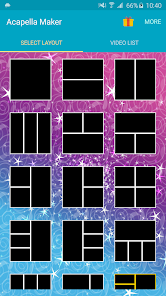
1. Pick a layout: 42 layouts for 1 to 9 voices
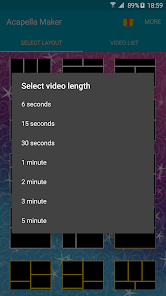
2. Pick a length, from 6 seconds up to 5 minutes
3. Add a guide track if you like: a song or backing track from your phone, or record one on the spot (the melody, a piano, a starting note), and listen to it while you sing
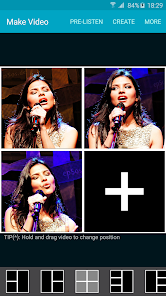
4. Record each part with the front or back camera, and record any part again until it sounds right
5. Make the video and share it to WhatsApp, Facebook, Instagram, TikTok or YouTube

MADE FOR SINGERS
• Choirs and church choirs: sing every voice for a gospel song, a hymn or a rehearsal
• A cappella groups and barbershop quartets
• Beatboxers and vocal percussion
• Harmony singers and cover songs
• Friends and family in one room: pass the phone around and let everyone sing a part

HEAR YOUR EARLIER PARTS, THEN MIX
• Put on headphones and hear your earlier parts while you record the next one
• Every part gets its own automatic timing, and a one-time audio calibration helps the voices line up
• In the Mix screen, set each part's volume and timing and play all the parts together before you create the video
• Loudness stays even, whether you record 2 parts or 9
• Wired, Bluetooth and USB headphones are recognized

EDIT YOUR COLLAGE
• Drag parts to swap their places in the layout
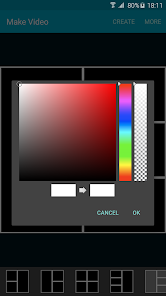
• Change the border color
• Your finished video is saved to your gallery, ready to share

FREE AND PREMIUM
Free: layouts with 1 to 4 voices and videos up to 1 minute, with a small Acapella Maker watermark and ads.
Premium is a one-time upgrade, not a subscription: all 42 layouts with up to 9 voices, videos up to 5 minutes, no watermark and no ads.

TIPS FOR A GOOD A CAPPELLA VIDEO
• Wear headphones when you sing along, so the microphone only hears your voice
• Keep the phone in the same place for every part, so the collage looks even
• Short on time? Start with 2 or 3 voices and a 30 second video

Questions or ideas? Write to acapella.maker@gmail.com. We read every message.
Acapella video maker: sing every part yourself and share one choir video.
Updated on
Sep 30, 2026

Data safety

Safety starts with understanding how developers collect and share your data. Data privacy and security practices may vary based on your use, region, and age. The developer provided this information and may update it over time.
  • This app may share these data types with third parties
    Location, App activity, and App info and performance
  • This app may collect these data types
    Location, App activity, and App info and performance
  • Data is encrypted in transit

Ratings and reviews

28.8K reviews
A Google user
January 21, 2019
I should have read the reviews first but I guess you get what you pay for. I "donated" $2.99 so I would be able to make longer videos so I can play all the parts to a piece so my students can practice along but even when I counted "1, 2" out loud to see if the app would keep it together but it still can't. It automatically "fixes audio delay" by ruining your tracks and ADDING delay even though you know you played exactly in time with the other track. This app is useless.
42 people found this review helpful
Did you find this helpful?
Lianne Dombrowski
January 23, 2026
Edit from 5 years after my initial review: improvements have been made and I have been able to subscribe. I wish I could record more than 9 parts as this app has almost no issues now. Original: I cannot get this thing to subscribe. I keep getting an error message, and the developers have not emailed me back. So for now I have to keep doing 4 parts for one minute since it won't let me subscribe. Otherwise I'm enjoying it but I would like to subscribe so I can actually use the whole thing.
7 people found this review helpful
Did you find this helpful?
Steve 1241
June 9, 2020
Horrible! There is no way that I can see to properly sync up the videos in the collage, even with the so-called "auto-sync" feature. The pre-listen feature always starts the first recording, then the second about half a second later, and so on, so the videos in the collage never play at the exact same time. Also, if you listen to an audio recording to sing along to, it gets recorded into the video as well, so with every video made, the audio recording keeps duplicating, creating a mess of voice.
86 people found this review helpful
Did you find this helpful?

What’s new

• Hear your earlier parts while you record the next one
• Automatic timing for each part, plus a one-time audio calibration
• New Mix screen: set each part's volume and timing, and play them before you create
• More even loudness, whether you record 2 parts or 9
• Bluetooth and USB headphones are recognised
• New export screen and finished-video screen
• Clearer wording in every language
• Fixes: a faster editor, fewer freezes, and premium is recognised straight away