
Uninstaller
Contains adsIn-app purchases


Everyone
info
1K+
Downloads

Everyone
Learn more


About this app
Uninstaller is an Android app uninstaller, app remover, and app manager for batch uninstall, bulk uninstall, APK backup, and storage cleanup. Use it to uninstall apps, remove apps you no longer need, delete unused apps, extract APK files, sort apps by size, find large apps, and reclaim storage without root.
Every uninstall follows Android's official confirmation flow. It does not bypass Android confirmation, request root access, or change protected system areas; you review selected apps before Android asks for confirmation.
Core app cleanup tools:
- App uninstaller and app remover: search installed apps, select multiple apps, and remove unwanted apps with Android confirmation.
- Batch uninstall and bulk uninstall: manage old apps, old games, unused apps, and space-consuming apps from one clean list.
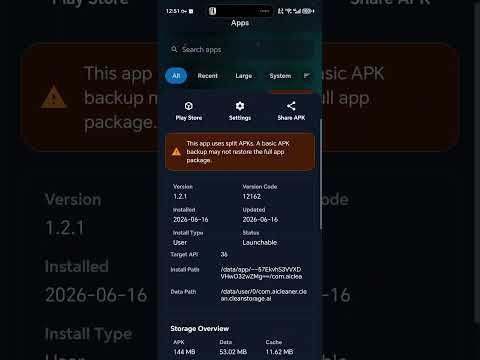
- APK backup and APK extractor: back up APK installers locally before cleanup, then save APKs, share APK files, install backups, or delete archives.
- Storage cleanup and reclaim storage: view app size, sort apps by size, find large apps, and understand phone storage before uninstalling.
- App manager and app details: browse the installed app list, package name, version, install date, update date, user app labels, and system app labels.
- Safe uninstall, no root: system and pre-installed apps are marked clearly and open Android App Info when direct removal is restricted.
- Local-first processing: app lists, APK backups, and cleanup actions stay on your device unless you choose to share a backup file.
Good for Android users who search for an app uninstaller, uninstall apps tool, app remover, batch uninstall, bulk uninstall, APK backup, storage cleanup, reclaim storage, app manager, sort apps by size, find large apps, no root, and Android confirmation in one practical workflow.
Every uninstall follows Android's official confirmation flow. It does not bypass Android confirmation, request root access, or change protected system areas; you review selected apps before Android asks for confirmation.
Core app cleanup tools:
- App uninstaller and app remover: search installed apps, select multiple apps, and remove unwanted apps with Android confirmation.
- Batch uninstall and bulk uninstall: manage old apps, old games, unused apps, and space-consuming apps from one clean list.
- APK backup and APK extractor: back up APK installers locally before cleanup, then save APKs, share APK files, install backups, or delete archives.
- Storage cleanup and reclaim storage: view app size, sort apps by size, find large apps, and understand phone storage before uninstalling.
- App manager and app details: browse the installed app list, package name, version, install date, update date, user app labels, and system app labels.
- Safe uninstall, no root: system and pre-installed apps are marked clearly and open Android App Info when direct removal is restricted.
- Local-first processing: app lists, APK backups, and cleanup actions stay on your device unless you choose to share a backup file.
Good for Android users who search for an app uninstaller, uninstall apps tool, app remover, batch uninstall, bulk uninstall, APK backup, storage cleanup, reclaim storage, app manager, sort apps by size, find large apps, no root, and Android confirmation in one practical workflow.
App uninstaller, batch remove apps, APK backup, storage cleanup
Updated on
Safety starts with understanding how developers collect and share your data. Data privacy and security practices may vary based on your use, region, and age. The developer provided this information and may update it over time.


Everyone
Learn moreApp support
About the developer
巫金生
newsalton@163.com
广东省东莞市高埗镇 上江城众兴街南五巷3号
东莞市, 广东省
China
523267


