
Download All Files
Contains ads
4.0star
133K reviews
10M+
Downloads

Everyone
info


About this app
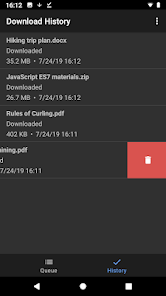
Download All Files is a powerful download manager.
It helps you download files quickly and reliably to your Android device. It is free and easy to use.
Key Features:
• Reliable file downloads
• Prioritize your downloads with download queue
• Pause/resume downloads
• Continue disconnected downloads
• It lets you save nearly all types of files from the web, so you can open them in different apps or on your computer
Note: Download All Files supports downloading regular files, both small and large. However, it does NOT support downloading YouTube videos or other streaming media like movies and music.
How to use it:
1. Use Chrome or other browser to find a file you want to download
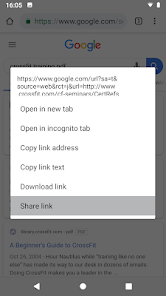
2. Long press the link
3. Choose "Share Link" from context menu
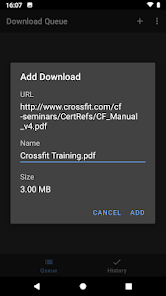
4. Choose "Download All Files" from list of applications
5. Confirm adding file in the app
Supported browsers:
• Google Chrome
• Stock Android browser
• Lightning Browser
It helps you download files quickly and reliably to your Android device. It is free and easy to use.
Key Features:
• Reliable file downloads
• Prioritize your downloads with download queue
• Pause/resume downloads
• Continue disconnected downloads
• It lets you save nearly all types of files from the web, so you can open them in different apps or on your computer
Note: Download All Files supports downloading regular files, both small and large. However, it does NOT support downloading YouTube videos or other streaming media like movies and music.
How to use it:
1. Use Chrome or other browser to find a file you want to download
2. Long press the link
3. Choose "Share Link" from context menu
4. Choose "Download All Files" from list of applications
5. Confirm adding file in the app
Supported browsers:
• Google Chrome
• Stock Android browser
• Lightning Browser
Updated on
Safety starts with understanding how developers collect and share your data. Data privacy and security practices may vary based on your use, region, and age. The developer provided this information and may update it over time.


Ratings and reviews
4.0
125K reviews

Larry Rock
- Flag inappropriate
- Show review history
May 5, 2021
Note: Saves to download folder - continue for details. It does not save all files. Enter a web address and it saves an html file that's limited to a header image. It will download other files a file location is entered i.e. if a page has 20 image files, each image file location must be entered and downloaded, one image at a time. 1 star because it will actually download but really has no value as a downloader.
4,126 people found this review helpful

Sir Shadrach
- Flag inappropriate
July 5, 2021
It is pretty good with a good.... The only problem is that it only supports 3 downloads simultaneous.. Like I expected it to be higher and if they could update it so dat u can watch de video or listen to music while it is downloading coz it misses all this.... Plus it doesn't give de information ov wat u r downloading... E.g..it's download link... Plus it this button which plays and pauses all de downloads but I think there should be one for customizing a single download at the tym
2,515 people found this review helpful

Mary Power
- Flag inappropriate
December 19, 2021
This is not a download app. It only downloads the NAMES of files you requested to be downloaded. You have to copy the downloaded filename and paste it into another Google search box in order to locate that file and "try again". Also refuses to download files for which YOUR phone doesn't have an app to open them. Now how - or why - would a downloader know THAT? 🤔
1,303 people found this review helpful
What's new
- Android 12 support
- Updated dependencies
- Fixed links to online documentation
- Updated dependencies
- Fixed links to online documentation


